

Feb 2025: Update to User Email Limits | Experience Community
Skip to main content

Feb 2025: Update to User Email Limits

  • February 14, 2025
  • 29 replies
  • 825 views

brookel
Groups Administrator
Forum|alt.badge.img+10

What is the Change?

Effective 2/17/2025: In order to ensure the highest level of email deliverability for Qualtrics clients and decrease the number of phishing attempts being sent from Qualtrics, we will begin enforcing weekly user level email limits on all academic users. To minimize any impact to users, the Qualtrics Engineering Team has set these limits based upon historic usage per user, with additional buffers to account for audience growth. If users send more emails in a one week period than they have historically, then they may receive an in-platform message that will prompt them to get their limit increased. The limit can be updated by Brand Administrators by editing the “Allowed Outgoing Emails/Week” user permission. As a reminder, emails should only be sent to recipients who have opted into receiving them; you can learn more about best practices here.

How Does This Affect New Users?

For new users, email limits will be automatically set to a default of 500 emails per week. Please keep this in mind while creating new users. If users are expected to exceed this limit, please provide them with an appropriate limit in the user permissions page. Users can monitor their email usage in their account settings, as outlined in the email limit support page

For future awareness, we are also reevaluating brand-level email limits of 300,000/week to strengthen prevention of phishing attempts that degrade email deliverability. We expect these limits to be flexible for brands that have low spam and bounce rates. We will share further communication here and on our Support pages as any brand-level adjustments are made. 

Edit: While the default limit for any new user is 500, variable limits for current users were set based on historical usage. We looked at a 4 year period to identify the highest weekly usage in that time, and set limits in increments of 500 based on that. If a user is within 80% of a limit, they were increased to the next highest limit to allow additional buffers. This means that only new users sending large distributions or people who are sending distributions that are 500 emails larger than any distribution they've sent prior would need to request an increase from their Brand Admin.

How to Get Help

Please report any issues with this change to the support team via the Customer Success Hub. 

If there are specific concerns or questions about the email limits that you would like to address, please reach out to your CSM through the Customer Success Hub.


 

29 replies

MartyK
Level 2 ●●
Forum|alt.badge.img+5
  • Level 2 ●●
  • February 14, 2025

In the military we called a this a shotgun response.  Not sure how this stops phishing attacks. And very curious how phishing attacks are conducted via Qualtrics mail distributions? Are users accounts being hacked and then the emails being sent through their accounts? If so, I would think a better solution would be to require approval from a brand admin (or other?) for sending out a distribution to more than N number of recipients at a time.  

This also strikes me as odd because, please correct me if I’m wrong, this only concerns sending out emails to a contact list, right? Again, seems there should be a better, more secure, and not ubiquitous solution.


  • February 14, 2025

One feature that would make managing these limits less cumbersome would be something that shows how many emails a user has sent against their limit. The last time that this change was rolled out, part of the difficulty for us was that there was no way to know what the limits needed to be raised to, it required a lot of guesswork.


Forum|alt.badge.img
  • February 14, 2025

Hi ​@brookel, I’m assuming email allotments are based on workflow owner rather than the project owner? If the survey is open for anonymous responses and there are several workflow emails that are triggered off of a submission, if the allotted amount of emails are reached during the week, will the owners be sent an email saying they have reached their email quota, or would they not know that that unless they went into the Qualtrics project itself to read the run history on the workflows? 


brookel
Groups Administrator
Forum|alt.badge.img+10
  • Author
  • Groups Administrator
  • February 14, 2025

@jon_dee Thank you for the feedback, our engineering team is working on additional updates to the User Interface based on this feedback.  Here is a support page that shows how users can see their usage.


  • February 14, 2025

@brookel thank you, that’s a helpful link, did not know about that


h_mckim
Level 2 ●●
Forum|alt.badge.img+3
  • Level 2 ●●
  • February 14, 2025

This is a huge issue for my university and will be a huge burden on our brand administrators.  To me I think a weekly limit is ridiculous and if there has to be a limit, a monthly limit or semester limit would be more appropriate.  For example, say you work in the Dean’s office of a college that has 2000 students enrolled.  You send out 1 email per semester to all your students, maybe to collect information prior to registration for the next semester.  That would make your weekly average about 142.  You will therefore not be able to send out that 1 email at the appropriate time, even though for the other 13 weeks of the semester you are not sending out any emails at all.  The tool you have been using to do your job now becomes useless, without intervention from the brand administrators.  There are 2 brand administrators at my institution and well over a thousand users - the 2 of us don’t have time for this.  I am very frustrated and will be honest that my institution is now looking at alternatives to Qualtrics.


Tom_1842
Level 8 ●●●●●●●●
Forum|alt.badge.img+28
  • Level 8 ●●●●●●●●
  • February 14, 2025

@brookel Thank you for this announcement. I am a little concerned about the brand-level weekly email limit adjustments since I don't see a way to monitor this metric at the brand or user level. Is that something the engineering team is thinking about adding to the User Interface as well? 


  • February 14, 2025

@h_mckim that’s a really good point. i was hoping they would do it based on peaks rather than averages, but i shouldn’t assume!


Forum|alt.badge.img+8
  • Level 2 ●●
  • February 14, 2025

I agree with h_mckim’s message about many faculty sending a one time email to thousands of students at the beginning of the semester and that’s it. Additionally, this is announced at noon on a Friday and this takes place on a Monday - which for many institutions is a holiday - so brand administrators basically have only a few hours to see your message and handle our users appropriately. That’s pretty unfeasible. 

@brookel Can this implementation be pushed a week so that we brand administrators can have time to react? As I’m sure many of us feel, I’m not enthused about working the long weekend just because Qualtrics only gave us a few hours heads up before such a big change.


h_mckim
Level 2 ●●
Forum|alt.badge.img+3
  • Level 2 ●●
  • February 14, 2025

I agree with the comment above about delaying implementation.  I have no idea what my users have scheduled for the beginning of next week.  We are working to get information about this change out to our campus users but finding out about this mid-day on Friday of a holiday weekend means that our users may not see our warnings before the change goes into effect.

Really disappointing after the first roll-out of email limits (that had to be rolled back because of negative impacts on clients), that we didn’t get more notification with this one.


h_mckim
Level 2 ●●
Forum|alt.badge.img+3
  • Level 2 ●●
  • February 14, 2025

Also, what happens to users who already have an account but have not yet sent out a survey or any other emails?  Will their limit be set to 0 based on their average use to date?


h_mckim
Level 2 ●●
Forum|alt.badge.img+3
  • Level 2 ●●
  • February 14, 2025

One feature that would make managing these limits less cumbersome would be something that shows how many emails a user has sent against their limit. The last time that this change was rolled out, part of the difficulty for us was that there was no way to know what the limits needed to be raised to, it required a lot of guesswork.

It would be really helpful as a brand administrator if we could download that data on all our users.


Forum|alt.badge.img+8
  • Level 2 ●●
  • February 14, 2025

And (especially since the new limits will be varied), can the brand administrators get a list of users and what the new limit is for each person so we can communicate this instead of just basically saying, “We have no idea what your new limit is and you have to go check yourself”? Qualtrics must have this report since they’re evaluating on an individual basis and also users can check for themselves.


brookel
Groups Administrator
Forum|alt.badge.img+10
  • Author
  • Groups Administrator
  • February 14, 2025

Thank you for your comments! 

While the default limit for any new user is 500, variable limits for current users were set based on historical usage. We looked at a 4 year period to identify the highest weekly usage in that time, and set limits in increments of 500 based on that. If a user is within 80% of a limit, they were increased to the next highest limit to allow additional buffer. This means that only new users sending large distributions or people who are sending distributions that are 500 emails larger than any distribution they've sent prior would need to request an increase from their Brand Admin.


h_mckim
Level 2 ●●
Forum|alt.badge.img+3
  • Level 2 ●●
  • February 14, 2025

For future awareness, we are also reevaluating brand-level email limits of 300,000/week to strengthen prevention of phishing attempts that degrade email deliverability. We expect these limits to be flexible for brands that have low spam and bounce rates. We will share further communication here and on our Support pages as any brand-level adjustments are made. 


Is there a way we can see what our brand-level emails have been historically?  Also what brand level spam and bounce rates are?  We need to be able to evaluate if we would be impacted by these possible limits.


Forum|alt.badge.img+8
  • Level 2 ●●
  • February 14, 2025

Thanks ​@brookel . So, to be clear:

  • New users in the future will be set at 500 emails/week
  • Existing users that have NEVER sent an email or have only set a few will be rounded up to 500/week
  • A professor that sent 2,000 emails once to a school three years ago and has never sent another email in the last three years will still be given a limit of 2,000 / week.

Correct?

Can we get a list of all users and what the new limit is for each person so we can communicate this?


Forum|alt.badge.img+8
  • Level 2 ●●
  • February 14, 2025

Also, with the 80% rule - so if a user regularly sends 1,100 emails, this will be rounded down to a 1,000 emails/week limit? As opposed to always rounded up to the next 500 e.g. 1,500? So we'll still have people hitting a limit and contacting us.


brookel
Groups Administrator
Forum|alt.badge.img+10
  • Author
  • Groups Administrator
  • February 14, 2025

Thank you all for your responses. We understand that a longer timeframe on limits may result in less burden for brand admins, however it would allow bad actors could send a semesters worth of fraudulent emails at once, thus rendering the limits less effective, hurting all Qualtrics users email deliverability.

Our intention and expectation is that this creates minimal disruption for existing users and very little ongoing administrative burden for brand admins, while also effectively preventing phishing campaigns that cause a security risk for our customers and hurt email deliverability for all users.


Forum|alt.badge.img+4
  • Level 1 ●
  • February 14, 2025

Hi @brookel.

The link you provided in the OP for users checking their account limit (email limit support page) doesn’t highlight that Account Settings have changed, and in order to access the screen in question users first have to click on the “Switch to older version” link. Can that documentation be updated so that we can continue to refer our users to the official Qualtrics documentation? (Or better yet, can Account Usage be added to the new version of Settings? That information is pretty crucial to this update, and it would be ideal if our users didn’t have to jump through hoops to see their info.)

This link includes a (not easily noticed) mention of having to switch to the older version, but it would still be nice to have an easier way for users to find where they can see their limit.

Thank you,

Ted Cain


brookel
Groups Administrator
Forum|alt.badge.img+10
  • Author
  • Groups Administrator
  • February 14, 2025

The limits are rounded up for all users so this should have little to no impact on anyone trying to send out distributions on Monday. There is no instance where any user is getting a limit lower than they have currently set, or lower than they have previously sent in any one week peak over the last 4 years. I will provide additional answers as soon as possible - thank you for your patience!


Forum|alt.badge.img+8
  • Level 2 ●●
  • February 18, 2025

Hi ​@brookel ,

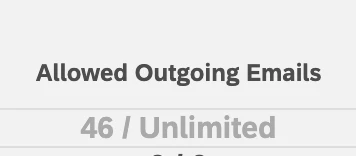
Has this been implemented and confirmed? Following the steps you linked above in the Qualtrics docs (with an additional step of switching to the older page), every user I check still has an account limit of ‘Unlimited’ in their Account Usage table. Here’s one:


brookel
Groups Administrator
Forum|alt.badge.img+10
  • Author
  • Groups Administrator
  • February 18, 2025

@riceball I apologize, I know this is a bit confusing. This “unlimited” email limit is for the lifetime of the account. 

This has been implemented and confirmed, thanks for checking.


h_mckim
Level 2 ●●
Forum|alt.badge.img+3
  • Level 2 ●●
  • February 18, 2025

So I am really confused.  Are you saying that users cannot actually see their own weekly limit of emails?


Forum|alt.badge.img+8
  • Level 2 ●●
  • February 18, 2025

so ​@brookel how do the users see what their limit is? Will that screen be updated so that users can see their usage next to their limit?

And how do we brand administrators see what their limit is? Checking a user from the admin console just says “Default” for their limit, which we can click and change to something else, but the default number isn’t seen that I can find.


h_mckim
Level 2 ●●
Forum|alt.badge.img+3
  • Level 2 ●●
  • February 18, 2025

@riceball I have found that some users have a different number filled in.  For example, I had 10,000 while our other brand admin had 50,000 and another person in our office had 1000.