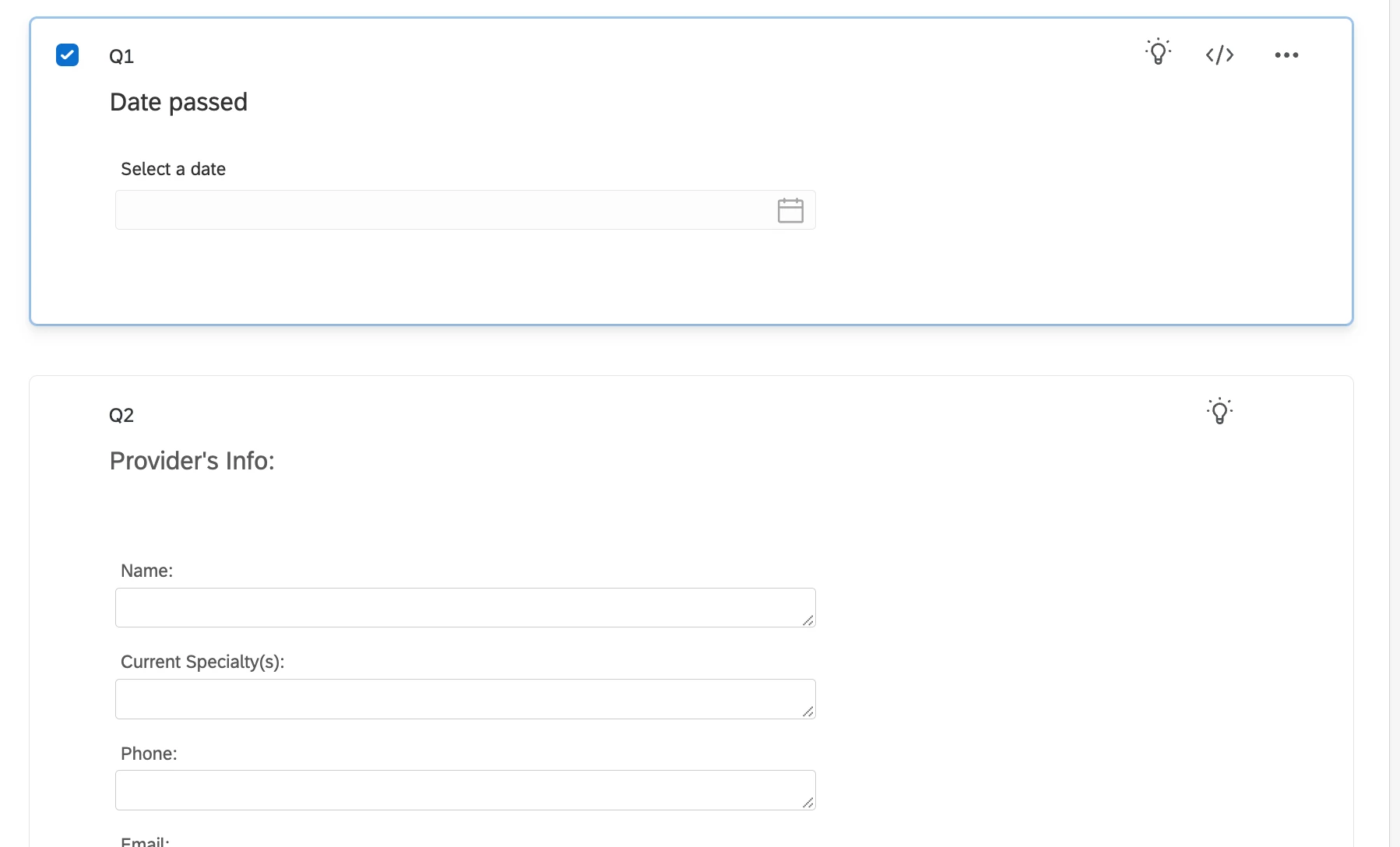
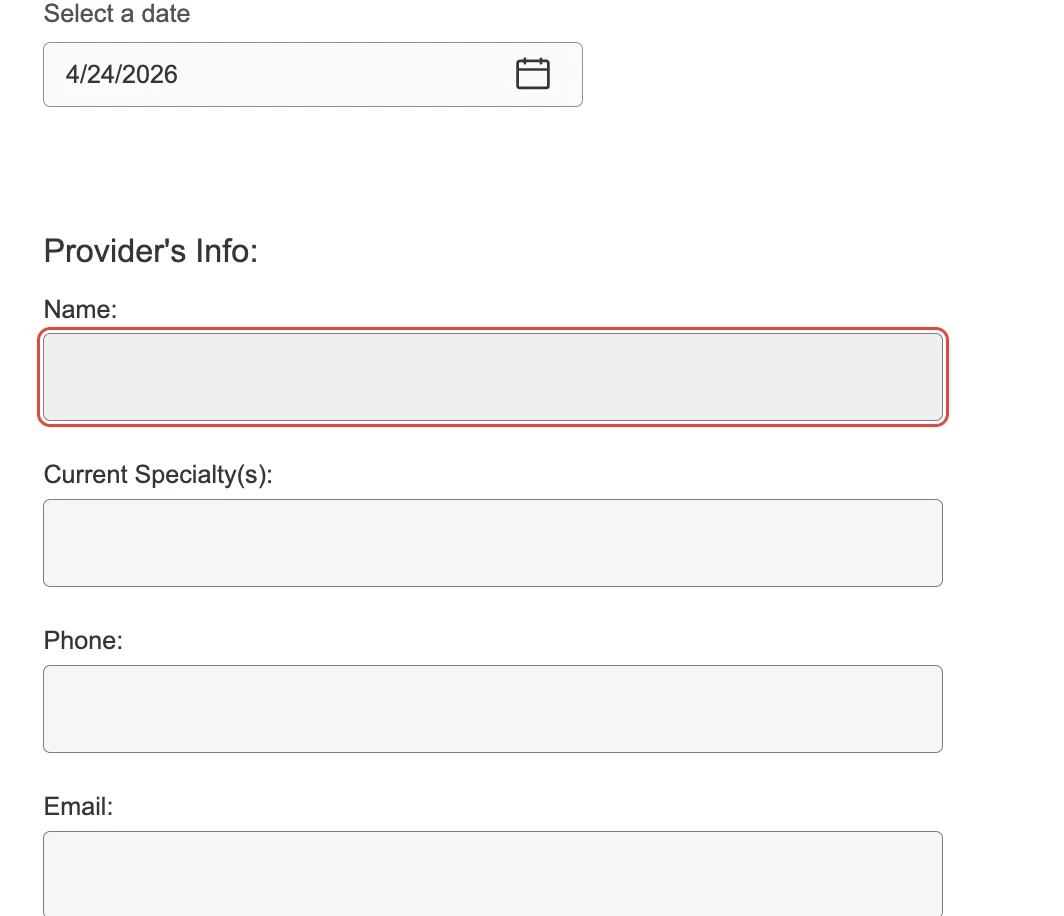
@Tom_1842 wondering if you can help out here since it’s your code. I followed the steps you outlined in the above community post and it worked perfectly for the calendar question, hid the time interval, and I love that it auto-closes the calendar once the date has been selected! But creates a secondary issue for me….
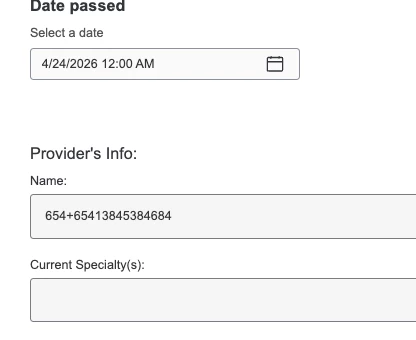
When I have the JS on the calendar question it then does not allow my to type in the form fields found in Q2 (the JS is only on Q1 which is the calendar question). I removed the JS from Q1 and then previewed the survey again, it allowed me to type in the form fields in Q2, but as soon as I place the JS back on Q1 it inhibits me from filling out the form fields - interesting as it’s 2 totally separate questions. I’m wondering if you can help identify where in your code I would need to edit/remove.
Qualtrics.SurveyEngine.addOnReady(function() { /*Place your JavaScript here to run when the page is fully displayed*/
// Function to click a specific time in the time picker when a day is selected function clickSpecificTime(timeText = '12:00 AM') { const timeItems = document.querySelectorAll('.react-datepicker__time-list-item'); for (const item of timeItems) { if (item.textContent.trim() === timeText) { item.click(); // Select the desired time break; } } }
// Attach click listeners to each day in the calendar function attachDayClickListeners() { const dayElements = document.querySelectorAll('.react-datepicker__day');
dayElements.forEach(day => { if (!day.dataset.listenerAttached) { // Add a click listener to select the time after a day is clicked day.addEventListener('click', () => { setTimeout(() => { clickSpecificTime('12:00 AM'); }, 50); // Delay to ensure the day actually gets selected });
// Mark this day element so listener does not reattach day.dataset.listenerAttached = 'true'; } }); }
// Override the input's value setter to prevent "12:00 AM" from being set function overrideInputValueSetter() { const inputs = document.querySelectorAll('input.text-input');
inputs.forEach(input => { // Get the original value property descriptor const descriptor = Object.getOwnPropertyDescriptor(Object.getPrototypeOf(input), 'value');
// Only override if it's configurable and hasn't been overridden already if (descriptor && descriptor.configurable && !input.dataset.overrideApplied) { Object.defineProperty(input, 'value', { get() { return descriptor.get.call(this); // Use the original getter }, set(newValue) { // Strip out "12:00 AM" before setting the value const cleanValue = newValue.replace(/\s*12:00\s?[AP]M/i, ''); descriptor.set.call(this, cleanValue); }, configurable: true, enumerable: true });
// Mark this input so does not override again input.dataset.overrideApplied = 'true'; // Remove ability to type in input and prevents keyboard on mobile input.setAttribute('readonly', true);
// Observe the DOM for changes to re-attach listeners and override setters as needed let globalObserver = new MutationObserver(() => { attachDayClickListeners(); // Re-attach day click listeners overrideInputValueSetter(); // Re-apply input value overrides });
// Initial setup on page load attachDayClickListeners(); overrideInputValueSetter();
// Remove the observers on page submit Qualtrics.SurveyEngine.addOnPageSubmit(function (type) { if (globalObserver) { globalObserver.disconnect(); globalObserver = null; } });
});
*one additional piece of info - in testing I found that if I add a page break between Q1 and Q2, keeping the JS on Q1, it allows for typed responses in the Q2 fields. Ideally I would prefer to not have a page break after just 1 simple calendar question.
Best answer by Tom_1842
@kgillis The JS code in that timestamp removal thread has evolved a bit since the first post. Try the below. It removes the question text bolding, addresses the scoping issue, works better with date restrictions, and works across most languages.
Qualtrics.SurveyEngine.addOnload(function() {
  /*Place your JavaScript here to run when the page loads*/
// Remove question bolding
var qid = this.questionId;
  setTimeout(function () {
    var questionDisplay = document.getElementById('question-display-' + qid);
    if (questionDisplay) {
      questionDisplay.style.fontWeight = 'normal';
    }
  }, 5);
});
Qualtrics.SurveyEngine.addOnReady(function() {
  /*Place your JavaScript here to run when the page is fully displayed*/
  // Fuction to remove any string containing ":" and remove AM/PM
  function stripColonTokens(raw) {
    if (typeof raw !== 'string') return raw;
    let cleaned = raw.replace(/(^|\s)[^\s]*:[^\s]*(?=\s|$)/g, ' ');
    cleaned = cleaned.replace(/\s+/g, ' ').trim();
    cleaned = cleaned.replace(/\s*(AM|PM|A\.M\.|P\.M\.|SA|CH|上午|下午|早上|中午|晚上|午前|午後|오전|오후|ص|م|पूर्वाह्न|अपराह्न|పూర్వాహ్నం|అపరాహ్నం|ก่อนเที่ยง|หลังเที่ยง|00 12 00)\s*$/iu, '');
    return cleaned.trim();
  }
  // Function to find relevant open time list
  function getOpenTimeList() {
    const poppers = document.querySelectorAll('.react-datepicker-popper');
    if (!poppers || poppers.length === 0) return null;
    const popper = poppers[poppers.length - 1]; // most recent popper
    return popper.querySelector('.react-datepicker__time-list');
  }
  // Function to determine if a LI is disabled (by class or aria-disabled)
  function isDisabledTimeItem(li) {
    if (!li) return true;
    if (li.classList.contains('react-datepicker__time-list-item--disabled')) return true;
    const ariaDisabled = li.getAttribute('aria-disabled');
    if (ariaDisabled && ariaDisabled.toLowerCase() === 'true') return true;
    return false;
  }
  // Function to click the first active time
  function clickFirstActiveTime() {
    const list = getOpenTimeList();
    if (!list) return;
    const items = Array.from(list.querySelectorAll('.react-datepicker__time-list-item'));
    if (items.length === 0) return;
    // Prefer already selected if it is active
    const selected = items.find(li => li.getAttribute('aria-selected') === 'true' && !isDisabledTimeItem(li));
    if (selected) {
      selected.click();
      return;
    }
    // Otherwise, choose the first active item from the top
    const firstActive = items.find(li => !isDisabledTimeItem(li));
    if (firstActive) {
      firstActive.click();
      return;
    }
  }
  // Attach click listeners to each day in the calendar
  function attachDayClickListeners() {
    const dayElements = document.querySelectorAll('.react-datepicker__day');
    dayElements.forEach(day => {
      if (!day.dataset.listenerAttached) {
        day.addEventListener('click', () => {
          // Give datepicker a half second to update the time list after date selection
          setTimeout(() => {
            clickFirstActiveTime();
          }, 50);
        });
        day.dataset.listenerAttached = 'true';
      }
    });
  }
  // Override the input's value setter to remove strings with colons and AM/PM
  var qid = this.questionId;
	function overrideInputValueSetter() {
		const questionContainer = document.getElementById("question-" + qid);
    	const inputs = questionContainer.querySelectorAll('input.text-input');
    inputs.forEach(input => {
      if (input.dataset.overrideApplied) return;
      const nativeDescriptor =
        Object.getOwnPropertyDescriptor(HTMLInputElement.prototype, 'value') ||
        Object.getOwnPropertyDescriptor(Object.getPrototypeOf(input), 'value');
      if (!nativeDescriptor || !nativeDescriptor.configurable) return;
      Object.defineProperty(input, 'value', {
        get() {
          return nativeDescriptor.get.call(this);
        },
        set(newValue) {
          const cleanedValue = stripColonTokens(String(newValue));
          nativeDescriptor.set.call(this, cleanedValue);
        },
        configurable: true,
        enumerable: true
      });
      input.dataset.overrideApplied = 'true';
      // Prevent typing and mobile keyboard
      input.setAttribute('readonly', true);
      // Clean any inputs on load
      const currentValue = nativeDescriptor.get.call(input);
      const cleanedNow = stripColonTokens(String(currentValue));
      if (cleanedNow !== currentValue) {
        nativeDescriptor.set.call(input, cleanedNow);
      }
    });
  }
  // Observe the DOM for changes to re-attach listeners and override setters
  let globalObserver = new MutationObserver(() => {
    attachDayClickListeners();
    overrideInputValueSetter();
  });
  globalObserver.observe(document.body, {
    childList: true,
    subtree: true
  });
  // Initial setup on page load
  attachDayClickListeners();
  overrideInputValueSetter();
  // Remove the observers on page submit
  Qualtrics.SurveyEngine.addOnPageSubmit(function () {
    if (globalObserver) {
      globalObserver.disconnect();
      globalObserver = null;
    }
  });
});
@vgayraud I’m not seeing that line anywhere in the JS - can you please point it out?
Qualtrics.SurveyEngine.addOnReady(function() { /*Place your JavaScript here to run when the page is fully displayed*/
// Function to click a specific time in the time picker when a day is selected function clickSpecificTime(timeText = '12:00 AM') { const timeItems = document.querySelectorAll('.react-datepicker__time-list-item'); for (const item of timeItems) { if (item.textContent.trim() === timeText) { item.click(); // Select the desired time break; } } }
// Attach click listeners to each day in the calendar function attachDayClickListeners() { const dayElements = document.querySelectorAll('.react-datepicker__day');
dayElements.forEach(day => { if (!day.dataset.listenerAttached) { // Add a click listener to select the time after a day is clicked day.addEventListener('click', () => { setTimeout(() => { clickSpecificTime('12:00 AM'); }, 50); // Delay to ensure the day actually gets selected });
// Mark this day element so listener does not reattach day.dataset.listenerAttached = 'true'; } }); }
// Override the input's value setter to prevent "12:00 AM" from being set function overrideInputValueSetter() { const inputs = document.querySelectorAll('input.text-input');
inputs.forEach(input => { // Get the original value property descriptor const descriptor = Object.getOwnPropertyDescriptor(Object.getPrototypeOf(input), 'value');
// Only override if it's configurable and hasn't been overridden already if (descriptor && descriptor.configurable && !input.dataset.overrideApplied) { Object.defineProperty(input, 'value', { get() { return descriptor.get.call(this); // Use the original getter }, set(newValue) { // Strip out "12:00 AM" before setting the value const cleanValue = newValue.replace(/\s*12:00\s?[AP]M/i, ''); descriptor.set.call(this, cleanValue); }, configurable: true, enumerable: true });
// Mark this input so does not override again input.dataset.overrideApplied = 'true'; // Remove ability to type in input and prevents keyboard on mobile input.setAttribute('readonly', true);
// Observe the DOM for changes to re-attach listeners and override setters as needed let globalObserver = new MutationObserver(() => { attachDayClickListeners(); // Re-attach day click listeners overrideInputValueSetter(); // Re-apply input value overrides });
// Override the input's value setter to prevent "12:00 AM" from being set function overrideInputValueSetter() { const inputs = document.querySelectorAll('input.text-input');
That did allow the field forms to work, but now the time is showing up (it doesn’t display it on the calendar, it just automatically shows up when I select a date), I would like for the date only to appear in the question answer
@kgillis The JS code in that timestamp removal thread has evolved a bit since the first post. Try the below. It removes the question text bolding, addresses the scoping issue, works better with date restrictions, and works across most languages.
Qualtrics.SurveyEngine.addOnload(function() {
  /*Place your JavaScript here to run when the page loads*/
// Remove question bolding
var qid = this.questionId;
  setTimeout(function () {
    var questionDisplay = document.getElementById('question-display-' + qid);
    if (questionDisplay) {
      questionDisplay.style.fontWeight = 'normal';
    }
  }, 5);
});
Qualtrics.SurveyEngine.addOnReady(function() {
  /*Place your JavaScript here to run when the page is fully displayed*/
  // Fuction to remove any string containing ":" and remove AM/PM
  function stripColonTokens(raw) {
    if (typeof raw !== 'string') return raw;
    let cleaned = raw.replace(/(^|\s)[^\s]*:[^\s]*(?=\s|$)/g, ' ');
    cleaned = cleaned.replace(/\s+/g, ' ').trim();
    cleaned = cleaned.replace(/\s*(AM|PM|A\.M\.|P\.M\.|SA|CH|上午|下午|早上|中午|晚上|午前|午後|오전|오후|ص|م|पूर्वाह्न|अपराह्न|పూర్వాహ్నం|అపరాహ్నం|ก่อนเที่ยง|หลังเที่ยง|00 12 00)\s*$/iu, '');
    return cleaned.trim();
  }
  // Function to find relevant open time list
  function getOpenTimeList() {
    const poppers = document.querySelectorAll('.react-datepicker-popper');
    if (!poppers || poppers.length === 0) return null;
    const popper = poppers[poppers.length - 1]; // most recent popper
    return popper.querySelector('.react-datepicker__time-list');
  }
  // Function to determine if a LI is disabled (by class or aria-disabled)
  function isDisabledTimeItem(li) {
    if (!li) return true;
    if (li.classList.contains('react-datepicker__time-list-item--disabled')) return true;
    const ariaDisabled = li.getAttribute('aria-disabled');
    if (ariaDisabled && ariaDisabled.toLowerCase() === 'true') return true;
    return false;
  }
  // Function to click the first active time
  function clickFirstActiveTime() {
    const list = getOpenTimeList();
    if (!list) return;
    const items = Array.from(list.querySelectorAll('.react-datepicker__time-list-item'));
    if (items.length === 0) return;
    // Prefer already selected if it is active
    const selected = items.find(li => li.getAttribute('aria-selected') === 'true' && !isDisabledTimeItem(li));
    if (selected) {
      selected.click();
      return;
    }
    // Otherwise, choose the first active item from the top
    const firstActive = items.find(li => !isDisabledTimeItem(li));
    if (firstActive) {
      firstActive.click();
      return;
    }
  }
  // Attach click listeners to each day in the calendar
  function attachDayClickListeners() {
    const dayElements = document.querySelectorAll('.react-datepicker__day');
    dayElements.forEach(day => {
      if (!day.dataset.listenerAttached) {
        day.addEventListener('click', () => {
          // Give datepicker a half second to update the time list after date selection
          setTimeout(() => {
            clickFirstActiveTime();
          }, 50);
        });
        day.dataset.listenerAttached = 'true';
      }
    });
  }
  // Override the input's value setter to remove strings with colons and AM/PM
  var qid = this.questionId;
	function overrideInputValueSetter() {
		const questionContainer = document.getElementById("question-" + qid);
    	const inputs = questionContainer.querySelectorAll('input.text-input');
    inputs.forEach(input => {
      if (input.dataset.overrideApplied) return;
      const nativeDescriptor =
        Object.getOwnPropertyDescriptor(HTMLInputElement.prototype, 'value') ||
        Object.getOwnPropertyDescriptor(Object.getPrototypeOf(input), 'value');
      if (!nativeDescriptor || !nativeDescriptor.configurable) return;
      Object.defineProperty(input, 'value', {
        get() {
          return nativeDescriptor.get.call(this);
        },
        set(newValue) {
          const cleanedValue = stripColonTokens(String(newValue));
          nativeDescriptor.set.call(this, cleanedValue);
        },
        configurable: true,
        enumerable: true
      });
      input.dataset.overrideApplied = 'true';
      // Prevent typing and mobile keyboard
      input.setAttribute('readonly', true);
      // Clean any inputs on load
      const currentValue = nativeDescriptor.get.call(input);
      const cleanedNow = stripColonTokens(String(currentValue));
      if (cleanedNow !== currentValue) {
        nativeDescriptor.set.call(input, cleanedNow);
      }
    });
  }
  // Observe the DOM for changes to re-attach listeners and override setters
  let globalObserver = new MutationObserver(() => {
    attachDayClickListeners();
    overrideInputValueSetter();
  });
  globalObserver.observe(document.body, {
    childList: true,
    subtree: true
  });
  // Initial setup on page load
  attachDayClickListeners();
  overrideInputValueSetter();
  // Remove the observers on page submit
  Qualtrics.SurveyEngine.addOnPageSubmit(function () {
    if (globalObserver) {
      globalObserver.disconnect();
      globalObserver = null;
    }
  });
});