Phone Number Auto-Format with New Survey Experience / Simple Layout | Experience Community
Skip to main content
Solved

Phone Number Auto-Format with New Survey Experience / Simple Layout

  • March 25, 2026
  • 4 replies
  • 21 views

Forum|alt.badge.img+8

I would like my text entry question to automatically apply dashes “-” to a 10 digit phone number as the user is typing. The code I see across the community only seems to work for the older survey layouts and not the New Survey Experience / Simple layout.


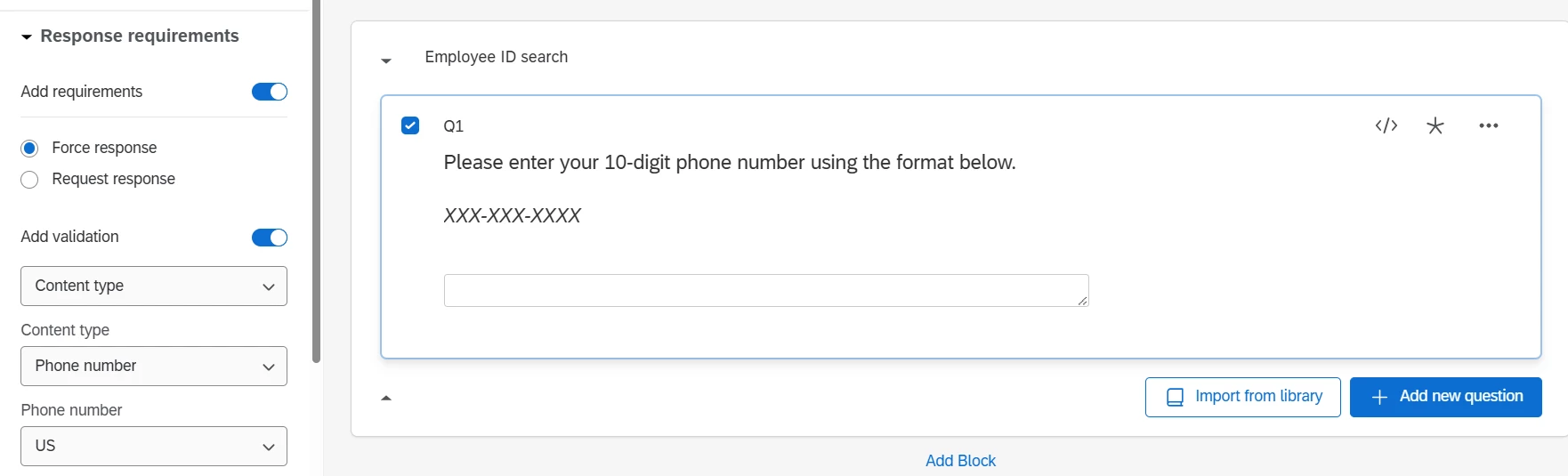
Does anyone have JavaScript to automatically apply dashes while entering in a phone number? The code needs to be able to work with a phone number content restriction and forced response settings as shown in the screenshot below.


Best answer by vgayraud

Hi ​@jake_dufinetz 

Adapted from a script I already wrote that would do the opposite (strip all non digits chars and store as 10 digits number). I didn’t test extensively this new version. Designed to work both in classic layouts and NSTE.

Qualtrics.SurveyEngine.addOnPageSubmit(function () {
var questionId = this.questionId;

function setNativeValue(element, value) {
const valueSetter = Object.getOwnPropertyDescriptor(element, 'value').set;
const prototype = Object.getPrototypeOf(element);
const prototypeValueSetter = Object.getOwnPropertyDescriptor(prototype, 'value').set;
if (valueSetter && valueSetter !== prototypeValueSetter) {
prototypeValueSetter.call(element, value);
} else {
valueSetter.call(element, value);
}
}

function formatPhoneNumber(digits) {
if (digits.length === 10) {
return digits.slice(0, 3) + '-' + digits.slice(3, 6) + '-' + digits.slice(6);
}
return digits;
}

var inputClassic = document.querySelector("#" + this.questionId + " .InputText");
var inputSimple = document.querySelector("#question-" + this.questionId + " .text-input");
var inputElement;

if (inputClassic) {
inputElement = inputClassic;
console.log(inputClassic, inputSimple, inputElement);

var digitsOnly = inputElement.value.replace(/\D/g, "");
inputElement.value = formatPhoneNumber(digitsOnly);

} else {
inputElement = inputSimple;
console.log(inputClassic, inputSimple, inputElement);

var digitsOnly = inputElement.value.replace(/\D/g, "");
var formatted = formatPhoneNumber(digitsOnly);

setNativeValue(inputElement, formatted);
inputElement.dispatchEvent(new Event('input', {
bubbles: true
}));
}

var noTel = inputElement.value;
console.log("Formatted phone:", noTel);
});

 

4 replies

vgayraud
QPN Level 7 ●●●●●●●
Forum|alt.badge.img+62
  • QPN Level 7 ●●●●●●●
  • Answer
  • March 26, 2026

Hi ​@jake_dufinetz 

Adapted from a script I already wrote that would do the opposite (strip all non digits chars and store as 10 digits number). I didn’t test extensively this new version. Designed to work both in classic layouts and NSTE.

Qualtrics.SurveyEngine.addOnPageSubmit(function () {
var questionId = this.questionId;

function setNativeValue(element, value) {
const valueSetter = Object.getOwnPropertyDescriptor(element, 'value').set;
const prototype = Object.getPrototypeOf(element);
const prototypeValueSetter = Object.getOwnPropertyDescriptor(prototype, 'value').set;
if (valueSetter && valueSetter !== prototypeValueSetter) {
prototypeValueSetter.call(element, value);
} else {
valueSetter.call(element, value);
}
}

function formatPhoneNumber(digits) {
if (digits.length === 10) {
return digits.slice(0, 3) + '-' + digits.slice(3, 6) + '-' + digits.slice(6);
}
return digits;
}

var inputClassic = document.querySelector("#" + this.questionId + " .InputText");
var inputSimple = document.querySelector("#question-" + this.questionId + " .text-input");
var inputElement;

if (inputClassic) {
inputElement = inputClassic;
console.log(inputClassic, inputSimple, inputElement);

var digitsOnly = inputElement.value.replace(/\D/g, "");
inputElement.value = formatPhoneNumber(digitsOnly);

} else {
inputElement = inputSimple;
console.log(inputClassic, inputSimple, inputElement);

var digitsOnly = inputElement.value.replace(/\D/g, "");
var formatted = formatPhoneNumber(digitsOnly);

setNativeValue(inputElement, formatted);
inputElement.dispatchEvent(new Event('input', {
bubbles: true
}));
}

var noTel = inputElement.value;
console.log("Formatted phone:", noTel);
});



Forum|alt.badge.img+8
  • Author
  • QPN Level 4 ●●●●
  • March 26, 2026

Hi ​@vgayraud - This works pretty well, thank you!! The one piece that is different than other code we have used is that it doesn’t insert the dashes “-” live when the user is typing. Instead, it seems to evaluate the entered text after the submit button is pressed.

  • If there are 10 digits in the text box, then the code inserts the dashes within.
  • If there are > 10 digits or < 10 digits in the text box, the code does not insert any dashes within (leaving the input as is).
  • If there are any non-numerical characters in the text box, then the code will remove those characters and then check if there are 10 digits remaining to either insert the dashes or leave the input as is.

Does this all sound correct to you? And I’m guessing with NTSE it is much harder to do the live dash insert while the user is typing?


Hi ​@jake_dufinetz 

Adapted from a script I already wrote that would do the opposite (strip all non digits chars and store as 10 digits number). I didn’t test extensively this new version. Designed to work both in classic layouts and NSTE.


vgayraud
QPN Level 7 ●●●●●●●
Forum|alt.badge.img+62
  • QPN Level 7 ●●●●●●●
  • March 26, 2026

Correct yes, it’s just reformatting the input on submit. If you have more or less than 10 characters, it should be caught by the question’s validation as invalid number.

I haven’t much played around reformatting on the fly but I think I remember seeing similar posts about formatting numbers (insert commas for thousand separators or something like that).


Forum|alt.badge.img+8
  • Author
  • QPN Level 4 ●●●●
  • March 26, 2026

Got it, alright thank you. I can’t seem to mark you post as the best answer yet but your solution inserting the dashes after page submit will work for now, thanks!