


Form Field Question - autocomplete *only want on some of the statements | Experience Community
Skip to main content
Question

Form Field Question - autocomplete *only want on some of the statements

  • April 16, 2026
  • 3 replies
  • 21 views

kgillis
Level 6 ●●●●●●
Forum|alt.badge.img+31

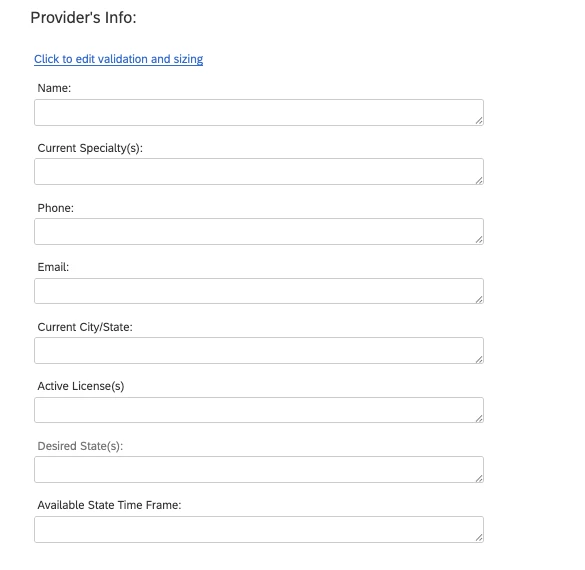
I have a form field question with 8 statements. I would like 2 of the statements to have the autocomplete feature - Current Specialty(s) and Desired State(s), is this possible to do in keeping this all in one question and not having to break it out into separate questions to enable autocomplete?



3 replies

Forum|alt.badge.img+26

Hi ​@kgillis ,


Assuming you are using Flat layout

  1. Add this portion to the header
<!-- jQuery (Qualtrics compatible) -->
<script src="https://code.jquery.com/jquery-1.12.4.min.js"></script>
<!-- jQuery UI -->
<script src="https://code.jquery.com/ui/1.12.1/jquery-ui.min.js"></script>
<!-- jQuery UI CSS -->
<link href="https://code.jquery.com/ui/1.12.1/themes/base/jquery-ui.css" rel="stylesheet" />
<script>
var $j = jQuery.noConflict();
</script>


  1. Add this portion to the Form Field question in JavaScript.
Qualtrics.SurveyEngine.addOnReady(function () {
var $inputs = $j(this.getQuestionContainer()).find("input.InputText");

// Autocomplete data sources
var autoListField2 = [
"Anaesthesiology", "Cardiology", "Cardiothoracic Surgery", "Dermatology", "Diagnostic Radiology", "Emergency Medicine", "Endocrinology", "Family Medicine"
];

var autoListField7 = [
"Alabama (AL)", "Alaska (AK)", "Arizona (AZ)", "Arkansas (AR)", "California (CA)", "Colorado (CO)", "Connecticut (CT)", "Delaware (DE)", "Florida (FL)", "Georgia (GA)"

];

// Field 2 (index 1)
$inputs.eq(1).autocomplete({
source: autoListField2,
minLength: 1
});

// Field 7 (index 6)
$inputs.eq(6).autocomplete({
source: autoListField7,
minLength: 1
});
});

Note: I got it to work by tweaking a little after getting some assistance from Copilot.

 Hope this helps.


nikamshubham73
Level 2 ●●
Forum|alt.badge.img+3

Hi ​@kgillis,

You can also try the below code, it works for 2nd Input Text box on the page, you can repeat the same for the 7th Text box by replacing jQuery(".InputText").eq(6). It contains the list of food items, you can replace with your own auto complete wordings. 
 

Qualtrics.SurveyEngine.addOnload(function()

{

    /*Place your JavaScript here to run when the page loads*/

});

Qualtrics.SurveyEngine.addOnReady(function() {

    //Targets the 2 textbox on the page

    const input = jQuery(".InputText").eq(1);

    //Put in the choices you want for auto complete

    const suggestions = [

        "Pizza", "Burger", "Pasta", "Biryani", "Sushi",

        "Ice Cream", "Chocolate", "Sandwich", "Fries", "Salad",

        "Dosa", "Idli", "Paneer Tikka", "Noodles", "Fried Rice"

    ];

    // Create dropdown

    const dropdown = jQuery("<ul id='customDropdown'></ul>").css({

        position: "absolute",

        border: "1px solid #ccc",

        background: "#fff",

        listStyle: "none",

        padding: "0",

        margin: "0",

        zIndex: 9999,

        display: "none",

        maxHeight: "150px",

        overflowY: "auto"

    });

    jQuery("body").append(dropdown);

    // Position dropdown

    function positionDropdown() {

        const offset = input.offset();

        dropdown.css({

            top: offset.top + input.outerHeight(),

            left: offset.left,

            width: input.outerWidth()

        });

    }

    // Input typing

    input.on("input", function() {

        const value = this.value.toLowerCase().trim();

        dropdown.empty();

        if (!value) {

            dropdown.hide();

            return;

        }

        const filtered = value.length === 1

            ? suggestions

            : suggestions.filter(item =>

                item.toLowerCase().includes(value)

            );

        if (filtered.length === 0) {

            dropdown.hide();

            return;

        }

        filtered.forEach(item => {

            const li = jQuery("<li></li>").text(item).css({

                padding: "8px",

                cursor: "pointer"

            });

            li.hover(

                function() { jQuery(this).css("background", "#eee"); },

                function() { jQuery(this).css("background", "#fff"); }

            );

            // Select item

            li.on("mousedown", function(e) {

                e.preventDefault();

                e.stopPropagation();

                input.val(item).trigger("change");

                dropdown.stop(true, true).fadeOut(100, function() {

                    dropdown.empty();

                });

            });

            dropdown.append(li);

        });

        positionDropdown();

        dropdown.show();

    });

    // Hide on outside click

    jQuery(document).on("mousedown", function(e) {

        if (

            !jQuery(e.target).closest(input).length &&

            !jQuery(e.target).closest("#customDropdown").length

        ) {

            dropdown.fadeOut(100, function() {

                dropdown.empty();

            });

        }

    });

    // Hide dropdown on Next click 

    jQuery(document).on("mousedown", ".NextButton", function() {

        jQuery("#customDropdown").css({

            "display": "none",

            "visibility": "hidden",

            "pointer-events": "none"

        }).empty();

    });

    // Extra cleanup when page unloads

    Qualtrics.SurveyEngine.addOnUnload(function() {

        jQuery("#customDropdown").remove();

    });

});


vgayraud
QPN Level 7 ●●●●●●●
Forum|alt.badge.img+63
  • QPN Level 7 ●●●●●●●
  • April 17, 2026

Hi,

Assuming you want to use Qualtrics’ native autocomplete feature  - and all the benefits coming with it such as being able to link to supplemental data sources, Google Maps, translations, filters - versus custom javascript solutions, you’re limited to the single line text entry question type.

What I’ve done in the past is tweaking the style of these questions to bring them visually closer to the style of a form for the respondent, but you’ll still have multiple questions in the back yes.