How to add not applicable option to one item from a 15 item slider response | Experience Community
Skip to main content
Solved

How to add not applicable option to one item from a 15 item slider response

  • June 5, 2026
  • 16 replies
  • 70 views

Forum|alt.badge.img+1

Hi, 

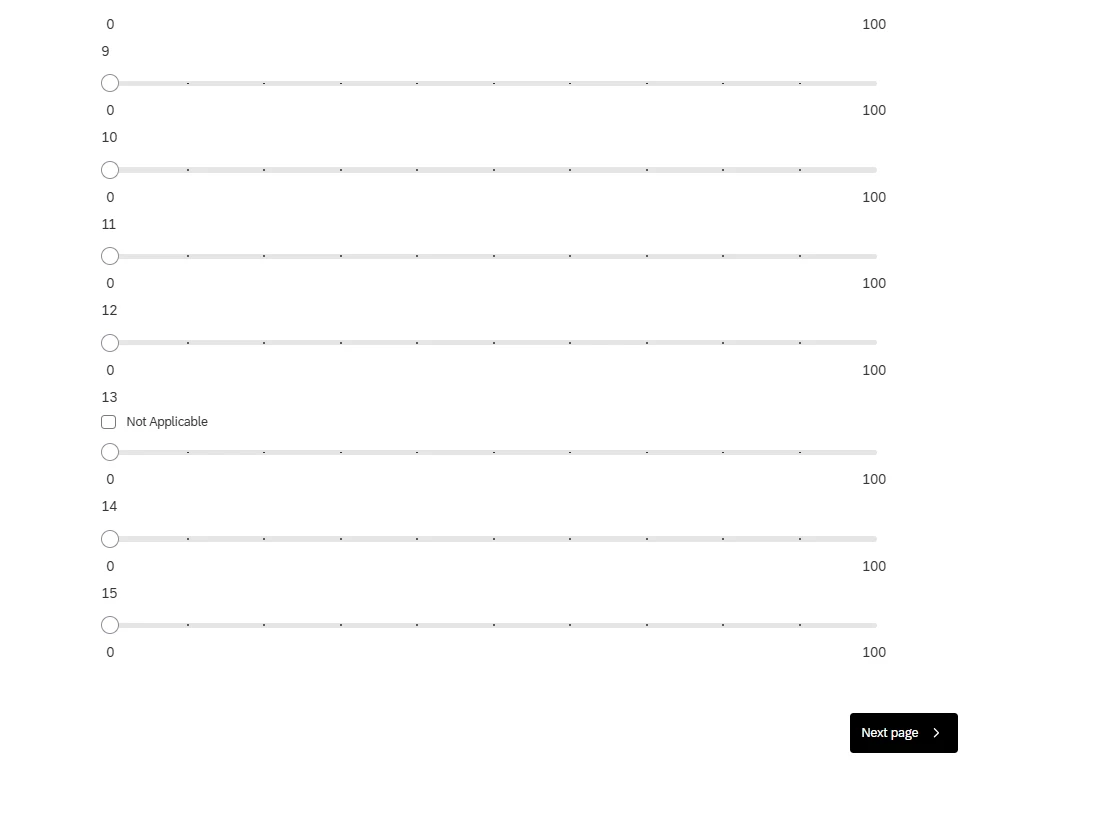
Does anyone know how to add a not applicable option to one item from a 15 item slider survey?

I only want the not applicable/skip option on item 13 and to appear next to the text. I saw a user was able to achieve this on another post using a star slider and altering the JavaScript.


Thanks in advance for your help.


My current JavaScript is below


Qualtrics.SurveyEngine.addOnload(function()

{

/*Place your JavaScript here to run when the page loads*/


});


Qualtrics.SurveyEngine.addOnReady(function()

{

/*Place your JavaScript here to run when the page is fully displayed*/


});


Qualtrics.SurveyEngine.addOnUnload(function()

{

/*Place your JavaScript here to run when the page is unloaded*/


});

Best answer by vgayraud

It’s .n-a-container for legacy layouts.

16 replies

gPandey_715
Level 4 ●●●●
Forum|alt.badge.img+10
  • Level 4 ●●●●
  • June 5, 2026

Hi ​@jeany3 ,

Unfortunately, this is not supported natively. The "Not Applicable" option is applied at the question level and will appear for all slider statements.

However, this can be achieved using JavaScript. Assuming you want to display the Not Applicable option only for the 13th statement, you can add the following code under Question JavaScript:


const naOptions = document.querySelectorAll('.slider-na');

naOptions.forEach((el, index) => {
    if(index !== 11) {
        el.style.display = 'none';
    }
});


Forum|alt.badge.img+1
  • Author
  • Level 1 ●
  • June 5, 2026

Hi ​@gPandey_715 thanks for your reply.

I tried adding your code but nothing happened. Are you able to provide the full code I need to insert?

Before I posted, I was using ChatGPT. It got close with the code below but only in Preview Question (clicking on the … on the block). It had Skip but the checkbox was at the opposite end by itself and not together. 

When viewing my survey in the preview mode there was no Skip or checkbox.  
 

Qualtrics.SurveyEngine.addOnReady(function()
{
    var that = this;

    const elements = document.querySelectorAll('.ResultsInput');

    elements.forEach((element, i) => {

        if (i !== 12) return; // Item 13 only

        // Create stable container OUTSIDE slider rendering layer
        const wrapper = document.createElement('span');
        wrapper.style.display = 'inline-flex';
        wrapper.style.alignItems = 'center';
        wrapper.style.marginLeft = '12px';

        // Checkbox (force visibility)
        const checkbox = document.createElement('input');
        checkbox.type = 'checkbox';
        checkbox.id = 'skip-item13';
        checkbox.style.width = '18px';
        checkbox.style.height = '18px';
        checkbox.style.opacity = '1';
        checkbox.style.visibility = 'visible';

        // Label
        const label = document.createElement('label');
        label.htmlFor = 'skip-item13';
        label.textContent = ' Skip';
        label.style.marginLeft = '6px';

        wrapper.appendChild(checkbox);
        wrapper.appendChild(label);

        // 🔥 KEY FIX: insert AFTER the slider row, not inside it
        element.parentNode.insertBefore(wrapper, element.nextSibling);

        // behaviour
        checkbox.addEventListener('change', function () {
            if (this.checked) {
                that.setChoiceValue(i + 1, 0);
            }
        });
    });
});


gPandey_715
Level 4 ●●●●
Forum|alt.badge.img+10
  • Level 4 ●●●●
  • June 5, 2026

Hi ​@jeany3 ,

Copy and paste the below code in your Slider question type JS.
 

Qualtrics.SurveyEngine.addOnReady(function() {

    const naOptions = document.querySelectorAll('.slider-na');

    naOptions.forEach((el, index) => {
        if (index !== 11)
            el.style.display = 'none';
        }
    });

});


Forum|alt.badge.img+1
  • Author
  • Level 1 ●
  • June 5, 2026

@gPandey_715 

I receive an error message
 

Invalid JavaScript

You cannot save until you fix the following error:

Line 9: Unexpected token }


gPandey_715
Level 4 ●●●●
Forum|alt.badge.img+10
  • Level 4 ●●●●
  • June 5, 2026

@jeany3 My bad, I missed the opening parentheses after if statement. Please copy the code below.
 

Qualtrics.SurveyEngine.addOnReady(function() {

    const naOptions = document.querySelectorAll('.slider-na');

    naOptions.forEach((el, index) => {
        if (index !== 11) {
            el.style.display = 'none';
        }
    });

});


Forum|alt.badge.img+1
  • Author
  • Level 1 ●
  • June 5, 2026

@gPandey_715  all good. 

Its still not working though. No Skip text or checkbox.


gPandey_715
Level 4 ●●●●
Forum|alt.badge.img+10
  • Level 4 ●●●●
  • June 5, 2026

Just to confirm, which question type are you using? Is it a Slider question? ​@jeany3 


Forum|alt.badge.img+1
  • Author
  • Level 1 ●
  • June 5, 2026

@gPandey_715 

Question type: Slider
Slider type: Sliders 
Response requirements: Forced response

If I enable Add “not applicable” option, not applicable (Skip) is available on all items. 


gPandey_715
Level 4 ●●●●
Forum|alt.badge.img+10
  • Level 4 ●●●●
  • June 5, 2026

@jeany3 
 

That's strange. I tried using the same code on a Slider question with the "Not Applicable" option enabled, and it worked fine on my end.

I'm attaching a few screenshots for reference. Could you double-check that the code was added under the Question JavaScript and that the "Not Applicable" option is enabled for the Slider question?

If you're still experiencing issues, could you share a screenshot of your question setup and the JavaScript you've added? That may help identify what's causing the difference.


Have a look at this


Forum|alt.badge.img+1
  • Author
  • Level 1 ●
  • June 5, 2026

@gPandey_715 

I’m not sure what’s happening.

Not applicable is enabled. 

I have a Skip option on all 15 items.


gPandey_715
Level 4 ●●●●
Forum|alt.badge.img+10
  • Level 4 ●●●●
  • June 5, 2026

@jeany3  Looking at your screenshot, it appears the option is being displayed as Skip rather than the standard Not Applicable option. Could you inspect one of the Skip checkboxes and share the HTML structure (or a screenshot of the inspected element)? It's possible your brand/theme is rendering the option differently, so the .slider-na selector may not be targeting the correct element.


vgayraud
QPN Level 7 ●●●●●●●
Forum|alt.badge.img+65
  • QPN Level 7 ●●●●●●●
  • Answer
  • June 5, 2026

It’s .n-a-container for legacy layouts.


Forum|alt.badge.img+1
  • Author
  • Level 1 ●
  • June 5, 2026

@gPandey_715 


I renamed Not Applicable to Skip. There is an option to after enabling Add “not applicable” option


Forum|alt.badge.img+1
  • Author
  • Level 1 ●
  • June 5, 2026

@vgayraud you legend! It worked!!

Thanks so much ​@gPandey_715 


vgayraud
QPN Level 7 ●●●●●●●
Forum|alt.badge.img+65
  • QPN Level 7 ●●●●●●●
  • June 5, 2026

Be aware that this snippet will always show the statement with that index though. If you have randomization on your statements, it will break your data.

In order to target the right statements, retrieve their ids with the question api and hard code them after.

Following code should always target the right statements and is scoped only to the question. Replace the hard coded ids in targetChoiceIds with the ones you want from your console log.

Qualtrics.SurveyEngine.addOnReady(function() {

const targetChoiceIds = ['1', '3'];

const info = this.getQuestionInfo();
console.log(info.Choices);

document.querySelectorAll('#' + this.questionId + ' .n-a-container').forEach(function(el) {
const input = el.querySelector('input');
if (input) {
const choiceId = input.id.split('~')[1];
console.log('choiceId:', choiceId, 'visible:', targetChoiceIds.indexOf(choiceId) !== -1);
if (targetChoiceIds.indexOf(choiceId) === -1) {
el.style.display = 'none';
}
}
});
});


Forum|alt.badge.img+1
  • Author
  • Level 1 ●
  • June 6, 2026

@vgayraud thanks for pointing that out. The 15 item questionnaire is 1 of 4 questionnaires I’m using. The items in the questionnaires are not randomised but the order of the 4 questionnaires is randomised.