

I want to add a middle line into the slider question I have. I tried to use Grid Lines with Snap to Grid or without Snap to Grid function, but it doesn't look like the way I want. Here is an example screenshot of the output I have right now: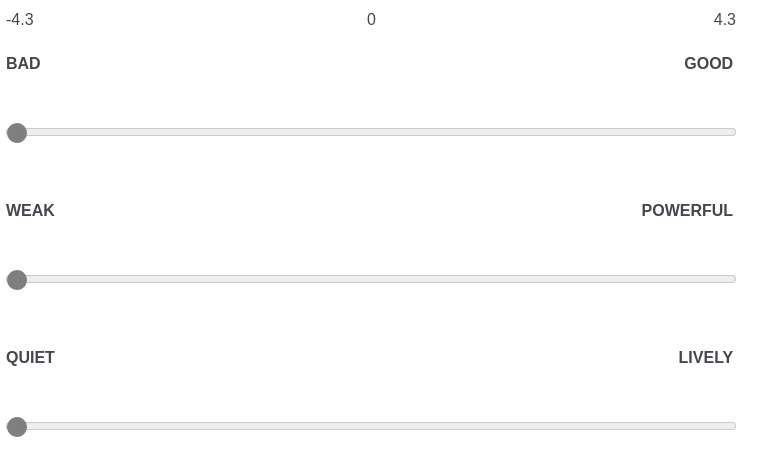 I have two questions:
1-) When I select Grid Lines to 1 --> I can only see -4.3 and +4.3 (min and max values) and when I make grid lines to 2, I can see 0 too. However, I only wanna show 0.
2-) Is there any way to create a vertical line that shows the position of zero for all choices? It is gonna be like a vertical line at the middle of each question coming from 0.
Thank you very much for your help. I really appreciate!

Solved
Slider Question adding a middle line
Best answer by rondev
Solution for Point 2: Paste the below CSS in the look and feel -> style -> custom css:
.slider-container:after {
content:"";
position: absolute;
z-index: -1;
top: 50px;
bottom: 0;
left: 50%;
border-left: 2px solid #9b9b9b;
transform: translate(-50%);
}







Sign up
Already have an account? Login

Welcome! To join the Qualtrics Experience Community, log in with your existing Qualtrics credentials below.
Confirm your username, share a bit about yourself, then you're ready to explore and connect .
Free trial account? No problem. Log in with your trial credentials to join.
No free trial account? No problem! Register here
Already a member? Hi and welcome back! We're glad you're here 🙂
You will see the Qualtrics login page briefly before being taken to the Experience Community.
Login with Qualtrics
Welcome! To join the Qualtrics Experience Community, log in with your existing Qualtrics credentials below.
Confirm your username, share a bit about yourself, then you're ready to explore and connect .
Free trial account? No problem. Log in with your trial credentials to join. No free trial account? No problem! Register here
Already a member? Hi and welcome back! We're glad you're here 🙂
You will see the Qualtrics login page briefly before being taken to the Experience Community.
Login to the Community
Welcome! To join the Qualtrics Experience Community, log in with your existing Qualtrics credentials below.
Confirm your username, share a bit about yourself, then you're ready to explore and connect .
Free trial account? No problem. Log in with your trial credentials to join.
No free trial account? No problem! Register here
Already a member? Hi and welcome back! We're glad you're here 🙂
You will see the Qualtrics login page briefly before being taken to the Experience Community.
Login with Qualtrics
Welcome! To join the Qualtrics Experience Community, log in with your existing Qualtrics credentials below.
Confirm your username, share a bit about yourself, then you're ready to explore and connect .
Free trial account? No problem. Log in with your trial credentials to join. No free trial account? No problem! Register here
Already a member? Hi and welcome back! We're glad you're here 🙂
You will see the Qualtrics login page briefly before being taken to the Experience Community.
Enter your E-mail address. We'll send you an e-mail with instructions to reset your password.