


Code for hiding matrix table labels | Experience Community
Skip to main content
Solved

Code for hiding matrix table labels

  • Dec 2, 2024 4:53 PM UTC
  • 3 replies
  • 128 views

Forum|alt.badge.img+1

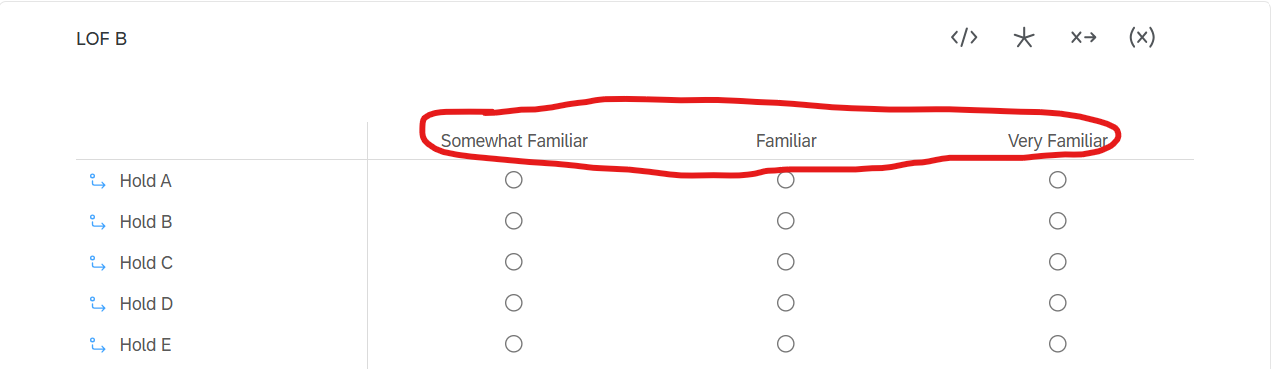
Does anyone know how to hide the scale labels for a matrix table (without eliminating the choices themselves)? [the goal is to make it appear to the survey respondent like these items are a continuation of the prior question,  which has the same scale, without a break] 
 

Best answer by vgayraud

Hi,

Qualtrics.SurveyEngine.addOnReady(function()
{

jQuery('#' + this.questionId + ' th[role="columnheader"]').css('display', 'none');

});


View original

3 replies

  • Level 4 ●●●●
  • Dec 3, 2024 6:01 AM UTC

Just delete the characters and leave a space. 


vgayraud
QPN Level 8 ●●●●●●●●
Forum|alt.badge.img+68
  • QPN Level 8 ●●●●●●●●
  • Answer
  • Dec 3, 2024 6:51 AM UTC

Hi,

Qualtrics.SurveyEngine.addOnReady(function()
{

jQuery('#' + this.questionId + ' th[role="columnheader"]').css('display', 'none');

});


Forum|alt.badge.img+1
  • Author
  • Dec 3, 2024 1:33 PM UTC

Hi,

Qualtrics.SurveyEngine.addOnReady(function()
{

jQuery('#' + this.questionId + ' th[role="columnheader"]').css('display', 'none');

});


That works perfectly. Very, very helpful.  Thank you!!