


Hello.
I'm trying to redesign a group of MAXDIFF QUESTIONS (matrix type) to include separator lines, borders and color. (A pic of what I'm trying to achieve is included.) Quite desperate at this point tbh. I found code that looked promising below, but it doesn't work. Can anyone offer suggestions that do not include javascript?
.maxdiff .inner_table td {
border-left: 3px black;
border-right: 3px black;
border-style: double;
}
What I hope to achieve: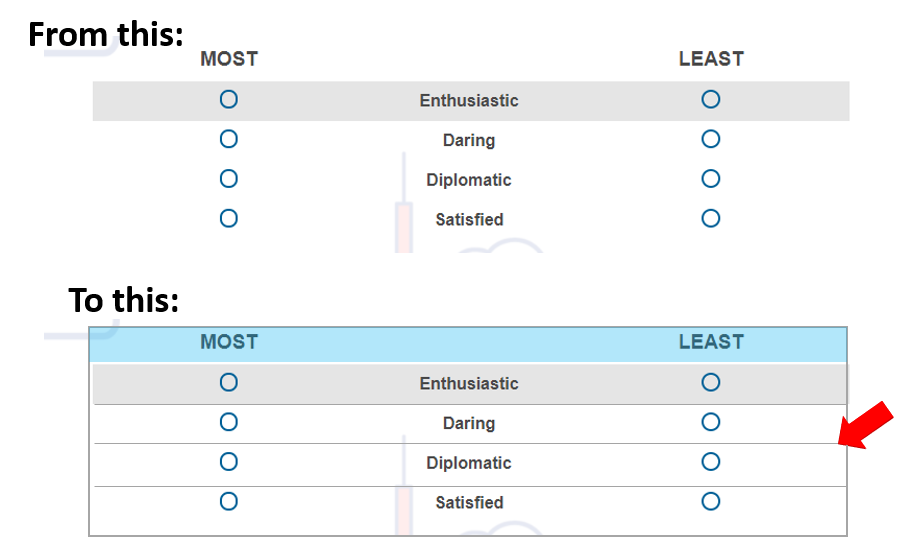

Solved
CODE FOR LINES BORDERS AND SHADING FOR MAXDIFF QUESTION
Best answer by ahmedA
- Remove the
.
before the table. Why? thead { background :red; }Other colours.- If it's only for one question, then I would recommend pasting it in the question HTML within the style tags.
- More table styling


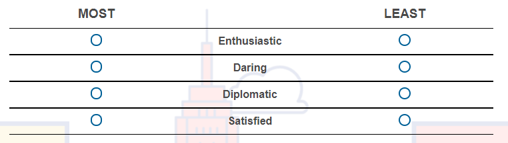 This is EXCELLENT! I'm so close. Ultimately, though, I'm trying to get a single border around the entire table and change the color for the header row so that the final product looks like this:
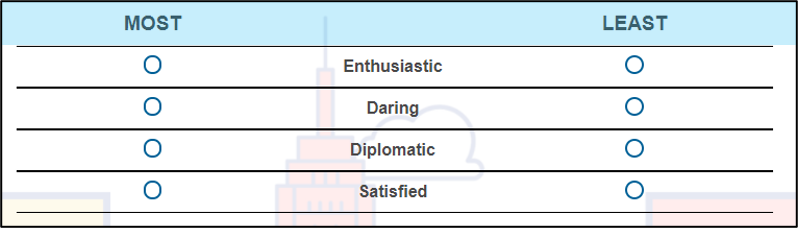 I know nothing, but it seems like I need just a few more lines (I sound like a drug addict) to get me to the end: 1) Border and 2) header row color. Does anything come to your mind?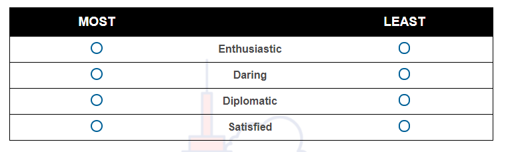



Sign up
Already have an account? Login

Welcome! To join the Qualtrics Experience Community, log in with your existing Qualtrics credentials below.
Confirm your username, share a bit about yourself, then you're ready to explore and connect .
Free trial account? No problem. Log in with your trial credentials to join.
No free trial account? No problem! Register here
Already a member? Hi and welcome back! We're glad you're here 🙂
You will see the Qualtrics login page briefly before being taken to the Experience Community.
Login with Qualtrics
Welcome! To join the Qualtrics Experience Community, log in with your existing Qualtrics credentials below.
Confirm your username, share a bit about yourself, then you're ready to explore and connect .
Free trial account? No problem. Log in with your trial credentials to join. No free trial account? No problem! Register here
Already a member? Hi and welcome back! We're glad you're here 🙂
You will see the Qualtrics login page briefly before being taken to the Experience Community.
Login to the Community
Welcome! To join the Qualtrics Experience Community, log in with your existing Qualtrics credentials below.
Confirm your username, share a bit about yourself, then you're ready to explore and connect .
Free trial account? No problem. Log in with your trial credentials to join.
No free trial account? No problem! Register here
Already a member? Hi and welcome back! We're glad you're here 🙂
You will see the Qualtrics login page briefly before being taken to the Experience Community.
Login with Qualtrics
Welcome! To join the Qualtrics Experience Community, log in with your existing Qualtrics credentials below.
Confirm your username, share a bit about yourself, then you're ready to explore and connect .
Free trial account? No problem. Log in with your trial credentials to join. No free trial account? No problem! Register here
Already a member? Hi and welcome back! We're glad you're here 🙂
You will see the Qualtrics login page briefly before being taken to the Experience Community.
Enter your E-mail address. We'll send you an e-mail with instructions to reset your password.