


I'm using JS script to get qualtrics to pick randomly a word from a set of words and print it out on the screen using embedded data field. At the same time, I also populate another embedded data field with the words that have been picked so that subsequent questions will not print out the same words again.
Qualtrics.SurveyEngine.addOnload(function()
{
/*Place your JavaScript here to run when the page loads*/
/* pass in the content of the embedded data field */
var used = "${e://Field/used}";
/* set an array of all the words to be randomly picked */
var everything = ["hoodie","coffee maker","amusement park ticket","concert ticket"];
if (used.split("").length == 0) { /* check if the read-in embedded data field is empty */
/* pick a word from the array randomly */
var good = everything[Math.floor(Math.random() * everything.length)];
/* set the word to the embedded field called 'good', this will be piped into the question*/
Qualtrics.SurveyEngine.setEmbeddedData("good", good);
/* overwrite the embedded field 'used' */
Qualtrics.SurveyEngine.setEmbeddedData("used", good);
console.log(good);
console.log(used);
} else {
var usedArray = used.split(",");
/* make an array that only contains those words that haven't been picked */
var newArray = everything.filter( function( el ) {
return usedArray.indexOf( el ) < 0;
} );
var good = newArray[Math.floor(Math.random() * newArray.length)];
/* update the array with used words */
usedArray = usedArray.push(good);
/* join the array with used words into a string, to update the corresponding embedded field */
used = usedArray.join(",");
Qualtrics.SurveyEngine.setEmbeddedData("good", good);
/* overwrite the embedded field 'used' with the updated string of used words */
Qualtrics.SurveyEngine.setEmbeddedData("used", used);
console.log(good);
console.log(used);
};
});
My survey flow: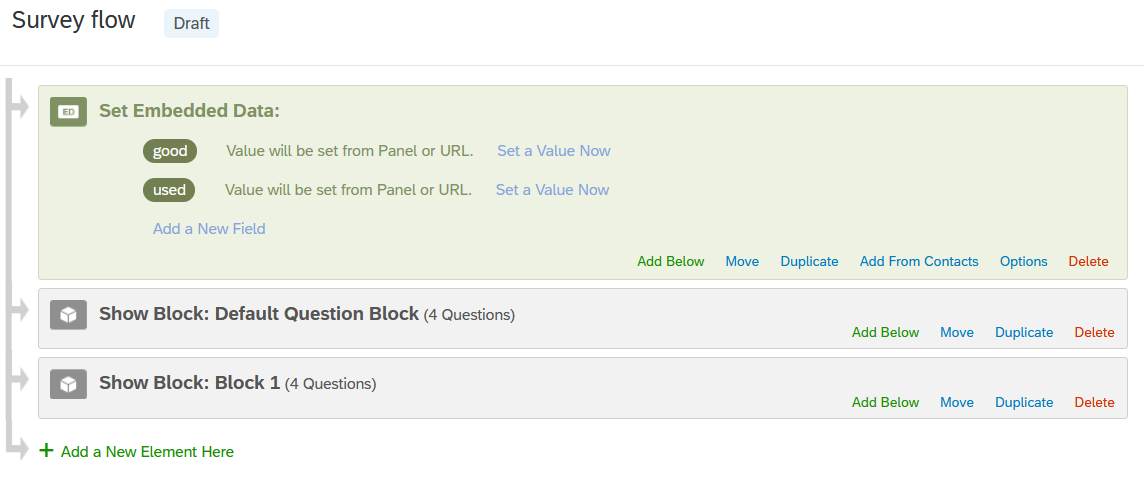
My question block: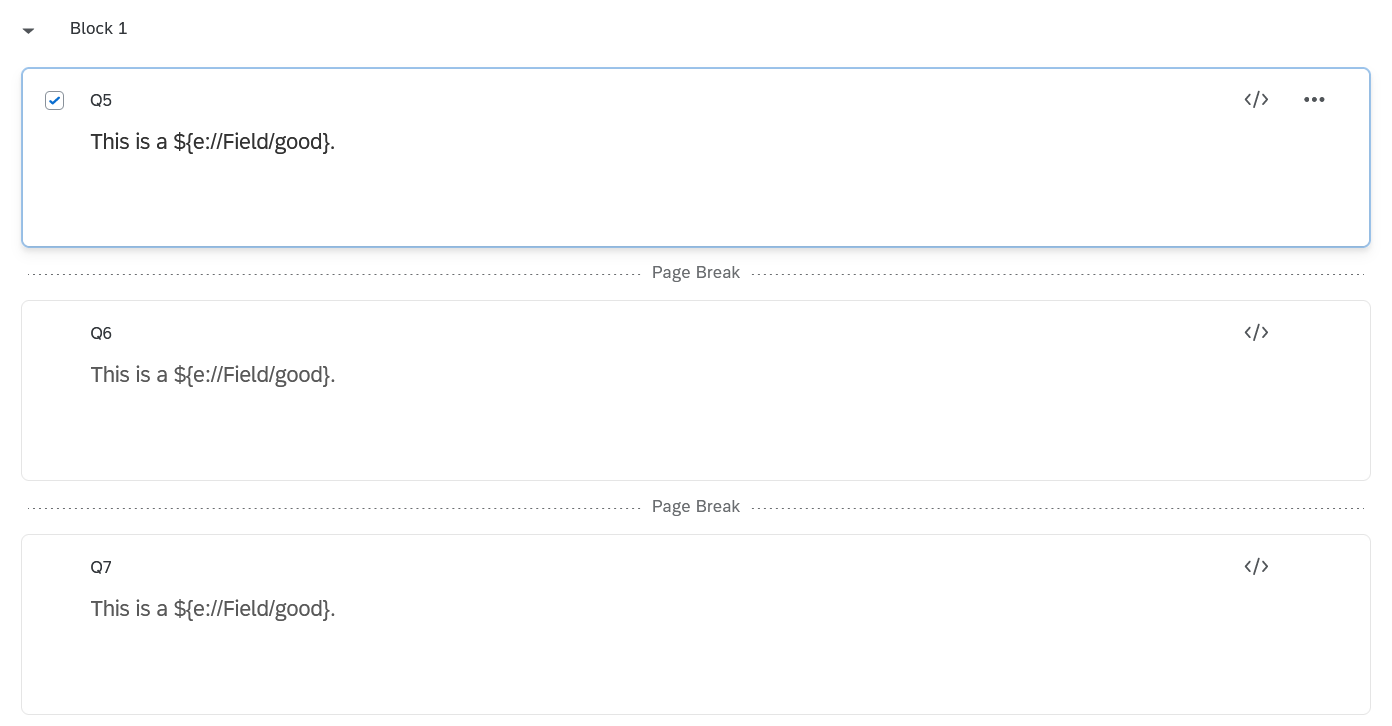
What was actually printed out during Preview, and Console: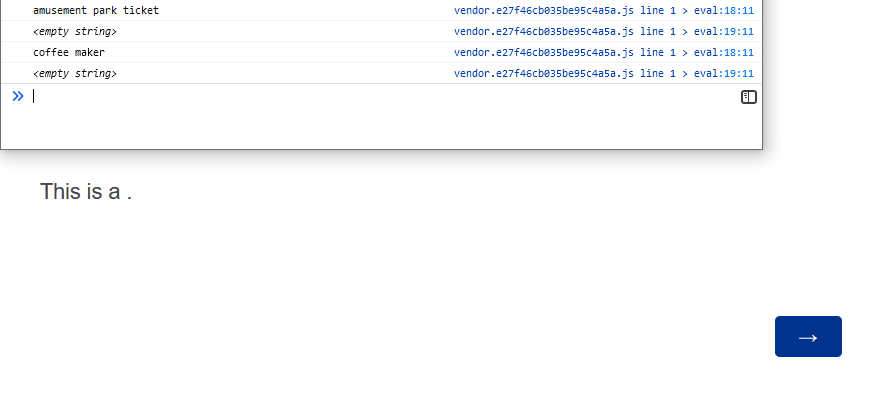 After clicking Next:
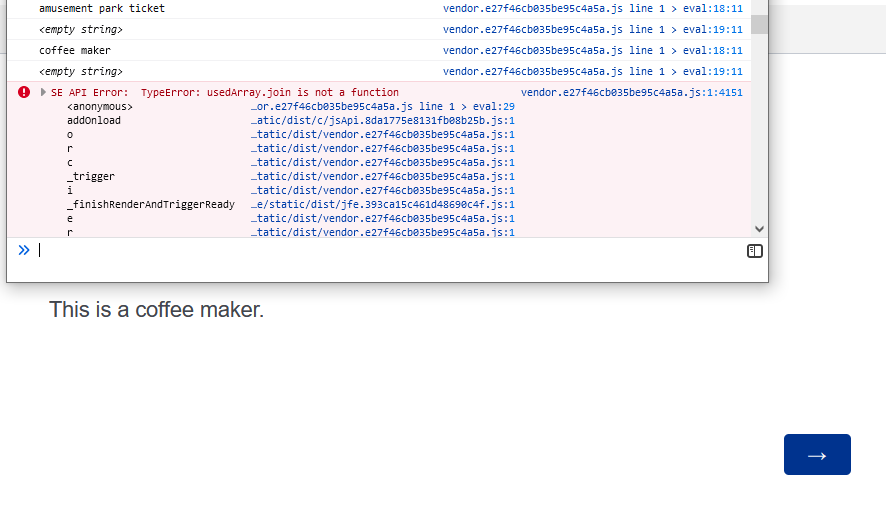 What is happening why isn't my code working?
Thanks!

Code for randomly printing words and updating embedded data field doesn't work



Sign up
Already have an account? Login

Welcome! To join the Qualtrics Experience Community, log in with your existing Qualtrics credentials below.
Confirm your username, share a bit about yourself, then you're ready to explore and connect .
Free trial account? No problem. Log in with your trial credentials to join.
No free trial account? No problem! Register here
Already a member? Hi and welcome back! We're glad you're here 🙂
You will see the Qualtrics login page briefly before being taken to the Experience Community.
Login with Qualtrics
Welcome! To join the Qualtrics Experience Community, log in with your existing Qualtrics credentials below.
Confirm your username, share a bit about yourself, then you're ready to explore and connect .
Free trial account? No problem. Log in with your trial credentials to join. No free trial account? No problem! Register here
Already a member? Hi and welcome back! We're glad you're here 🙂
You will see the Qualtrics login page briefly before being taken to the Experience Community.
Login to the Community
Welcome! To join the Qualtrics Experience Community, log in with your existing Qualtrics credentials below.
Confirm your username, share a bit about yourself, then you're ready to explore and connect .
Free trial account? No problem. Log in with your trial credentials to join.
No free trial account? No problem! Register here
Already a member? Hi and welcome back! We're glad you're here 🙂
You will see the Qualtrics login page briefly before being taken to the Experience Community.
Login with Qualtrics
Welcome! To join the Qualtrics Experience Community, log in with your existing Qualtrics credentials below.
Confirm your username, share a bit about yourself, then you're ready to explore and connect .
Free trial account? No problem. Log in with your trial credentials to join. No free trial account? No problem! Register here
Already a member? Hi and welcome back! We're glad you're here 🙂
You will see the Qualtrics login page briefly before being taken to the Experience Community.
Enter your E-mail address. We'll send you an e-mail with instructions to reset your password.