

I am trying to program a conjoint and best as I can tell have followed the steps on this guide: https://m-graham.com/resources/conjoint%20how-to.pdf . However, my tables for the conjoint choices are not populating, and I cannot see where it is breaking. Any suggestions would be greatly appreciated! Code for all steps is below.
Here is the javascript I used for randomization in an early question that every respondent sees (I did put this through Visual Studio and it didn't flag anything):
Qualtrics.SurveyEngine.addOnload(function()
{
response.setContentType("text/plain");
// Set number of choices ;
var numChoice = 4;
// Vectors containing all attribute levels :
var relidenomArray = [" Baptist", " Presbyterian ", " Methodist ", " Catholic "];
var theoposArray = [" Evangelical ", " Mainstream "];
var locationArray = [" Urban ", " Rural "];
var stateArray = [" Georgia ", " New York "];
var poliorientArray = [" Republican ", " Purple church ", " Democratic "];
var ethcompArray = [" Predominanty white ", " Ethnically diverse ", " Predominantly Black "];
// Fisher - Yates shuffle :
function shuffle ( array ){
for (var i = array . length - 1; i > 0; i --){
var j = Math . floor ( Math . random () * (i + 1));
var temp = array [i];
array [i] = array [j];
array [j] = temp ;
}
return array ;
}
// Shuffle a vector , choose the first entry :
function shuffle_one ( theArray ){
var out = shuffle ( theArray );
var out = out [0];
return ( out )
};
// Perform the randomization and save the result :
for (i = 1; i <= numChoice ; i ++) {
Qualtrics . SurveyEngine . setEmbeddedData (" choice "+i+" _relidenom1 ", shuffle_one ( relidenomArray ));
Qualtrics . SurveyEngine . setEmbeddedData (" choice "+i+" _relidenom2 ", shuffle_one ( relidenomArray ));
Qualtrics . SurveyEngine . setEmbeddedData (" choice "+i+" _theopos1 ", shuffle_one ( theoposArray ));
Qualtrics . SurveyEngine . setEmbeddedData (" choice "+i+" _theopos2 ", shuffle_one ( theoposArray ));
Qualtrics . SurveyEngine . setEmbeddedData (" choice "+i+" _location1 ", shuffle_one ( locationArray ));
Qualtrics . SurveyEngine . setEmbeddedData (" choice "+i+" _location2 ", shuffle_one ( locationArray ));
Qualtrics . SurveyEngine . setEmbeddedData (" choice "+i+" _state1 ", shuffle_one ( stateArray ));
Qualtrics . SurveyEngine . setEmbeddedData (" choice "+i+" _state2 ", shuffle_one ( stateArray ));
Qualtrics . SurveyEngine . setEmbeddedData (" choice "+i+" _poliorient1 ", shuffle_one ( poliorientArray ));
Qualtrics . SurveyEngine . setEmbeddedData (" choice "+i+" _poliorient2 ", shuffle_one ( poliorientArray ));
Qualtrics . SurveyEngine . setEmbeddedData (" choice "+i+" _ethcomp1 ", shuffle_one ( ethcompArray ));
Qualtrics . SurveyEngine . setEmbeddedData (" choice "+i+" _ethcomp2 ", shuffle_one ( ethcompArray ));
}
});
Here is a screenshot example of the embedded data in the survey flow (I've checked they all match the syntax choicei_variable1 and 2 for choices 1-4, and this comes before the javascript):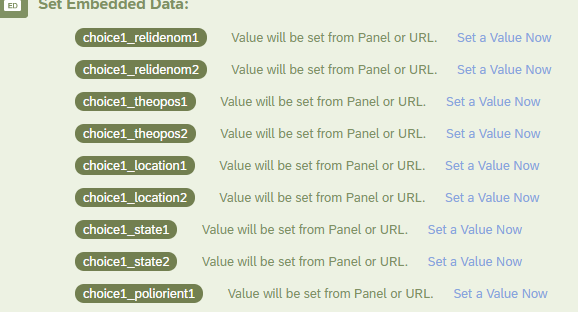
In the Loop and Merge block, I have this for the Fields, repeated for each attribute:
Finally, I call the Fields into the survey questions using ${lm://Field1} up to Field 12. I do this four times for a total of four choice sets with two profiles each.

Connecting javascript, embedded data, and loop and merge block
Sign up
Already have an account? Login

Welcome! To join the Qualtrics Experience Community, log in with your existing Qualtrics credentials below.
Confirm your username, share a bit about yourself, then you're ready to explore and connect .
Free trial account? No problem. Log in with your trial credentials to join.
No free trial account? No problem! Register here
Already a member? Hi and welcome back! We're glad you're here 🙂
You will see the Qualtrics login page briefly before being taken to the Experience Community.
Login with Qualtrics
Welcome! To join the Qualtrics Experience Community, log in with your existing Qualtrics credentials below.
Confirm your username, share a bit about yourself, then you're ready to explore and connect .
Free trial account? No problem. Log in with your trial credentials to join. No free trial account? No problem! Register here
Already a member? Hi and welcome back! We're glad you're here 🙂
You will see the Qualtrics login page briefly before being taken to the Experience Community.
Login to the Community
Welcome! To join the Qualtrics Experience Community, log in with your existing Qualtrics credentials below.
Confirm your username, share a bit about yourself, then you're ready to explore and connect .
Free trial account? No problem. Log in with your trial credentials to join.
No free trial account? No problem! Register here
Already a member? Hi and welcome back! We're glad you're here 🙂
You will see the Qualtrics login page briefly before being taken to the Experience Community.
Login with Qualtrics
Welcome! To join the Qualtrics Experience Community, log in with your existing Qualtrics credentials below.
Confirm your username, share a bit about yourself, then you're ready to explore and connect .
Free trial account? No problem. Log in with your trial credentials to join. No free trial account? No problem! Register here
Already a member? Hi and welcome back! We're glad you're here 🙂
You will see the Qualtrics login page briefly before being taken to the Experience Community.
Enter your E-mail address. We'll send you an e-mail with instructions to reset your password.