

Have looked around and wasn't able to find anything that would do this, does anyone have a workaround on how to make a retake link expire after the survey has been submitted? I'm working with legacy data so I already start the participant with the retake link, and the survey is a multiple access project so the participant is able to access their record after submitting it (using the ResponseID retake link method) but I don't want the old retake links to be active anymore as that becomes confusing when more than 1 retake link is requested.
I'm thinking of using an Authenticator to check for the latest ResponseID in the database (and if not found, then an error message will appear for the old retake link). I'm able to get it to block if the ResponseID doesn't exist, but I'm not able to grant access if the ResponseID matches so I'm likely missing a step here...

Disable retake link after one use
 +1
+1Best answer by Mishraji
EMack - Unfortunately, Retake links cannot be disabled. Your approach of using an authenticator to control this behaviour seems correct. However, you cannot check using response Id's because response ID changes with each and every retake (i.e., Response ID for original response and retake is different; so it will always show the error message in the above setup)
You can instead add the following branch condition in your survey flow and update 'first_retake' variable against the participant in the database using an action.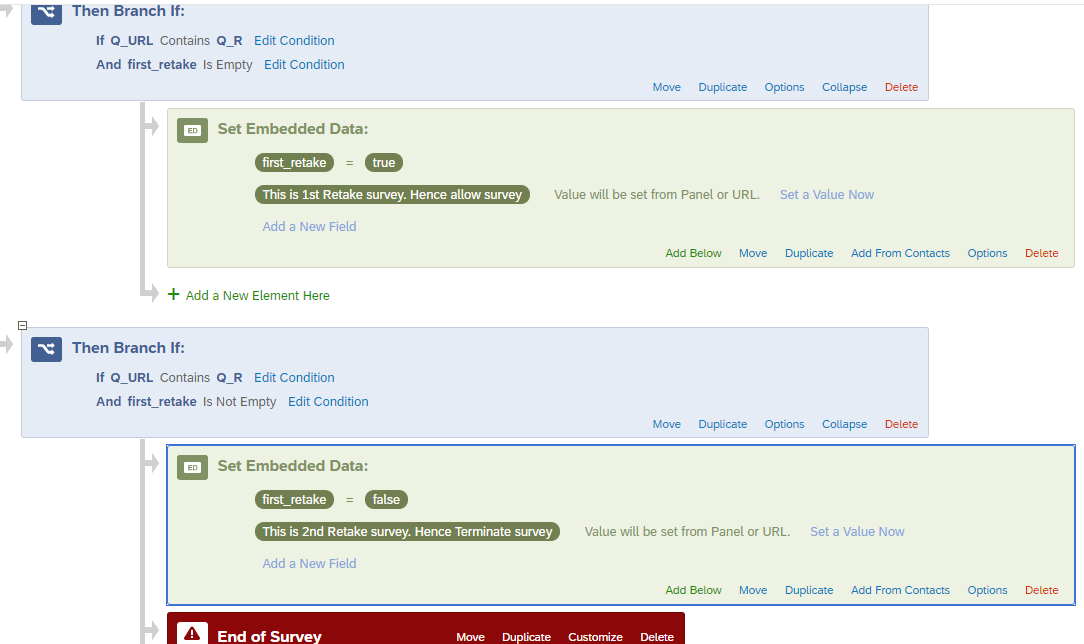



Sign up
Already have an account? Login

Welcome! To join the Qualtrics Experience Community, log in with your existing Qualtrics credentials below.
Confirm your username, share a bit about yourself, then you're ready to explore and connect .
Free trial account? No problem. Log in with your trial credentials to join.
No free trial account? No problem! Register here
Already a member? Hi and welcome back! We're glad you're here 🙂
You will see the Qualtrics login page briefly before being taken to the Experience Community.
Login with Qualtrics
Welcome! To join the Qualtrics Experience Community, log in with your existing Qualtrics credentials below.
Confirm your username, share a bit about yourself, then you're ready to explore and connect .
Free trial account? No problem. Log in with your trial credentials to join. No free trial account? No problem! Register here
Already a member? Hi and welcome back! We're glad you're here 🙂
You will see the Qualtrics login page briefly before being taken to the Experience Community.
Login to the Community
No account yet? Create an account
Welcome! To join the Qualtrics Experience Community, log in with your existing Qualtrics credentials below.
Confirm your username, share a bit about yourself, then you're ready to explore and connect .
Free trial account? No problem. Log in with your trial credentials to join.
No free trial account? No problem! Register here
Already a member? Hi and welcome back! We're glad you're here 🙂
You will see the Qualtrics login page briefly before being taken to the Experience Community.
Login with Qualtrics
Welcome! To join the Qualtrics Experience Community, log in with your existing Qualtrics credentials below.
Confirm your username, share a bit about yourself, then you're ready to explore and connect .
Free trial account? No problem. Log in with your trial credentials to join. No free trial account? No problem! Register here
Already a member? Hi and welcome back! We're glad you're here 🙂
You will see the Qualtrics login page briefly before being taken to the Experience Community.
Enter your E-mail address. We'll send you an e-mail with instructions to reset your password.