


Flatpickr not saving data with Simple Layout | Experience Community
Skip to main content
Solved

Flatpickr not saving data with Simple Layout

  • Nov 22, 2023 7:37 PM UTC
  • 5 replies
  • 243 views

Radam
Level 4 ●●●●
Forum|alt.badge.img+34
  • Level 4 ●●●●

I can get it to display using:

Qualtrics.SurveyEngine.addOnload(function()
{
jQuery("#question-"+this.questionId+" .text-input").flatpickr({
    dateFormat: "Y-m-d"
});

});


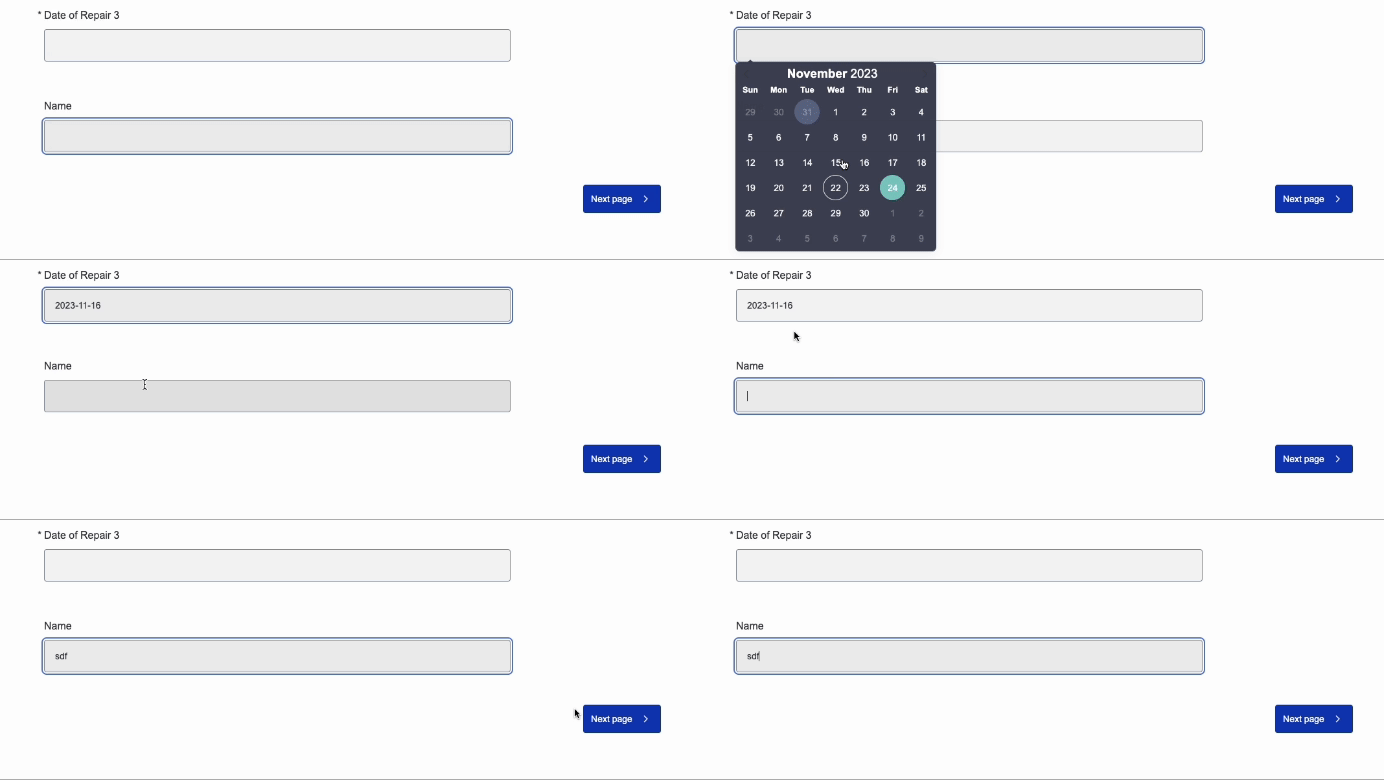
But upon answering the new question the date question’s data is deleted? See GIF below.


Best answer by qualtrics_nerd

Hi @Radam ,

You can check work around provide by @Tom_1842  on below link for simple layout.


While in the meantime , I am trying to find if there is a  workaround  without using embedded data.

Hope it resolves your query😊!!

View original

5 replies

Radam
Level 4 ●●●●
Forum|alt.badge.img+34
  • Author
  • Level 4 ●●●●
  • Nov 27, 2023 2:30 PM UTC

Bumping this up hoping that it was lost in the holiday weekend.  Thank you!


Radam
Level 4 ●●●●
Forum|alt.badge.img+34
  • Author
  • Level 4 ●●●●
  • Dec 22, 2023 2:21 PM UTC

Sorry desperately bumping this back up for any guidance 


qualtrics_nerd
Level 5 ●●●●●
Forum|alt.badge.img+19
  • Level 5 ●●●●●
  • Dec 22, 2023 5:06 PM UTC

Hi @Radam ,

I tried your code in my survey and it didn't work  (maybe you are using different layout).
If not can you try below code and update as below .
I have two Text entry question on a page , first one is  flatpicker and other one is  normal text entry.
The below JS code works perfectly for it , can you try and let me know:


Qualtrics.SurveyEngine.addOnload(function()
{

jQuery(".InputText").eq(0).flatpickr({
dateFormat: "Y-m-d"
});


});

Qualtrics.SurveyEngine.addOnReady(function()
{

});

Qualtrics.SurveyEngine.addOnUnload(function()
{

});


Hope it resolves your query😊!!


Radam
Level 4 ●●●●
Forum|alt.badge.img+34
  • Author
  • Level 4 ●●●●
  • Dec 22, 2023 5:24 PM UTC

I still doesn’t work for me in the Simple Layout, thank you for the help though! 


qualtrics_nerd
Level 5 ●●●●●
Forum|alt.badge.img+19
  • Level 5 ●●●●●
  • Answer
  • Dec 22, 2023 6:36 PM UTC

Hi @Radam ,

You can check work around provide by @Tom_1842  on below link for simple layout.


While in the meantime , I am trying to find if there is a  workaround  without using embedded data.

Hope it resolves your query😊!!