

Dear All,
I am trying to reference the text of a selected choice to appear in the following questions that are in the same page.
I have followed the solution from https://www.qualtrics.com/community/discussion/2534/how-to-reference-to-a-selected-choice-on-the-current-page-that-hasnt-been-submitted-yet.
However, it references the Id/recode values of 7/8/9, instead of "per day / per week / per month". I have also tried changing the getChoiceValue to other get commands from https://s.qualtrics.com/WRAPI/QuestionAPI/classes/Qualtrics%20JavaScript%20Question%20API.html. But the result is still the same. 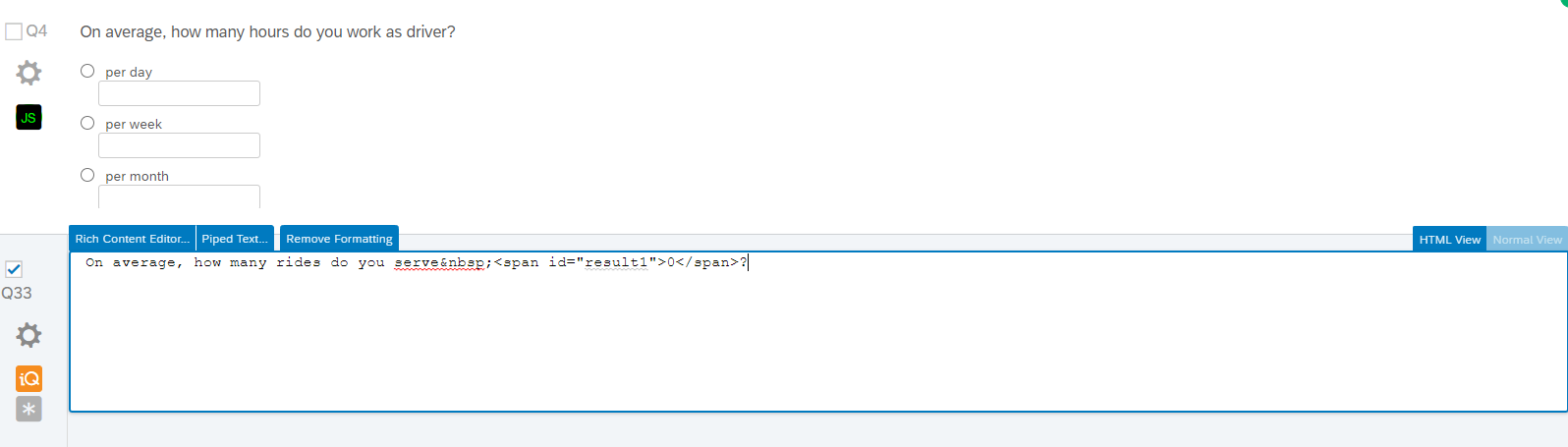
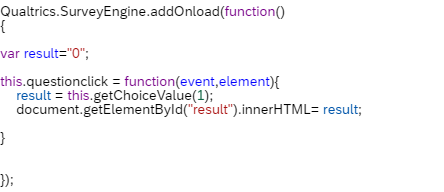 Appended above is the reference code. Appreciate if anyone could help please. Thank you.

Solved
How to reference to the selected choice on the current page that hasn't been submitted yet?
Best answer by ahmedA
You'll have to write that logic yourself. So, something like,
if(result ==8) {
result ="per day";
}else if(result ==9){....}
Read more about if/else statements here.


Sign up
Already have an account? Login

Welcome! To join the Qualtrics Experience Community, log in with your existing Qualtrics credentials below.
Confirm your username, share a bit about yourself, then you're ready to explore and connect .
Free trial account? No problem. Log in with your trial credentials to join.
No free trial account? No problem! Register here
Already a member? Hi and welcome back! We're glad you're here 🙂
You will see the Qualtrics login page briefly before being taken to the Experience Community.
Login with Qualtrics
Welcome! To join the Qualtrics Experience Community, log in with your existing Qualtrics credentials below.
Confirm your username, share a bit about yourself, then you're ready to explore and connect .
Free trial account? No problem. Log in with your trial credentials to join. No free trial account? No problem! Register here
Already a member? Hi and welcome back! We're glad you're here 🙂
You will see the Qualtrics login page briefly before being taken to the Experience Community.
Login to the Community
Welcome! To join the Qualtrics Experience Community, log in with your existing Qualtrics credentials below.
Confirm your username, share a bit about yourself, then you're ready to explore and connect .
Free trial account? No problem. Log in with your trial credentials to join.
No free trial account? No problem! Register here
Already a member? Hi and welcome back! We're glad you're here 🙂
You will see the Qualtrics login page briefly before being taken to the Experience Community.
Login with Qualtrics
Welcome! To join the Qualtrics Experience Community, log in with your existing Qualtrics credentials below.
Confirm your username, share a bit about yourself, then you're ready to explore and connect .
Free trial account? No problem. Log in with your trial credentials to join. No free trial account? No problem! Register here
Already a member? Hi and welcome back! We're glad you're here 🙂
You will see the Qualtrics login page briefly before being taken to the Experience Community.
Enter your E-mail address. We'll send you an e-mail with instructions to reset your password.