

I've been working on this idea but can't seem to get it the last 100 feet. We have an inventory of office supplies and when people take something out, we want them to answer a survey that quickly gathers what items they have taken and updates those values in a list so that at any time we can review it and have an accurate reflection of how many are left of each item. In order to keep people doing the survey, it needs to be fast and efficient. In this vein, the survey is set up such that it will ask them a category of item and then branch more specifically to what they are taking. For example, if I wanted to take a single blue dry erase marker out, I would answer selecting dry erase markers, then blue, then type 1.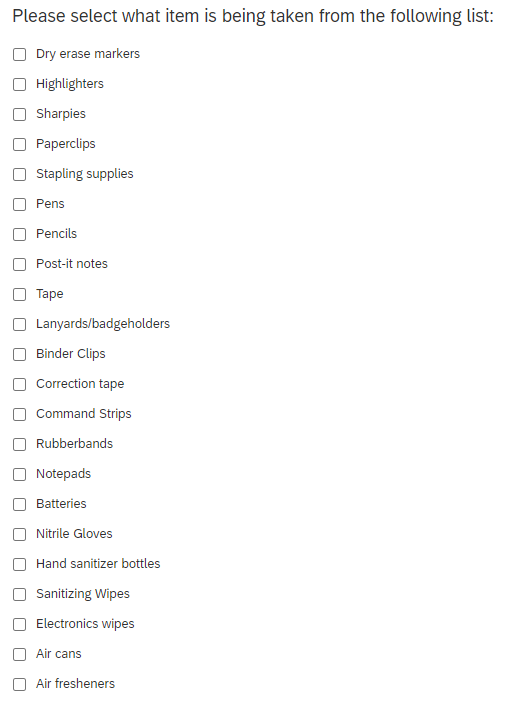
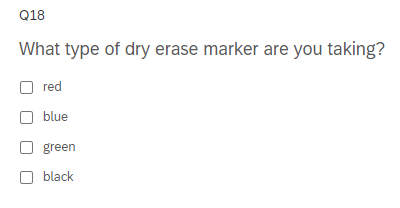
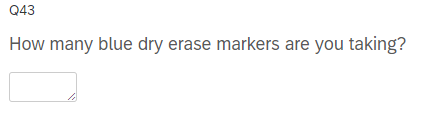 The survey would then end without bothering me about any other items. Behind the scenes, it should update a list where the quantity of blue dry erase markers would go down by 1.
Working with an IT guy in my organization, I set up a contact list where each item has a fake email associated with it and we tried to work out the logic of it. It got to a point where it was mostly working. The issue we ran into is when someone selects multiple items, it only updates the last selection and subtracts all the entered values in the survey. For example, if I select red, green, and black dry erase markers and I take 1 of each, only black will be updated and it will go from 10 down to 7.
How do I get the survey to properly update each value?

I need to collect data on inventory levels based on multiple branching based on selections.




Sign up
Already have an account? Login

Welcome! To join the Qualtrics Experience Community, log in with your existing Qualtrics credentials below.
Confirm your username, share a bit about yourself, then you're ready to explore and connect .
Free trial account? No problem. Log in with your trial credentials to join.
No free trial account? No problem! Register here
Already a member? Hi and welcome back! We're glad you're here 🙂
You will see the Qualtrics login page briefly before being taken to the Experience Community.
Login with Qualtrics
Welcome! To join the Qualtrics Experience Community, log in with your existing Qualtrics credentials below.
Confirm your username, share a bit about yourself, then you're ready to explore and connect .
Free trial account? No problem. Log in with your trial credentials to join. No free trial account? No problem! Register here
Already a member? Hi and welcome back! We're glad you're here 🙂
You will see the Qualtrics login page briefly before being taken to the Experience Community.
Login to the Community
Welcome! To join the Qualtrics Experience Community, log in with your existing Qualtrics credentials below.
Confirm your username, share a bit about yourself, then you're ready to explore and connect .
Free trial account? No problem. Log in with your trial credentials to join.
No free trial account? No problem! Register here
Already a member? Hi and welcome back! We're glad you're here 🙂
You will see the Qualtrics login page briefly before being taken to the Experience Community.
Login with Qualtrics
Welcome! To join the Qualtrics Experience Community, log in with your existing Qualtrics credentials below.
Confirm your username, share a bit about yourself, then you're ready to explore and connect .
Free trial account? No problem. Log in with your trial credentials to join. No free trial account? No problem! Register here
Already a member? Hi and welcome back! We're glad you're here 🙂
You will see the Qualtrics login page briefly before being taken to the Experience Community.
Enter your E-mail address. We'll send you an e-mail with instructions to reset your password.