

Load External Java Library | Experience Community
Skip to main content
Solved

Load External Java Library

  • Oct 11, 2023 6:30 PM UTC
  • 5 replies
  • 171 views

Forum|alt.badge.img+1

Hi, I plan to collect device information from the anonymous survey link. Meta Info cannot work when using the anonymous link. Therefore, I tried to load the ua-parser java library (Here is the package link: https://github.com/faisalman/ua-parser-js/tree/gh-pages) into Qualtrics JavaScript.


However, the function doesn’t work. How to set up the external JS library work? I am a beginner in JavaScript. Below is my code. I appreciate any help.


Qualtrics.SurveyEngine.addOnReady(function()
{
    /*Place your JavaScript here to run when the page is fully displayed*/
     jQuery.getScript("https://github.com/faisalman/ua-parser-js.git", function(){
    
         //src = "https://github.com/faisalman/ua-parser-js.git";     
        //src="https://cdnjs.cloudflare.com/ajax/libs/ua-parser-js/0.7.28/ua-parser.min.js";
        
         // Create an instance of UAParser
        var parser = new UAParser();
        // Parse the user agent string
        var result = parser.getResult();
         
        
        // Access parsed information
        var deviceModel = result.device.model || "Unknown";
        var deviceType = result.device.type || "Unknown";
        var browserName = result.browser.name || "Unknown";
        var browserVersion = result.browser.version || "Unknown";
        var osSystem = result.os.name || "Unknown";
        
        Qualtrics.SurveyEngine.setJSEmbeddedData("DeviceModel", deviceModel);
        Qualtrics.SurveyEngine.setJSEmbeddedData("DeviceType",deviceType);
        Qualtrics.SurveyEngine.setJSEmbeddedData("BrowserName", browserName);
        Qualtrics.SurveyEngine.setJSEmbeddedData("BrowserVersion", browserVersion);
        Qualtrics.SurveyEngine.setJSEmbeddedData("OperatingSystem", osSystem);
    });

});
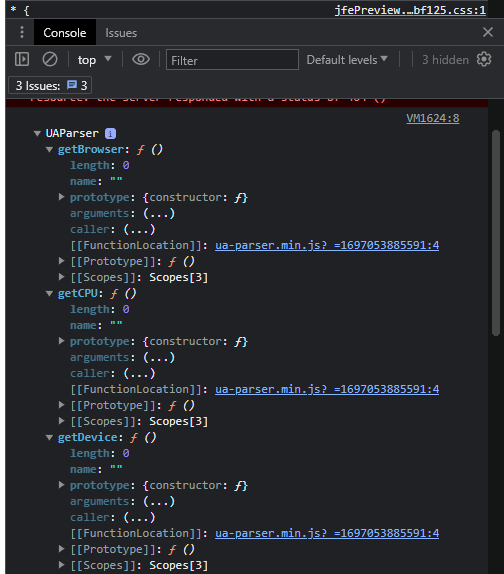
 

Best answer by Nam Nguyen

@Lizy The correct link is https://unpkg.com/ua-parser-js@0.7.31/dist/ua-parser.min.js

Replace it in your code, you won’t get 404 not found anymore in console log


View original

5 replies

Nam Nguyen
QPN Level 8 ●●●●●●●●
Forum|alt.badge.img+29
  • QPN Level 8 ●●●●●●●●
  • Oct 11, 2023 6:42 PM UTC

@Lizy Please paste the code so someone can replicate the problem. We can only debug with naked eyes with code picture like this


Forum|alt.badge.img+1
  • Author
  • Level 1 ●
  • Oct 11, 2023 6:56 PM UTC

@Lizy Please paste the code so someone can replicate the problem. We can only debug with naked eyes with code picture like this

Thank you so much for your reminder.


Nam Nguyen
QPN Level 8 ●●●●●●●●
Forum|alt.badge.img+29
  • QPN Level 8 ●●●●●●●●
  • Answer
  • Oct 11, 2023 7:53 PM UTC

@Lizy The correct link is https://unpkg.com/ua-parser-js@0.7.31/dist/ua-parser.min.js

Replace it in your code, you won’t get 404 not found anymore in console log


Forum|alt.badge.img+1
  • Author
  • Level 1 ●
  • Oct 12, 2023 1:36 PM UTC

@Lizy The correct link is https://unpkg.com/ua-parser-js@0.7.31/dist/ua-parser.min.js

Replace it in your code, you won’t get 404 not found anymore in console log


Hi @dxconnamnguyen THANK YOU so much for your help! It works. You’re brilliant. Thank you for saving me.


Nam Nguyen
QPN Level 8 ●●●●●●●●
Forum|alt.badge.img+29
  • QPN Level 8 ●●●●●●●●
  • Oct 13, 2023 12:08 AM UTC

@Lizy Happy to help 👍