

Hi, I'm currently prepping an experiment that will require participants to group 40 stimuli into a custom number of groups. The whole point of the task is to see how many groups come out of the 40 samples, so I need to have 40 groups available for the participants on screen since they can't create any themselves during the experiment.
However, the problem is that the stimuli are in audio format - so when I add columns to the groups, they start to overlap. But when I don't have columns, there's a lot of scrolling involved, which will tire the participants out if they have to scroll up and down constantly.
Has anyone come across this kind of thing? Do you have any suggestions at all?

Solved
Need help with customising a pick group and rank question
 +1
+1Best answer by Tom_1842
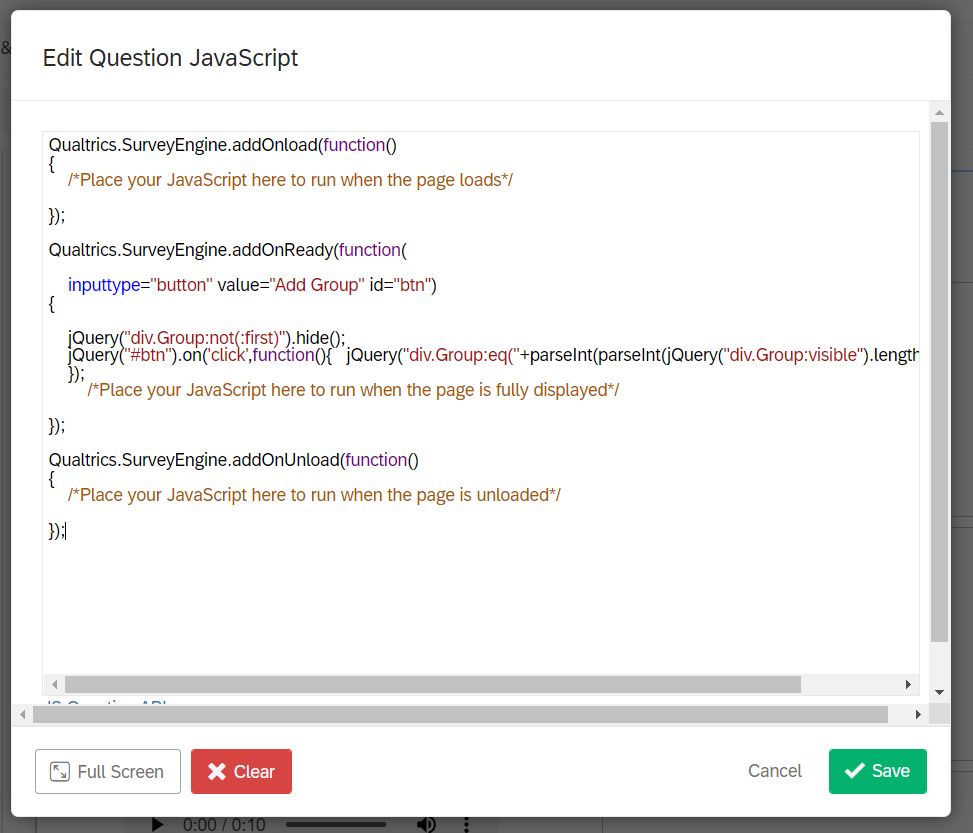
Hi, the inputtype="button" bit should go in the HTML view of the question. I also have it together in a QSF to import into a blank survey if it helps.
PGR_AddGroups.qsf



Sign up
Already have an account? Login

Welcome! To join the Qualtrics Experience Community, log in with your existing Qualtrics credentials below.
Confirm your username, share a bit about yourself, then you're ready to explore and connect .
Free trial account? No problem. Log in with your trial credentials to join.
No free trial account? No problem! Register here
Already a member? Hi and welcome back! We're glad you're here 🙂
You will see the Qualtrics login page briefly before being taken to the Experience Community.
Login with Qualtrics
Welcome! To join the Qualtrics Experience Community, log in with your existing Qualtrics credentials below.
Confirm your username, share a bit about yourself, then you're ready to explore and connect .
Free trial account? No problem. Log in with your trial credentials to join. No free trial account? No problem! Register here
Already a member? Hi and welcome back! We're glad you're here 🙂
You will see the Qualtrics login page briefly before being taken to the Experience Community.
Login to the Community
No account yet? Create an account
Welcome! To join the Qualtrics Experience Community, log in with your existing Qualtrics credentials below.
Confirm your username, share a bit about yourself, then you're ready to explore and connect .
Free trial account? No problem. Log in with your trial credentials to join.
No free trial account? No problem! Register here
Already a member? Hi and welcome back! We're glad you're here 🙂
You will see the Qualtrics login page briefly before being taken to the Experience Community.
Login with Qualtrics
Welcome! To join the Qualtrics Experience Community, log in with your existing Qualtrics credentials below.
Confirm your username, share a bit about yourself, then you're ready to explore and connect .
Free trial account? No problem. Log in with your trial credentials to join. No free trial account? No problem! Register here
Already a member? Hi and welcome back! We're glad you're here 🙂
You will see the Qualtrics login page briefly before being taken to the Experience Community.
Enter your E-mail address. We'll send you an e-mail with instructions to reset your password.