

I'm using noUISlider (thanks to this thread) to add three sliders vertically to a question. I am able to get all three sliders to show up in the question, however I am having an issue capturing the output from the sliders. My code is below. I'm fairly new to custom code, so any help would be appreciate.
This is what the question looks like. You can see the output for the first slider being captured but not the other two. 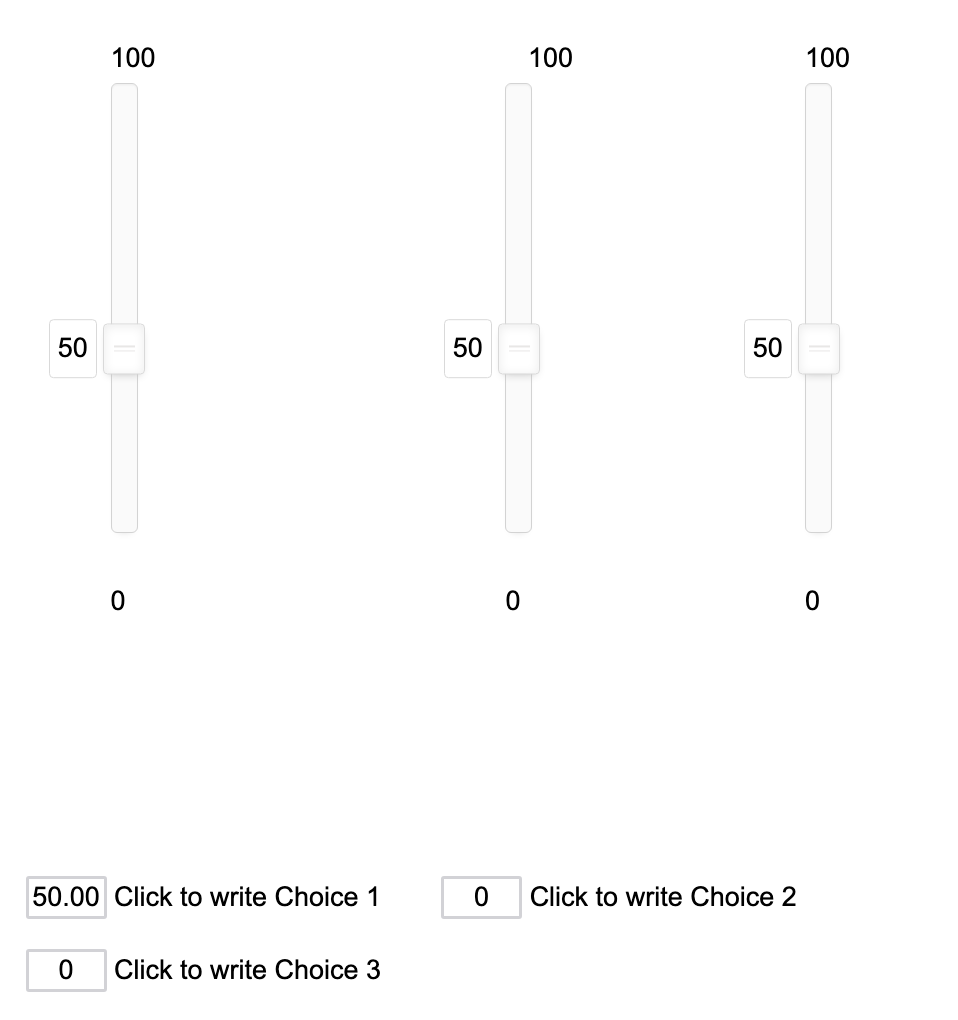
When I use this code, only the output from the first slider is captured:
Qualtrics.SurveyEngine.addOnload(function() {
// first slider
var Slider1 = document.getElementById('uiSlider1');
noUiSlider.create(Slider1, {
start: 50,
orientation: 'vertical',
tooltips: wNumb({decimals: 0}),
direction: 'rtl',
step: 1,
range: {
'min': 0,
'max': 100
},
});
//second slider
var Slider2 = document.getElementById('uiSlider2');
noUiSlider.create(Slider2, {
start: 50,
orientation: 'vertical',
tooltips: wNumb({decimals: 0}),
direction: 'rtl',
step: 1,
range: {
'min': 0,
'max': 100
},
});
//third slider
var Slider3 = document.getElementById('uiSlider3');
noUiSlider.create(Slider3, {
start: 50,
orientation: 'vertical',
tooltips: wNumb({decimals: 0}),
direction: 'rtl',
step: 1,
range: {
'min': 0,
'max': 100
},
});
//capture output from sliders - only inputNumber1 is currently captured
var inputNumber1 = document.getElementById('QR~'+this.questionId+'~1');
Slider1.noUiSlider.on('update', function (values, handle) {
inputNumber1.value = values[handle];
});
inputNumber1.addEventListener('change', function () {
Slider1.noUiSlider.set([null, this.value]);
});
inputNumber1.setAttribute(["readonly",true]);
var inputNumber2 = document.getElementById('QR~'+this.questionId+'~2');
Slider2.noUiSlider.on('update', function (values, handle) {
inputNumber2.value = values[handle];
});
inputNumber2.addEventListener('change', function () {
Slider2.noUiSlider.set([null, this.value]);
});
inputNumber2.setAttribute(["readonly",true])
var inputNumber3 = document.getElementById('QR~'+this.questionId+'~3');
Slider3.noUiSlider.on('update', function (values, handle) {
inputNumber3.value = values[handle];
});
inputNumber3.addEventListener('change', function () {
Slider3.noUiSlider.set([null, this.value]);
});
inputNumber3.setAttribute(["readonly",true])
});
Is there some other function I should be using for capturing the outcome? Or some other code I should be using but I'm not aware of because I'm so new at this? Thanks in advance!

Recording Response for Custom Sliders



Sign up
Already have an account? Login

Welcome! To join the Qualtrics Experience Community, log in with your existing Qualtrics credentials below.
Confirm your username, share a bit about yourself, then you're ready to explore and connect .
Free trial account? No problem. Log in with your trial credentials to join.
No free trial account? No problem! Register here
Already a member? Hi and welcome back! We're glad you're here 🙂
You will see the Qualtrics login page briefly before being taken to the Experience Community.
Login with Qualtrics
Welcome! To join the Qualtrics Experience Community, log in with your existing Qualtrics credentials below.
Confirm your username, share a bit about yourself, then you're ready to explore and connect .
Free trial account? No problem. Log in with your trial credentials to join. No free trial account? No problem! Register here
Already a member? Hi and welcome back! We're glad you're here 🙂
You will see the Qualtrics login page briefly before being taken to the Experience Community.
Login to the Community
No account yet? Create an account
Welcome! To join the Qualtrics Experience Community, log in with your existing Qualtrics credentials below.
Confirm your username, share a bit about yourself, then you're ready to explore and connect .
Free trial account? No problem. Log in with your trial credentials to join.
No free trial account? No problem! Register here
Already a member? Hi and welcome back! We're glad you're here 🙂
You will see the Qualtrics login page briefly before being taken to the Experience Community.
Login with Qualtrics
Welcome! To join the Qualtrics Experience Community, log in with your existing Qualtrics credentials below.
Confirm your username, share a bit about yourself, then you're ready to explore and connect .
Free trial account? No problem. Log in with your trial credentials to join. No free trial account? No problem! Register here
Already a member? Hi and welcome back! We're glad you're here 🙂
You will see the Qualtrics login page briefly before being taken to the Experience Community.
Enter your E-mail address. We'll send you an e-mail with instructions to reset your password.