
 sumDiv = document.createElement("div");
sumDiv.id = "totalizador";
sumDiv.style = "border: none;font-size: 20pt; font-weight: bold";
sumDiv.style.border = "none";
sumDiv.style.fontSize = "20pt";
sumDiv.style.fontWeight = "bold";
divPai = document.getElementsByClassName("groupsContainerTd")[0];
divPai.children[0].appendChild(sumDiv);
console.log(divPai);
questionID_23817 = this.questionId + "group0"
lol1 = document.getElementById(this.questionId + "group0")
totalizador_23817 = document.getElementById("totalizador")
function sum () {
var totalSum = 0;
var els = document.getElementById(questionID_23817)
if (els) {
for (var i = 0; i < els.childNodes.length; i++) {
var k = els.childNodes[i];
var v1 = k.getElementsByClassName("label")[0]
if (v1) {
var v2 = v1.textContent.split("€")[1];
totalSum += parseFloat(v2);
}
}
}
console.log("TOTAL: " + totalSum)
totalizador_23817.textContent = "Total: " + totalSum.toFixed(2);
}
setInterval(sum, 500)
});
Qualtrics.SurveyEngine.addOnReady(function() {
var newName = 'Verder naar de betaling'; //Update - New Next Button label
var lastLoopOnly = true; //Last loop only? Value doesn't matter to non-loops
//No changes below
if(!lastLoopOnly || "${lm://CurrentLoopNumber}" == "${lm://TotalLoops}") {
var nb = jQuery('#NextButton');
nb.val(newName);
nb.attr('title', 'Payment');
}
});
But now I would like to do it differently. Every time the respondent selects a product, the next page will show the products selected and the total amount spend. For example, the first page shows some products, the respondent selects one and the next page will appear the product selected and mount spend. the third page shows more other products, the respondent selects a product and the fourth page will show the product selected and the total amount spend summing the first + the second product selected and so on. Therefore, my question is can I store the shopping amount in a global variable so it can be used in different IS files for different pages? And What is the Javascript code I should use on each page to sum the products selected?
Thank you in advance for your help!
sumDiv = document.createElement("div");
sumDiv.id = "totalizador";
sumDiv.style = "border: none;font-size: 20pt; font-weight: bold";
sumDiv.style.border = "none";
sumDiv.style.fontSize = "20pt";
sumDiv.style.fontWeight = "bold";
divPai = document.getElementsByClassName("groupsContainerTd")[0];
divPai.children[0].appendChild(sumDiv);
console.log(divPai);
questionID_23817 = this.questionId + "group0"
lol1 = document.getElementById(this.questionId + "group0")
totalizador_23817 = document.getElementById("totalizador")
function sum () {
var totalSum = 0;
var els = document.getElementById(questionID_23817)
if (els) {
for (var i = 0; i < els.childNodes.length; i++) {
var k = els.childNodes[i];
var v1 = k.getElementsByClassName("label")[0]
if (v1) {
var v2 = v1.textContent.split("€")[1];
totalSum += parseFloat(v2);
}
}
}
console.log("TOTAL: " + totalSum)
totalizador_23817.textContent = "Total: " + totalSum.toFixed(2);
}
setInterval(sum, 500)
});
Qualtrics.SurveyEngine.addOnReady(function() {
var newName = 'Verder naar de betaling'; //Update - New Next Button label
var lastLoopOnly = true; //Last loop only? Value doesn't matter to non-loops
//No changes below
if(!lastLoopOnly || "${lm://CurrentLoopNumber}" == "${lm://TotalLoops}") {
var nb = jQuery('#NextButton');
nb.val(newName);
nb.attr('title', 'Payment');
}
});
But now I would like to do it differently. Every time the respondent selects a product, the next page will show the products selected and the total amount spend. For example, the first page shows some products, the respondent selects one and the next page will appear the product selected and mount spend. the third page shows more other products, the respondent selects a product and the fourth page will show the product selected and the total amount spend summing the first + the second product selected and so on. Therefore, my question is can I store the shopping amount in a global variable so it can be used in different IS files for different pages? And What is the Javascript code I should use on each page to sum the products selected?
Thank you in advance for your help!
Question
Store total value in a global variable to be used in different IS files for different pages
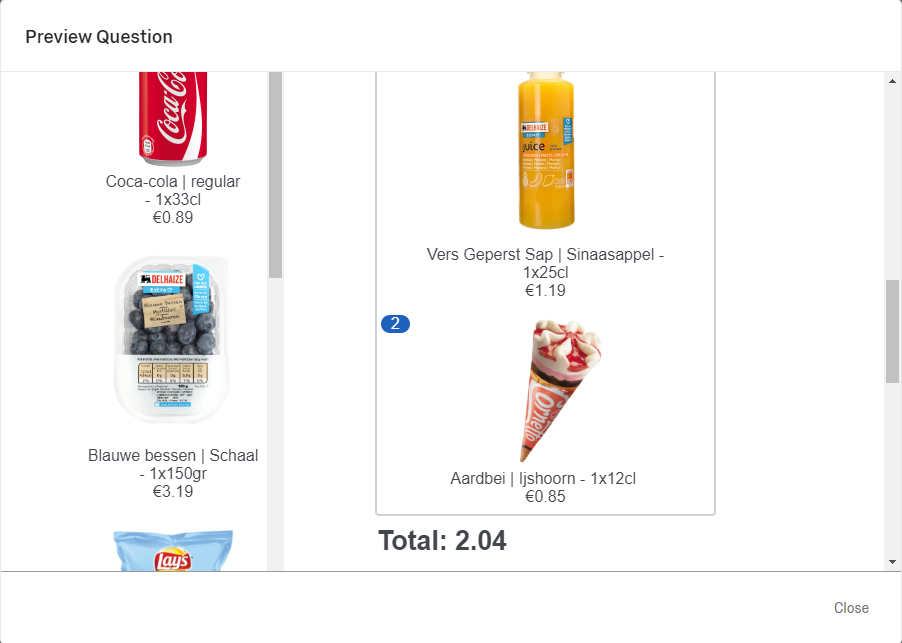
I created a pick and drag question where respondents had to pick products and drag in the “basket”. And as soon as they were adding the products, the total amount was being summed, as shown below picture. For that, I used the below JAVAscript:
!
sumDiv = document.createElement("div");
sumDiv.id = "totalizador";
sumDiv.style = "border: none;font-size: 20pt; font-weight: bold";
sumDiv.style.border = "none";
sumDiv.style.fontSize = "20pt";
sumDiv.style.fontWeight = "bold";
divPai = document.getElementsByClassName("groupsContainerTd")[0];
divPai.children[0].appendChild(sumDiv);
console.log(divPai);
questionID_23817 = this.questionId + "group0"
lol1 = document.getElementById(this.questionId + "group0")
totalizador_23817 = document.getElementById("totalizador")
function sum () {
var totalSum = 0;
var els = document.getElementById(questionID_23817)
if (els) {
for (var i = 0; i < els.childNodes.length; i++) {
var k = els.childNodes[i];
var v1 = k.getElementsByClassName("label")[0]
if (v1) {
var v2 = v1.textContent.split("€")[1];
totalSum += parseFloat(v2);
}
}
}
console.log("TOTAL: " + totalSum)
totalizador_23817.textContent = "Total: " + totalSum.toFixed(2);
}
setInterval(sum, 500)
});
Qualtrics.SurveyEngine.addOnReady(function() {
var newName = 'Verder naar de betaling'; //Update - New Next Button label
var lastLoopOnly = true; //Last loop only? Value doesn't matter to non-loops
//No changes below
if(!lastLoopOnly || "${lm://CurrentLoopNumber}" == "${lm://TotalLoops}") {
var nb = jQuery('#NextButton');
nb.val(newName);
nb.attr('title', 'Payment');
}
});
But now I would like to do it differently. Every time the respondent selects a product, the next page will show the products selected and the total amount spend. For example, the first page shows some products, the respondent selects one and the next page will appear the product selected and mount spend. the third page shows more other products, the respondent selects a product and the fourth page will show the product selected and the total amount spend summing the first + the second product selected and so on. Therefore, my question is can I store the shopping amount in a global variable so it can be used in different IS files for different pages? And What is the Javascript code I should use on each page to sum the products selected?
Thank you in advance for your help!
sumDiv = document.createElement("div");
sumDiv.id = "totalizador";
sumDiv.style = "border: none;font-size: 20pt; font-weight: bold";
sumDiv.style.border = "none";
sumDiv.style.fontSize = "20pt";
sumDiv.style.fontWeight = "bold";
divPai = document.getElementsByClassName("groupsContainerTd")[0];
divPai.children[0].appendChild(sumDiv);
console.log(divPai);
questionID_23817 = this.questionId + "group0"
lol1 = document.getElementById(this.questionId + "group0")
totalizador_23817 = document.getElementById("totalizador")
function sum () {
var totalSum = 0;
var els = document.getElementById(questionID_23817)
if (els) {
for (var i = 0; i < els.childNodes.length; i++) {
var k = els.childNodes[i];
var v1 = k.getElementsByClassName("label")[0]
if (v1) {
var v2 = v1.textContent.split("€")[1];
totalSum += parseFloat(v2);
}
}
}
console.log("TOTAL: " + totalSum)
totalizador_23817.textContent = "Total: " + totalSum.toFixed(2);
}
setInterval(sum, 500)
});
Qualtrics.SurveyEngine.addOnReady(function() {
var newName = 'Verder naar de betaling'; //Update - New Next Button label
var lastLoopOnly = true; //Last loop only? Value doesn't matter to non-loops
//No changes below
if(!lastLoopOnly || "${lm://CurrentLoopNumber}" == "${lm://TotalLoops}") {
var nb = jQuery('#NextButton');
nb.val(newName);
nb.attr('title', 'Payment');
}
});
But now I would like to do it differently. Every time the respondent selects a product, the next page will show the products selected and the total amount spend. For example, the first page shows some products, the respondent selects one and the next page will appear the product selected and mount spend. the third page shows more other products, the respondent selects a product and the fourth page will show the product selected and the total amount spend summing the first + the second product selected and so on. Therefore, my question is can I store the shopping amount in a global variable so it can be used in different IS files for different pages? And What is the Javascript code I should use on each page to sum the products selected?
Thank you in advance for your help!Sign up
Already have an account? Login

Welcome! To join the Qualtrics Experience Community, log in with your existing Qualtrics credentials below.
Confirm your username, share a bit about yourself, Once your account has been approved by our admins then you're ready to explore and connect .
Free trial account? No problem. Log in with your trial credentials to join.
No free trial account? No problem! Register here
Already a member? Hi and welcome back! We're glad you're here 🙂
You will see the Qualtrics login page briefly before being taken to the Experience Community
Login with Qualtrics
Welcome! To join the Qualtrics Experience Community, log in with your existing Qualtrics credentials below.
Confirm your username, share a bit about yourself, Once your account has been approved by our admins then you're ready to explore and connect .
Free trial account? No problem. Log in with your trial credentials to join. No free trial account? No problem! Register here
Already a member? Hi and welcome back! We're glad you're here 🙂
You will see the Qualtrics login page briefly before being taken to the Experience Community
Login to the Community
Welcome! To join the Qualtrics Experience Community, log in with your existing Qualtrics credentials below.
Confirm your username, share a bit about yourself, Once your account has been approved by our admins then you're ready to explore and connect .
Free trial account? No problem. Log in with your trial credentials to join.
No free trial account? No problem! Register here
Already a member? Hi and welcome back! We're glad you're here 🙂
You will see the Qualtrics login page briefly before being taken to the Experience Community
Login with Qualtrics
Welcome! To join the Qualtrics Experience Community, log in with your existing Qualtrics credentials below.
Confirm your username, share a bit about yourself, Once your account has been approved by our admins then you're ready to explore and connect .
Free trial account? No problem. Log in with your trial credentials to join. No free trial account? No problem! Register here
Already a member? Hi and welcome back! We're glad you're here 🙂
You will see the Qualtrics login page briefly before being taken to the Experience Community
Enter your E-mail address. We'll send you an e-mail with instructions to reset your password.