

I need to track how many people have clicked on the link in real-time and use the number as an embedded value in the follow-up questions. I feel it should be easy to do but there is no discussion.
I tried the quota function but it can only count the ones submitted the survey. I also checked the discussion count of how many times the participants clicked a link, but I found out that the record is independent for different participants.
Anyone can provide me with some suggestions?
Thanks a lot!

Solved
How can I count the number of participants open the survey?
 +1
+1Best answer by KimothiSaurabh
Jing - Yes, web service in survey flow.
You can create a blank survey with one record only. Let's assume below are details of that blank project that you have created:-
Survey id= SV_XXXXXX
Response id= R_2uHUSIIIII
embedded variable = Total_Visitors
Now in your original survey, we will have following script in survey flow:-
Step 1- to get current visitors count use this web service - https://syd1.qualtrics.com/API/v3/surveys/SV_XXXXX/responses/R_2uHUSl1111 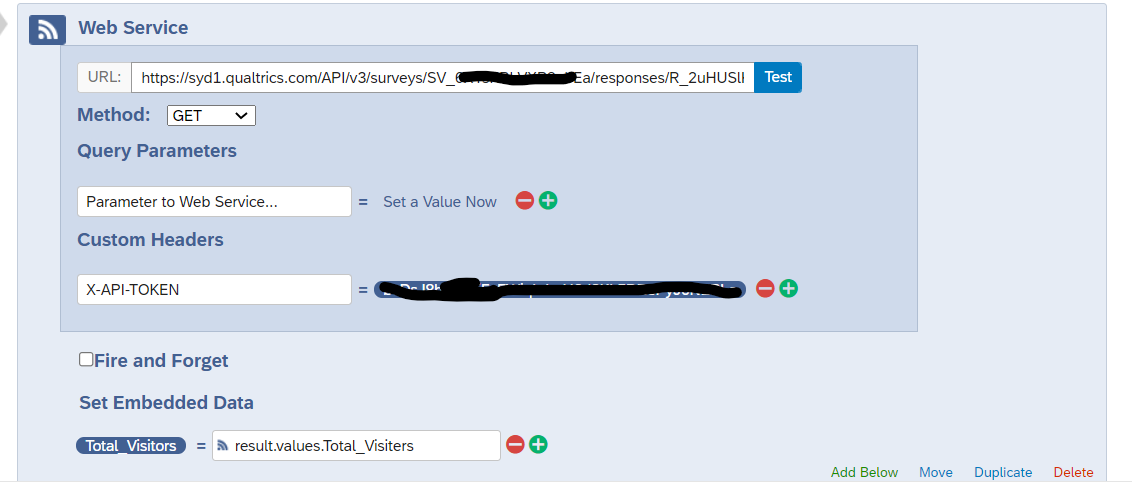 Step 2:- Increase total visitor count and store the current visitor number also.
 Step 3:- To update "total visitor count" in that blank survey data, use following webservice.
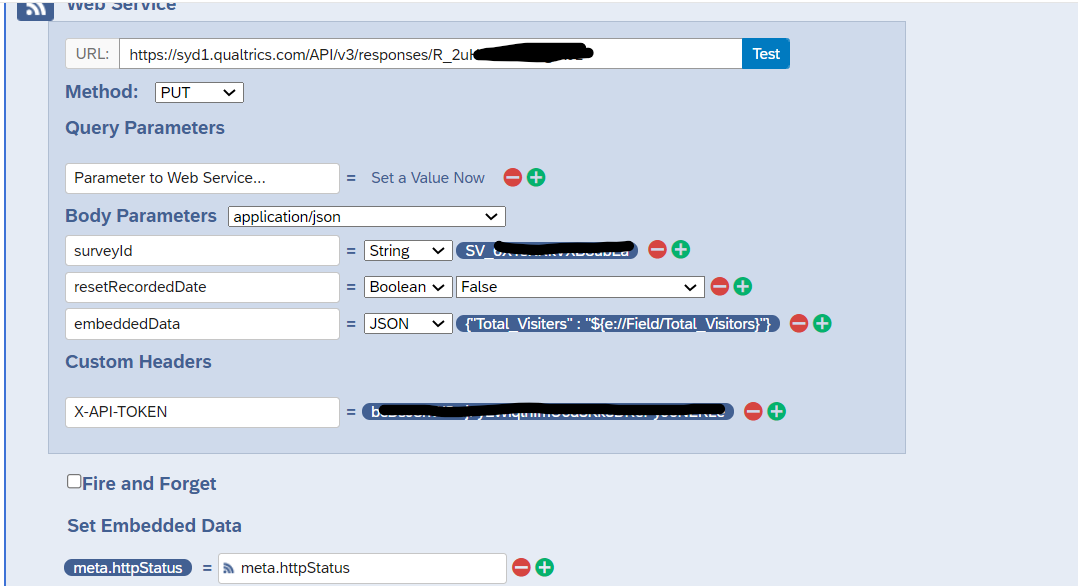 This way it will first check the total visitor count and increment it by one and then update this new count in that blank survey.
Please don't update total visitors value manually in that blank survey at any point because API can't update the manually edited value.


Sign up
Already have an account? Login

Welcome! To join the Qualtrics Experience Community, log in with your existing Qualtrics credentials below.
Confirm your username, share a bit about yourself, then you're ready to explore and connect .
Free trial account? No problem. Log in with your trial credentials to join.
No free trial account? No problem! Register here
Already a member? Hi and welcome back! We're glad you're here 🙂
You will see the Qualtrics login page briefly before being taken to the Experience Community.
Login with Qualtrics
Welcome! To join the Qualtrics Experience Community, log in with your existing Qualtrics credentials below.
Confirm your username, share a bit about yourself, then you're ready to explore and connect .
Free trial account? No problem. Log in with your trial credentials to join. No free trial account? No problem! Register here
Already a member? Hi and welcome back! We're glad you're here 🙂
You will see the Qualtrics login page briefly before being taken to the Experience Community.
Login to the Community
No account yet? Create an account
Welcome! To join the Qualtrics Experience Community, log in with your existing Qualtrics credentials below.
Confirm your username, share a bit about yourself, then you're ready to explore and connect .
Free trial account? No problem. Log in with your trial credentials to join.
No free trial account? No problem! Register here
Already a member? Hi and welcome back! We're glad you're here 🙂
You will see the Qualtrics login page briefly before being taken to the Experience Community.
Login with Qualtrics
Welcome! To join the Qualtrics Experience Community, log in with your existing Qualtrics credentials below.
Confirm your username, share a bit about yourself, then you're ready to explore and connect .
Free trial account? No problem. Log in with your trial credentials to join. No free trial account? No problem! Register here
Already a member? Hi and welcome back! We're glad you're here 🙂
You will see the Qualtrics login page briefly before being taken to the Experience Community.
Enter your E-mail address. We'll send you an e-mail with instructions to reset your password.