


Hello there!
In my survey I asked two questions, where people could state a price with the help of a slider.
Now, I want to see how many people have stated a higher, a lower or the same price within these two questions. However, when editing a filter, I can only choose "is higher/lower than or equal to" a certain number, not there very own previous answer.
Can someone help me out?
Thanks!

Solved
Can I program a filter, so that I get those answers who have changed in a specific way?
Best answer by Rudi
hi Linda131
the result of a slider question is numeric.
Step 1
Hence I would subtract price 2 from price 1 in the survey flow and store the result in an embedded data field priceDifferenceNumerical (in the options use number as the field definition)
then create branches and set another embedded data field priceDifferenceLabels with the text you want . (in the options use text set as the field definition)
for example:
if the result equals 0 the price is identical
if the result greater than 0 the price 2 is lower
if the result is less than 0 price 2 is higher
I would set it up as follows:
- set up the slider questions: note that there should be only one slider on the page
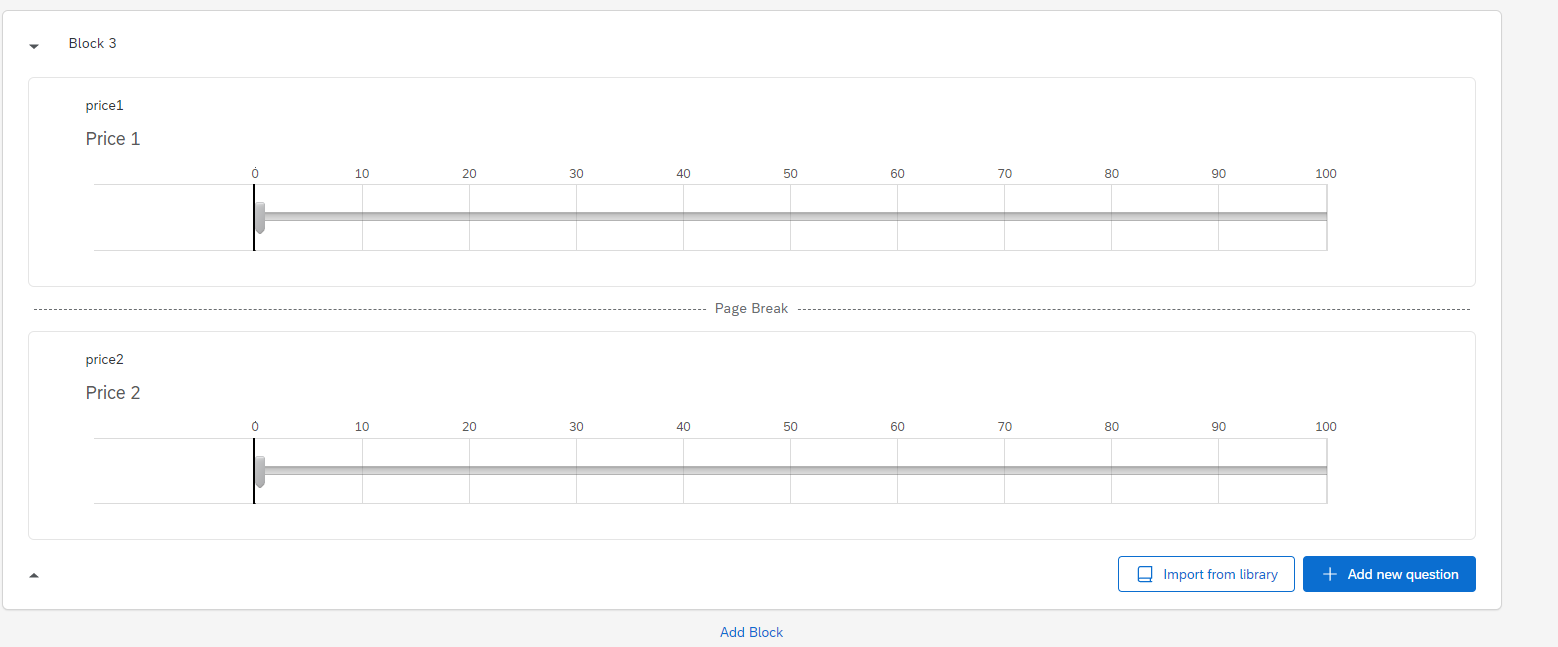 survey flow
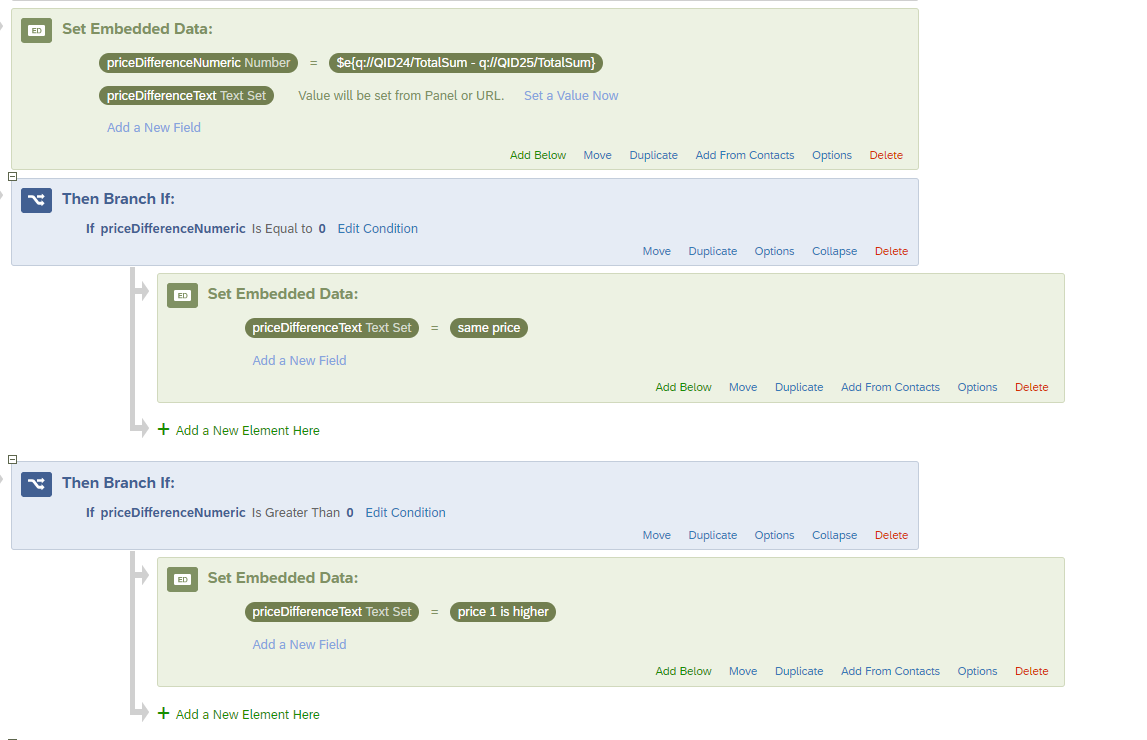 mind that you need to use the total sum at this point (hence one slider per page :-))
Hope this helps
Best regards
Rudi



Sign up
Already have an account? Login

Welcome! To join the Qualtrics Experience Community, log in with your existing Qualtrics credentials below.
Confirm your username, share a bit about yourself, then you're ready to explore and connect .
Free trial account? No problem. Log in with your trial credentials to join.
No free trial account? No problem! Register here
Already a member? Hi and welcome back! We're glad you're here 🙂
You will see the Qualtrics login page briefly before being taken to the Experience Community.
Login with Qualtrics
Welcome! To join the Qualtrics Experience Community, log in with your existing Qualtrics credentials below.
Confirm your username, share a bit about yourself, then you're ready to explore and connect .
Free trial account? No problem. Log in with your trial credentials to join. No free trial account? No problem! Register here
Already a member? Hi and welcome back! We're glad you're here 🙂
You will see the Qualtrics login page briefly before being taken to the Experience Community.
Login to the Community
No account yet? Create an account
Welcome! To join the Qualtrics Experience Community, log in with your existing Qualtrics credentials below.
Confirm your username, share a bit about yourself, then you're ready to explore and connect .
Free trial account? No problem. Log in with your trial credentials to join.
No free trial account? No problem! Register here
Already a member? Hi and welcome back! We're glad you're here 🙂
You will see the Qualtrics login page briefly before being taken to the Experience Community.
Login with Qualtrics
Welcome! To join the Qualtrics Experience Community, log in with your existing Qualtrics credentials below.
Confirm your username, share a bit about yourself, then you're ready to explore and connect .
Free trial account? No problem. Log in with your trial credentials to join. No free trial account? No problem! Register here
Already a member? Hi and welcome back! We're glad you're here 🙂
You will see the Qualtrics login page briefly before being taken to the Experience Community.
Enter your E-mail address. We'll send you an e-mail with instructions to reset your password.