

Hello,
For my study, I have three conditions where participants are randomly assigned to one of the three, and they answer a specific text box question. I achieved this using branch logic.
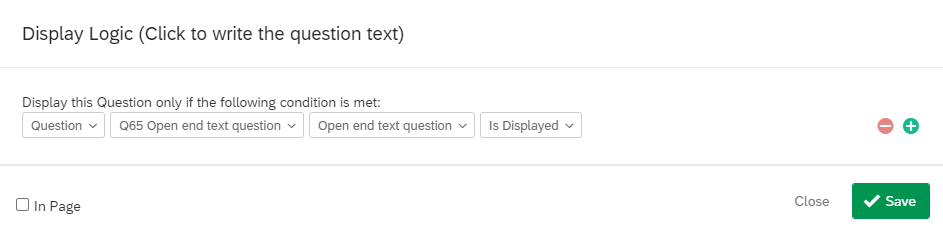
However, I would like to display a question later on in the study (not directly afterwards) which is dependent upon which condition they are in. Since these are text box questions, I'm confused as to how the display logic works in this scenario. When I choose one of the questions, it asks me to "select choice" but I don't want it to display if they give a certain answer - I want it to display simply if they are in that condition.
Any help is appreciated, thank you!

Solved
How to use display logic for a text entry question?
Best answer by ManfredBM
Hi,
you could use javascript on the text entry question to set a marker in an Embedded Data field. So something like:
Qualtrics.SurveyEngine.addOnload(function()
{
Qualtrics.SurveyEngine.setEmbeddedData( 'displayedQuestion', '1')
});
Later on in the survey you then can use this Embedded Data Field in the Display Logic.






Sign up
Already have an account? Login

Welcome! To join the Qualtrics Experience Community, log in with your existing Qualtrics credentials below.
Confirm your username, share a bit about yourself, then you're ready to explore and connect .
Free trial account? No problem. Log in with your trial credentials to join.
No free trial account? No problem! Register here
Already a member? Hi and welcome back! We're glad you're here 🙂
You will see the Qualtrics login page briefly before being taken to the Experience Community.
Login with Qualtrics
Welcome! To join the Qualtrics Experience Community, log in with your existing Qualtrics credentials below.
Confirm your username, share a bit about yourself, then you're ready to explore and connect .
Free trial account? No problem. Log in with your trial credentials to join. No free trial account? No problem! Register here
Already a member? Hi and welcome back! We're glad you're here 🙂
You will see the Qualtrics login page briefly before being taken to the Experience Community.
Login to the Community
No account yet? Create an account
Welcome! To join the Qualtrics Experience Community, log in with your existing Qualtrics credentials below.
Confirm your username, share a bit about yourself, then you're ready to explore and connect .
Free trial account? No problem. Log in with your trial credentials to join.
No free trial account? No problem! Register here
Already a member? Hi and welcome back! We're glad you're here 🙂
You will see the Qualtrics login page briefly before being taken to the Experience Community.
Login with Qualtrics
Welcome! To join the Qualtrics Experience Community, log in with your existing Qualtrics credentials below.
Confirm your username, share a bit about yourself, then you're ready to explore and connect .
Free trial account? No problem. Log in with your trial credentials to join. No free trial account? No problem! Register here
Already a member? Hi and welcome back! We're glad you're here 🙂
You will see the Qualtrics login page briefly before being taken to the Experience Community.
Enter your E-mail address. We'll send you an e-mail with instructions to reset your password.