Loop & Merge with empty custom fields | Experience Community
Skip to main content
Question

Loop & Merge with empty custom fields

  • Jan 27, 2024 11:55 PM UTC
  • 6 replies
  • 287 views

Forum|alt.badge.img+1

I have created a block with loop & merge that will go through only asking based on a previous questions selected answers. I edited the fields for the loop and merge to have them answer based on what they previously selected. However, not all questions in the loop have the same number of selections so how do I not show the empty fields.


For example, my Loop & Merge fields look like:

FIELD1, FIELD2, FIELD3, FIELD4

TitleA, opt1, opt2, opt3

TitleB, optA, optB

TitleC, optionA, optionB, optionC

TitleD, only

6 replies

Forum|alt.badge.img+22
  • Level 7 ●●●●●●●
  • Jan 28, 2024 2:40 AM UTC

Add a display logic to the choice to display only if the field is not empty.


Forum|alt.badge.img+1
  • Author
  • Jan 28, 2024 2:42 AM UTC

Add a display logic to the choice to display only if the field is not empty.

Everything I try this, I can’t find the option for the field being empty. Where is that option?


Forum|alt.badge.img+22
  • Level 7 ●●●●●●●
  • Jan 28, 2024 2:51 AM UTC

share a screenshot of the options you are seeing and what you are doing.


Forum|alt.badge.img+1
  • Author
  • Jan 28, 2024 2:17 PM UTC

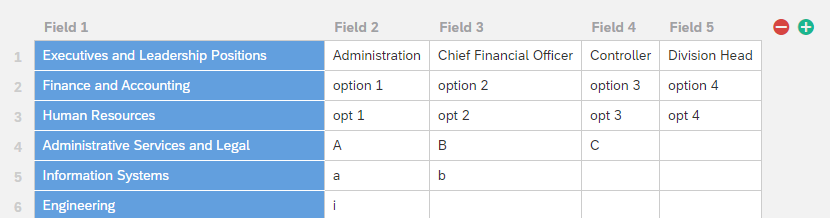
Here is what the fields in the Loop & Merge look like:

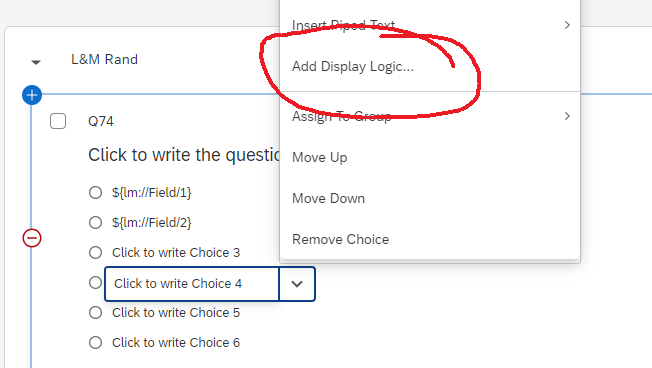
Then when going through the loop, the first three are fine, but the fourth one looks like:


Forum|alt.badge.img+22
  • Level 7 ●●●●●●●
  • Jan 28, 2024 2:22 PM UTC


TomG
Level 8 ●●●●●●●●
Forum|alt.badge.img+27
  • Level 8 ●●●●●●●●
  • Jan 28, 2024 3:10 PM UTC

Unfortunately, Qualtrics doesn’t let you add display logic based on loop & merge fields. 

I would hide the choices with JavaScript:

Qualtrics.SurveyEngine.addOnload(function() {
var fields = ["${lm://Field/2}","${lm://Field/3}","${lm://Field/4}","${lm://Field/5}"];
jQuery("#"+this.questionId+" .Selection").each(function(i) {
if(fields[i].length==0) jQuery(this).hide();
});
});