



Possible to remove Block from Randomizer if it was already selected in previous question? | Experience Community
Skip to main content
Solved

Possible to remove Block from Randomizer if it was already selected in previous question?

  • Apr 20, 2023 3:30 AM UTC
  • 2 replies
  • 365 views

Forum|alt.badge.img+2

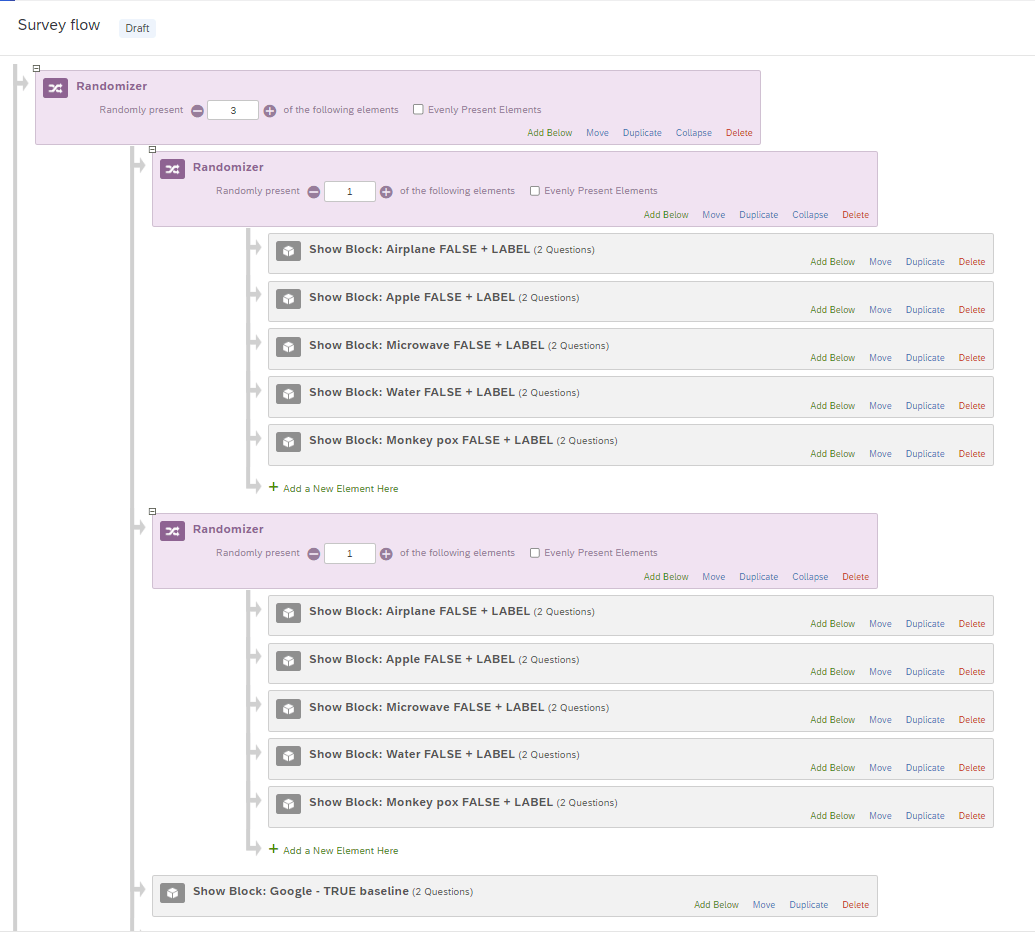
Hello, I would appreciate your advice. As shown in the graphic below I am trying to have a mixture of random and non-random blocks in a survey. In the example, you can see that there are two questions where one of five blocks are randomly shown to the respondent. Normally, the step is to show two of five blocks, but this is not feasible in my case because I want to have a mixture of random and non-random blocks in the survey flow.

My question is this. Given that both random blocks present the same five options. Is there a way to set the survey flow so the same block CANNOT be shown twice to the respondent? For example, if the Block Airplane FALSE + LABEL is randomly shown to a respondent, then it will no longer appear later in the survey.

Appreciate your insights.
 

Best answer by KimothiSaurabh

Hi @chanman202 I am not sure how mixture of randomize and non-randomize block will be achieved through that setup but if that's the way you want it, you can simply create a flag variable for each block to track if that is already asked.


Like in below screenshot, “Block A” will be asked once only. You will have to put all of those blocks in individual display condition to stop repetition. 


View original

2 replies

Forum|alt.badge.img+18
  • Level 3 ●●●
  • Answer
  • Apr 20, 2023 7:25 AM UTC

Hi @chanman202 I am not sure how mixture of randomize and non-randomize block will be achieved through that setup but if that's the way you want it, you can simply create a flag variable for each block to track if that is already asked.


Like in below screenshot, “Block A” will be asked once only. You will have to put all of those blocks in individual display condition to stop repetition. 


Forum|alt.badge.img+2
  • Author
  • Apr 20, 2023 11:38 AM UTC

Thank you so much. This solution works perfectly!