

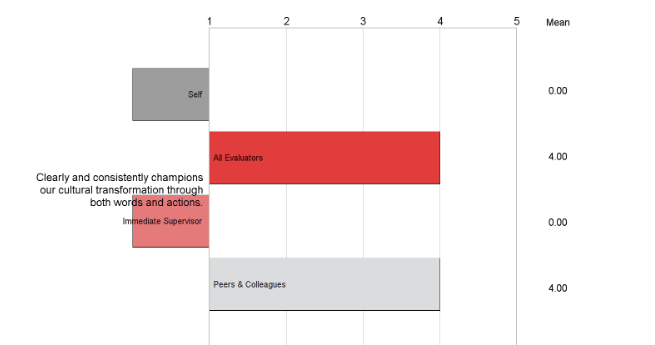
 I want to adjust the bars on my graphs that dont have a response yet. Currently, if there isn't a response in the immediate supervisor category, the bar goes outside of the graph to the left, which covers up the labels on the outside. Is there a way to prevent the bar from going outside of the graph? I would like it if it just didnt show a bar at all, only the name of the category and the average of 0 on the outside.
I still want the report to show the words "immediate supervisor" in the graph so that the participant knows it is just blank and not rolled up into one of the other categories. If I hide the "Immediate supervisor" category in the display logic, its not clear that its blank or what happened to that category.
I want to adjust the bars on my graphs that dont have a response yet. Currently, if there isn't a response in the immediate supervisor category, the bar goes outside of the graph to the left, which covers up the labels on the outside. Is there a way to prevent the bar from going outside of the graph? I would like it if it just didnt show a bar at all, only the name of the category and the average of 0 on the outside.
I still want the report to show the words "immediate supervisor" in the graph so that the participant knows it is just blank and not rolled up into one of the other categories. If I hide the "Immediate supervisor" category in the display logic, its not clear that its blank or what happened to that category.
Adjusting bars in graph when there's no response
 +2
+2!
I want to adjust the bars on my graphs that dont have a response yet. Currently, if there isn't a response in the immediate supervisor category, the bar goes outside of the graph to the left, which covers up the labels on the outside. Is there a way to prevent the bar from going outside of the graph? I would like it if it just didnt show a bar at all, only the name of the category and the average of 0 on the outside.
I still want the report to show the words "immediate supervisor" in the graph so that the participant knows it is just blank and not rolled up into one of the other categories. If I hide the "Immediate supervisor" category in the display logic, its not clear that its blank or what happened to that category.
I want to adjust the bars on my graphs that dont have a response yet. Currently, if there isn't a response in the immediate supervisor category, the bar goes outside of the graph to the left, which covers up the labels on the outside. Is there a way to prevent the bar from going outside of the graph? I would like it if it just didnt show a bar at all, only the name of the category and the average of 0 on the outside.
I still want the report to show the words "immediate supervisor" in the graph so that the participant knows it is just blank and not rolled up into one of the other categories. If I hide the "Immediate supervisor" category in the display logic, its not clear that its blank or what happened to that category.Sign up
Already have an account? Login

Welcome! To join the Qualtrics Experience Community, log in with your existing Qualtrics credentials below.
Confirm your username, share a bit about yourself, then you're ready to explore and connect .
Free trial account? No problem. Log in with your trial credentials to join.
No free trial account? No problem! Register here
Already a member? Hi and welcome back! We're glad you're here 🙂
You will see the Qualtrics login page briefly before being taken to the Experience Community.
Login with Qualtrics
Welcome! To join the Qualtrics Experience Community, log in with your existing Qualtrics credentials below.
Confirm your username, share a bit about yourself, then you're ready to explore and connect .
Free trial account? No problem. Log in with your trial credentials to join. No free trial account? No problem! Register here
Already a member? Hi and welcome back! We're glad you're here 🙂
You will see the Qualtrics login page briefly before being taken to the Experience Community.
Login to the Community
Welcome! To join the Qualtrics Experience Community, log in with your existing Qualtrics credentials below.
Confirm your username, share a bit about yourself, then you're ready to explore and connect .
Free trial account? No problem. Log in with your trial credentials to join.
No free trial account? No problem! Register here
Already a member? Hi and welcome back! We're glad you're here 🙂
You will see the Qualtrics login page briefly before being taken to the Experience Community.
Login with Qualtrics
Welcome! To join the Qualtrics Experience Community, log in with your existing Qualtrics credentials below.
Confirm your username, share a bit about yourself, then you're ready to explore and connect .
Free trial account? No problem. Log in with your trial credentials to join. No free trial account? No problem! Register here
Already a member? Hi and welcome back! We're glad you're here 🙂
You will see the Qualtrics login page briefly before being taken to the Experience Community.
Enter your E-mail address. We'll send you an e-mail with instructions to reset your password.