

Hello,
I have a carry forward list of 8 choices but we only need to rank 5. Client wants a grid view so I am using buttons approach but this automatically creates 8 columns (from 1 to 8 in accordance to the number of choices).
Since we are only ranking 5, I just want to show 5 columns.
I tried the following:
$("header~rank~6").hide();
$("header~rank~7").hide();
$("header~rank~8").hide();
$("QID25~6~0").hide();
$("QID25~6~1").hide();
$("QID25~6~2").hide();
$("QID25~6~3").hide();
$("QID25~6~4").hide();
$("QID25~6~5").hide();
$("QID25~6~6").hide();
$("QID25~6~7").hide();
$("QID25~7~0").hide();
$("QID25~7~1").hide();
$("QID25~7~2").hide();
$("QID25~7~3").hide();
$("QID25~7~4").hide();
$("QID25~7~5").hide();
$("QID25~7~6").hide();
$("QID25~7~7").hide();
$("QID25~8~0").hide();
$("QID25~8~1").hide();
$("QID25~8~2").hide();
$("QID25~8~3").hide();
$("QID25~8~4").hide();
$("QID25~8~5").hide();
$("QID25~8~6").hide();
$("QID25~8~7").hide();
But it only hides the headers. It is still keeping the input buttons.
I also tried with a $(td).eq(4).hide(); approach but did not work as well.
Any suggestions on how to accomplish this?
Thank you.

How to hide columns in RANKING question using JS?

Best answer by rondev
Use the below code:
for(var i=5;i<=7;i++){
jQuery(".ChoiceStructure .Answers").find("th:eq("+i+")").css("visibility","collapse");
jQuery(".ChoiceStructure tbody tr").each(function(){
jQuery(this).find("td:eq("+i+")").css("visibility","collapse");
})
}




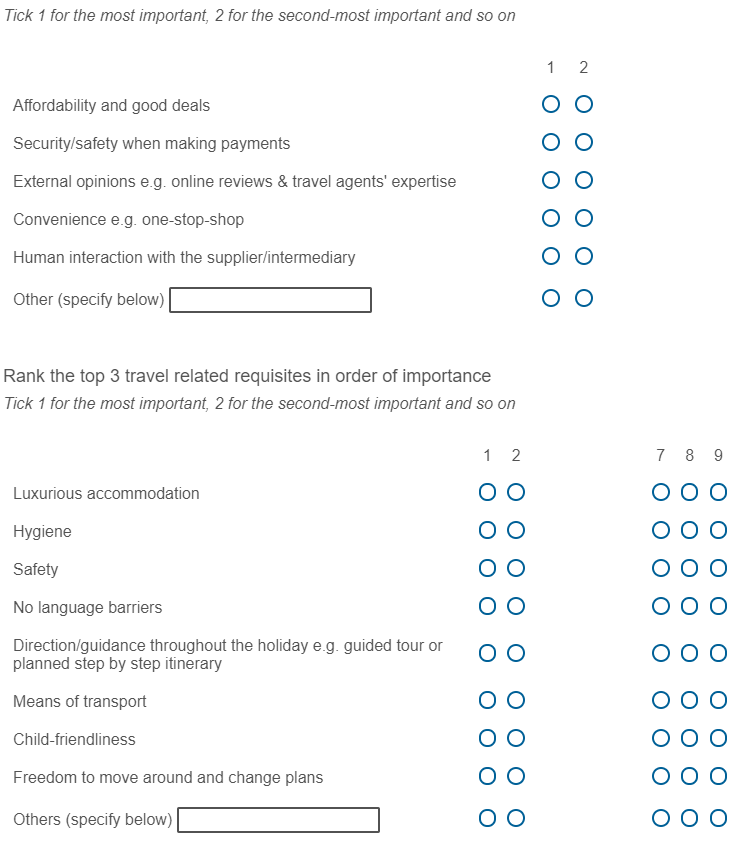 This is the code I have inputted solely in the above question:
 Sign up
Already have an account? Login

Welcome! To join the Qualtrics Experience Community, log in with your existing Qualtrics credentials below.
Confirm your username, share a bit about yourself, then you're ready to explore and connect .
Free trial account? No problem. Log in with your trial credentials to join.
No free trial account? No problem! Register here
Already a member? Hi and welcome back! We're glad you're here 🙂
You will see the Qualtrics login page briefly before being taken to the Experience Community.
Login with Qualtrics
Welcome! To join the Qualtrics Experience Community, log in with your existing Qualtrics credentials below.
Confirm your username, share a bit about yourself, then you're ready to explore and connect .
Free trial account? No problem. Log in with your trial credentials to join. No free trial account? No problem! Register here
Already a member? Hi and welcome back! We're glad you're here 🙂
You will see the Qualtrics login page briefly before being taken to the Experience Community.
Login to the Community
No account yet? Create an account
Welcome! To join the Qualtrics Experience Community, log in with your existing Qualtrics credentials below.
Confirm your username, share a bit about yourself, then you're ready to explore and connect .
Free trial account? No problem. Log in with your trial credentials to join.
No free trial account? No problem! Register here
Already a member? Hi and welcome back! We're glad you're here 🙂
You will see the Qualtrics login page briefly before being taken to the Experience Community.
Login with Qualtrics
Welcome! To join the Qualtrics Experience Community, log in with your existing Qualtrics credentials below.
Confirm your username, share a bit about yourself, then you're ready to explore and connect .
Free trial account? No problem. Log in with your trial credentials to join. No free trial account? No problem! Register here
Already a member? Hi and welcome back! We're glad you're here 🙂
You will see the Qualtrics login page briefly before being taken to the Experience Community.
Enter your E-mail address. We'll send you an e-mail with instructions to reset your password.