


The Beautiful Community | Badge of the Month | June 2026 | Experience Community
Skip to main content

The Beautiful Community | Badge of the Month | June 2026

  • June 1, 2026
  • 27 replies
  • 432 views
AlonsoC
Administrator
Forum|alt.badge.img+29

The Beautiful Game is coming to the Qualtrics Community


As you cheer on your team at the 2026 World Cup, we’ll be cheering you on here! For the first time in Badge of the Month history, there’s no limit to the points you can earn -- complete as many stages as you want, stack your points, and climb the leaderboard. The tournament ends on June 30.


How to Play

Work your way through the bracket below. Submit one stage or all five—it's up to you. Each stage has a clear task, a point value, and a community outcome.


Group Stage

50 pts

Task: Share a Qualtrics tip, workaround, or "I wish I knew this earlier" moment.

Ex: Hidden logic tricks, survey shortcuts, filter settings.

Outcome: Help others skip a frustrating discovery.

Round of 16

75 pts

Task: Share a real AI use case using AI tools alongside Qualtrics.

Ex: AI prompts, Copilot analysis, vibe coding projects.

Outcome: Grow the community AI playbook.

Quarterfinals

100 pts

Task: Document a streamlined workflow or API use (Before vs. After).

Ex: Auto-tickets, CRM chains, scheduled reports.

Outcome: Fill undocumented efficiency gaps.

Semifinals

150 pts

Task: Share a recap of a Qualtrics Event, Qualtrics Learn (formerly Basecamp) course, or XM thought-leadership piece.

Ex: Break down actionable pro-tips from that session that any member can implement in their own projects today.

Outcome: Transform inspiration into actionable steps. 

BTS, Shakira, & Madonna Mega-Mix

175 pts

Task: Share a "Plug-and-Play" standard or template designed to work for any team, anywhere.

Ex: "Standard Questions" to keep data consistent, Global Accessibility Checklist= rules to ensure surveys are easy to take on any device, in any language.

Outcome: Create the gold standard for how Qualtrics should be used globally.

Golden Boot

200 pts

Task: Share a reusable artifact (Widget, JS snippet, survey template, or dashboard layout).

Ex: NPS trend widget, tracker snippet, response rate template.

Outcome: Create assets that outlive the month.

 Bonus Plays 

Hat Trick +25

Contribute across 3 different product areas. Share links to get points.

Player of the Match +25

Most liked contribution of the month, awarded at month's end.

Assist +25

Leave a substantive follow-up on another member's BOM post.

Host Nation +50

First-time BOM participant? Welcome to the tournament bonus!

Away Team +50

Share any of your BOM contributions on LinkedIn.

Highlight Reel +50

Submit a video walkthrough or screen recording of your play.

Note: Community Managers have ultimate discretion over the awarding of all points to ensure the quality and relevance of contributions.


27 replies

Tom_1842
Level 8 ●●●●●●●●
Forum|alt.badge.img+28
  • Level 8 ●●●●●●●●
  • June 1, 2026

This is a neat idea! I'll start us off with something I worked on recently: a QSF that ensures respondents view entire videos before proceeding (for both uploaded MP4s and YouTube).

In a previous setup, we used a Timing question to hide the Next button for about the length of the video, but respondents would just click through as soon as it appeared. We switched to using “video ended” events to control the Next button, but needed a way to stop people from skipping ahead, especially on mobile. It was also important to allow respondents to rewind if needed.

In the updated setup:

  • For MP4s, the native controls are still there, but I added custom controls and JS that prevents forward seeking. Users can play, pause, and rewind, but can't jump ahead. The Next button only activates once the video ends.
  • For YouTube, (most) native controls are hidden and replaced with custom ones, and playback/end detection are handled through YouTube’s IFrame API. Since the native controls are removed, users can't skip ahead, and the Next button only activates once the video ends.

You can check it out using the survey link below (Sample Pre-Test, Uploaded MP4, YouTube, Sample Post-Test) and try it yourself with the attached QSF.

Example Survey


AlonsoC
Administrator
Forum|alt.badge.img+29
  • Author
  • Administrator
  • June 1, 2026

@Tom_1842, what a great workaround and helpful resources that I’m sure many will find useful! +200 points


Forum|alt.badge.img+28

Anonymised responses

Just enabling anonymised response in survey options is not enough when there are any “End of survey” element in survey flow or Quota that overwrites the survey options.

Within each “End of survey” element or Quota, the “Do NOT record any personal information and remove panel association” also needs to be enabled.


P.s Just curious,

1) Does earlier tasks need to be completed in order to work on the later task?

2) Does completing more stages stack the points or is it based on highest target completed?

3) Are the tasks and bonus plays repeatable?


vgayraud
QPN Level 7 ●●●●●●●
Forum|alt.badge.img+65
  • QPN Level 7 ●●●●●●●
  • June 2, 2026

Here’s a little utility I designed to help dashboard builders to visually identify deprecated widgets in their dashboards.

It’s a bookmarklet (javascript function saved and executed in a browser bookmark). Fully load a dashboard page (scroll down to bottom and let all widgets load: Qualtrics doesn’t load widgets until they are displayed for efficiency reasons) and then run the bookmarklet.

Video demo attached.

javascript: (function () {
var D = ['reporting.breakdowntrends', 'reporting.scatterplot', 'reporting.star', 'reporting.image', 'reporting.breakdownbar', 'reporting.simpletable', 'reporting.simplechart', 'reporting.pivottable', 'reporting.imageslideshow', 'reporting.recordgrid', 'reporting.voiceletticker', 'reporting.mapview', 'reporting.distributionstable', 'reporting.breakdowntable', 'reporting.multiplesourcetable'];

function match(n, d) {
if (n.indexOf(d) !== 0) return false;
var c = n.charAt(d.length);
return c === '' || c === '.';
}

function detect(w) {
var all = w.querySelectorAll('*');
for (var d = 0; d < D.length; d++) {
var cls = D[d].replace(/\./g, '-');
for (var k = 0; k < all.length; k++) {
var el = all[k],
at = el.attributes;
for (var a = 0; a < at.length; a++) {
if (match(at[a].name, D[d])) return D[d];
}
if (el.classList && el.classList.contains(cls)) return D[d];
}
}
return null;
}

function overlay(w, d) {
var l = d.replace('reporting.', '');
var anchor = w.querySelector('.base-widget') || w;
if (window.getComputedStyle(anchor).position === 'static') anchor.style.position = 'relative';
var o = document.createElement('div');
o.style.cssText = 'position:absolute;inset:0;z-index:9999;background:rgba(180,0,0,0.15);display:flex;align-items:center;justify-content:center;pointer-events:none;';
var b = document.createElement('div');
b.style.cssText = 'background:rgba(180,0,0,0.85);color:#fff;font-size:12px;font-weight:bold;font-family:monospace;padding:6px 10px;border-radius:4px;text-align:center;max-width:80%;word-break:break-word;';
b.textContent = l;
o.appendChild(b);
anchor.appendChild(o);
}
var counts = {},
ww = document.querySelectorAll('[id^="widget-wrapper-"]');
for (var i = 0; i < ww.length; i++) {
var m = detect(ww[i]);
if (!m) continue;
overlay(ww[i], m);
counts[m] = (counts[m] || 0) + 1;
}
setTimeout(function () {
var keys = Object.keys(counts),
total = 0;
for (var k = 0; k < keys.length; k++) total += counts[keys[k]];
if (!total) {
alert('No deprecated widgets found.');
} else {
var lines = ['Deprecated widgets found: ' + total, ''];
for (var k2 = 0; k2 < keys.length; k2++) lines.push(counts[keys[k2]] + ' x ' + keys[k2]);
alert(lines.join('\n'));
}
}, 100);
})();


AlonsoC
Administrator
Forum|alt.badge.img+29
  • Author
  • Administrator
  • June 2, 2026

Anonymised responses

Just enabling anonymised response in survey options is not enough when there are any “End of survey” element in survey flow or Quota that overwrites the survey options.

Within each “End of survey” element or Quota, the “Do NOT record any personal information and remove panel association” also needs to be enabled.


P.s Just curious,

1) Does earlier tasks need to be completed in order to work on the later task?

2) Does completing more stages stack the points or is it based on highest target completed?

3) Are the tasks and bonus plays repeatable?


Hi ​@Chee Heng_SZ , great questions!

  1. No, earlier tasks do not need to be completed to move onto later ones. Complete each task in the order that works best for you.
  2. Each task you complete stacks your points. Example: If you shared actionable tips from a Qualtrics Event you attended (+150) and posted it on Linkedin (+50), your total for that contribution would be 200.
  3. Yes, so long as each contribution is unique!

AlonsoC
Administrator
Forum|alt.badge.img+29
  • Author
  • Administrator
  • June 2, 2026

Here’s a little utility I designed to help dashboard builders to visually identify deprecated widgets in their dashboards.

It’s a bookmarklet (javascript function saved and executed in a browser bookmark). Fully load a dashboard page (scroll down to bottom and let all widgets load: Qualtrics doesn’t load widgets until they are displayed for efficiency reasons) and then run the bookmarklet.

Video demo attached.

javascript: (function () {
var D = ['reporting.breakdowntrends', 'reporting.scatterplot', 'reporting.star', 'reporting.image', 'reporting.breakdownbar', 'reporting.simpletable', 'reporting.simplechart', 'reporting.pivottable', 'reporting.imageslideshow', 'reporting.recordgrid', 'reporting.voiceletticker', 'reporting.mapview', 'reporting.distributionstable', 'reporting.breakdowntable', 'reporting.multiplesourcetable'];

function match(n, d) {
if (n.indexOf(d) !== 0) return false;
var c = n.charAt(d.length);
return c === '' || c === '.';
}

function detect(w) {
var all = w.querySelectorAll('*');
for (var d = 0; d < D.length; d++) {
var cls = D[d].replace(/\./g, '-');
for (var k = 0; k < all.length; k++) {
var el = all[k],
at = el.attributes;
for (var a = 0; a < at.length; a++) {
if (match(at[a].name, D[d])) return D[d];
}
if (el.classList && el.classList.contains(cls)) return D[d];
}
}
return null;
}

function overlay(w, d) {
var l = d.replace('reporting.', '');
var anchor = w.querySelector('.base-widget') || w;
if (window.getComputedStyle(anchor).position === 'static') anchor.style.position = 'relative';
var o = document.createElement('div');
o.style.cssText = 'position:absolute;inset:0;z-index:9999;background:rgba(180,0,0,0.15);display:flex;align-items:center;justify-content:center;pointer-events:none;';
var b = document.createElement('div');
b.style.cssText = 'background:rgba(180,0,0,0.85);color:#fff;font-size:12px;font-weight:bold;font-family:monospace;padding:6px 10px;border-radius:4px;text-align:center;max-width:80%;word-break:break-word;';
b.textContent = l;
o.appendChild(b);
anchor.appendChild(o);
}
var counts = {},
ww = document.querySelectorAll('[id^="widget-wrapper-"]');
for (var i = 0; i < ww.length; i++) {
var m = detect(ww[i]);
if (!m) continue;
overlay(ww[i], m);
counts[m] = (counts[m] || 0) + 1;
}
setTimeout(function () {
var keys = Object.keys(counts),
total = 0;
for (var k = 0; k < keys.length; k++) total += counts[keys[k]];
if (!total) {
alert('No deprecated widgets found.');
} else {
var lines = ['Deprecated widgets found: ' + total, ''];
for (var k2 = 0; k2 < keys.length; k2++) lines.push(counts[keys[k2]] + ' x ' + keys[k2]);
alert(lines.join('\n'));
}
}, 100);
})();


Great artifact (200) and video walkthrough (50), ​@vgayraud!


Here is something I wish I knew earlier: you can reset (aka update) question export tags! Saves a lot of time if you make a typo or change your naming convention.


To reset the question export tags:

  1. Update the question name as desired
  2. Select Recode values in the editing pane
  3. Select Actions (upper left)
  4. Click Reset question export tags


I also made a quick screen recording! (no audio)


AlonsoC
Administrator
Forum|alt.badge.img+29
  • Author
  • Administrator
  • June 3, 2026

@songforisabelle, great tip and vid! +100 woohoo!


@songforisabelle, great tip and vid! +100 woohoo!

I forgot to mention, but this is my first Badge of the Month too!


Sachin Nandikol
QPN Level 7 ●●●●●●●
Forum|alt.badge.img+52
  • QPN Level 7 ●●●●●●●
  • June 4, 2026

One lesson I learned while implementing automated survey distributions is that Contact Deduplication and Opt-Out checks are not always evaluated the way many teams expect.

If your XM Directory deduplication logic is based on fields such as External Data Reference + Survey Month, a contact who previously unsubscribed may still receive a survey if a new record is created with different deduplication values. In this scenario, Qualtrics treats the record as a new contact. Quatrics should introduce some other solution for this like it should check for PII data and based on that Opt-Out should work.

Before designing opt-out processes, make sure your deduplication strategy aligns with your communication suppression requirements.


Sachin Nandikol
QPN Level 7 ●●●●●●●
Forum|alt.badge.img+52
  • QPN Level 7 ●●●●●●●
  • June 4, 2026

One of the most common questions I see from customers and practitioners is how to design a scalable integration between Salesforce and Qualtrics for automated feedback collection and closed loop action management.

As part of multiple CX implementations, I have worked on integrations involving survey triggers, contact synchronization, ticket creation, response writebacks and dashboard reporting. To help others who may be designing a similar solution, I am sharing a high level yet very simple Salesforce - Qualtrics integration architecture diagram that outlines the key components and data flow.

Hopefully this serves as a useful starting point for anyone planning a Salesforce and Qualtrics integration project.


NewHomeCXManager
Level 3 ●●●
Forum|alt.badge.img+8

One of the most common questions I see from customers and practitioners is how to design a scalable integration between Salesforce and Qualtrics for automated feedback collection and closed loop action management.

As part of multiple CX implementations, I have worked on integrations involving survey triggers, contact synchronization, ticket creation, response writebacks and dashboard reporting. To help others who may be designing a similar solution, I am sharing a high level yet very simple Salesforce - Qualtrics integration architecture diagram that outlines the key components and data flow.

Hopefully this serves as a useful starting point for anyone planning a Salesforce and Qualtrics integration project.

Great resource and tips!  Thank you


NewHomeCXManager
Level 3 ●●●
Forum|alt.badge.img+8

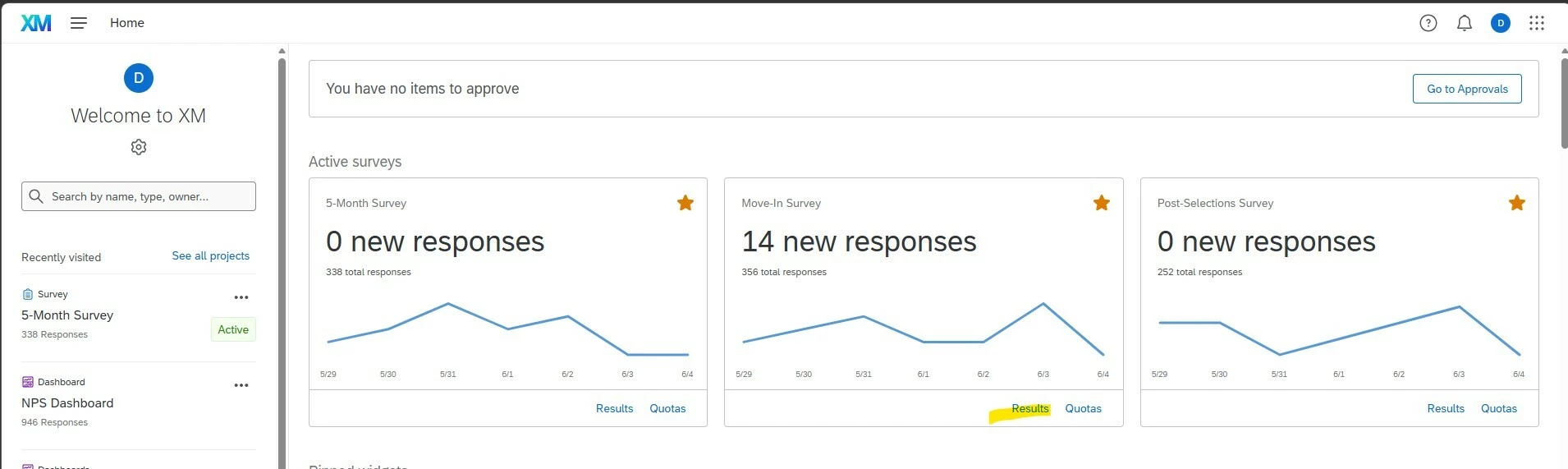
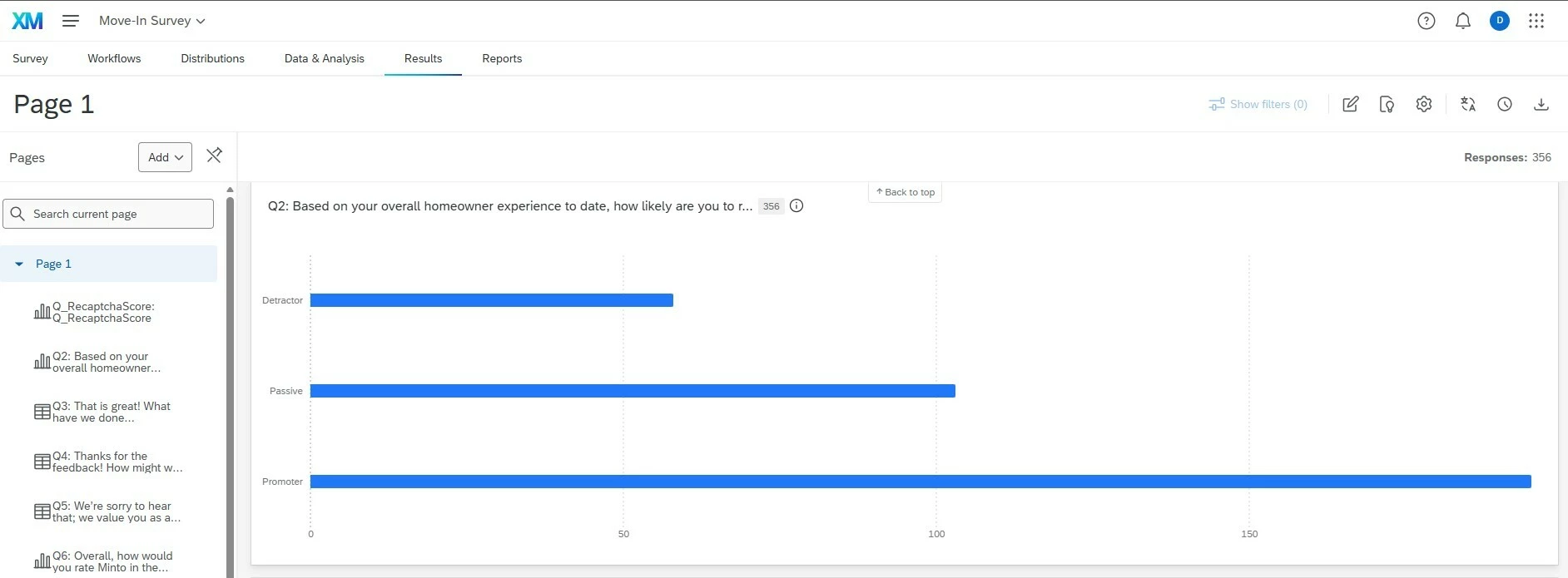
We are 8 months going live with Qualtrics - and still learning tips and tricks during this first year. One thing that would have been very helpful to know earlier related to my home dashboard view. I recently discovered that when I click results on the home page, it automatically brought me to the results chart. i.e. for Promoters, Passive and Detractors. This is great for reporting to front line managers when I need some quick charts to include in a presentation or email.


hokie404
Level 2 ●●
Forum|alt.badge.img+4
  • Level 2 ●●
  • June 4, 2026

Something I WISH I knew earlier - how to very simply randomize long choice lists across multiple questions — no JavaScript needed

I was overcomplicating this with JavaScript solutions for so long before realizing basic Qualtrics carry forward settings handled it perfectly!

Say you have a question with ~50 response options and want to display them randomly, but also split them across pages (randomly, no repeats). For this example, let’s say we want to split across 4 pages.

Just put all 50+ choices in every multiselect question, then chain carry forward "not displayed" + a randomizer cap (advanced randomizer, show subset of up to XX options) across questions.

  • Q1: randomize, show randomized subset of 13 options
  • Q2: carry forward Q1 not-displayed → randomize subset, show 13
  • Q3: carry forward Q2 not-displayed → randomize subset, show 13
  • Q4: carry forward Q3 not-displayed → show all remaining

"Not displayed" only pulls from choices that were eligible to show on the prior question but weren't selected by the randomizer — so Q2's pool is exactly the 37 choices Q1 didn't show, not all 50. Each page draws from whatever's left, and no choice ever appears twice.

For analysis, just easily merge the questions together - no one should have multiple answers for any one option. 


AlonsoC
Administrator
Forum|alt.badge.img+29
  • Author
  • Administrator
  • June 4, 2026

@songforisabelle, great tip and vid! +100 woohoo!

I forgot to mention, but this is my first Badge of the Month too!

@songforisabelle, welcome to the Qualtrics Community and what a great BOM to make your debut in! +50


Forum|alt.badge.img+5

Qualtrics TIP


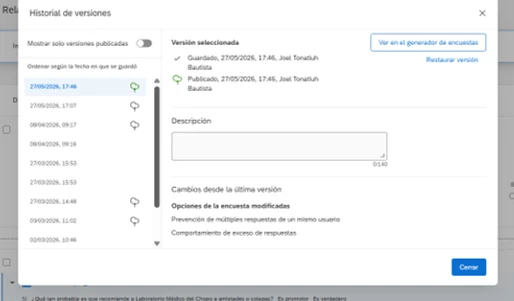
A helpful tip I wish I had known earlier is that you can easily restore your survey format if something gets deleted by mistake. All you have to do is go to “Versions” and open the “Version History” to recover your survey settings.

There was a time when a new team member accidentally deleted the answer options for a question, and we had to rewrite everything and reconfigure the logic from scratch. If I had known this tip back then, it would have saved me a lot of time.


Forum|alt.badge.img+5

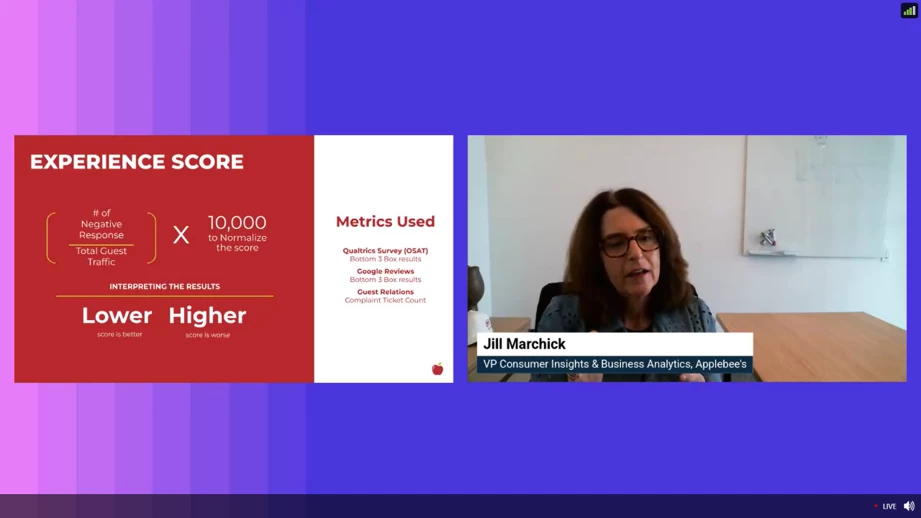
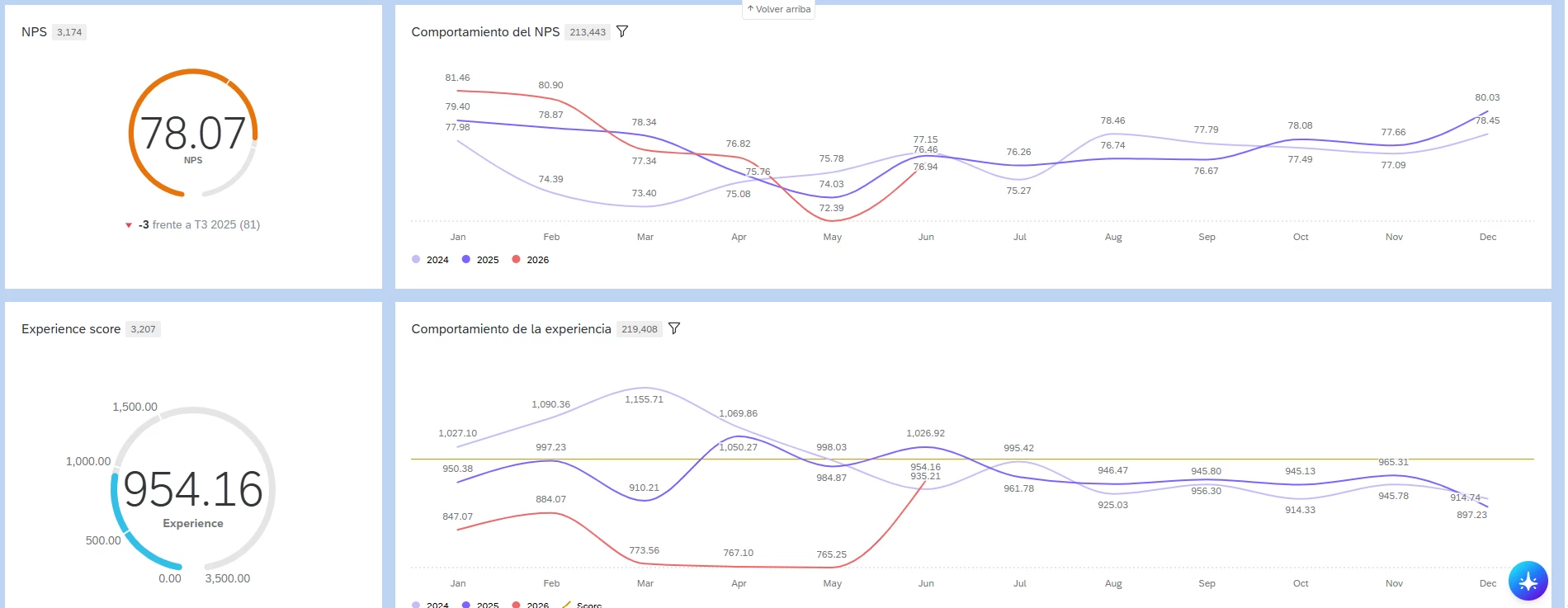
I’ll try to keep this summary of the Applebee’s webinar I attended some time ago brief. One concept that really stood out to me and proved very helpful was the Experience Score.

While Qualtrics helps us analyze customer feedback by topics or sentiment, these insights don’t always fully connect with key metrics like NPS, CSAT, or CES—they often remain somewhat disconnected. However, by incorporating sentiment analysis, you can start to see a clearer correlation between the voice of the customer and these performance indicators.

The Experience Score is a composite metric designed to evaluate the overall quality of the customer experience. Rather than relying on a single satisfaction question, it takes a more holistic approach by assessing the entire customer journey—from the first interaction to the final resolution—while considering factors such as emotions, effort, satisfaction, and overall perception.


It’s worth mentioning that I’ve already started applying this approach within my organization, and it has been incredibly helpful. I’m also attaching a photo from the Qualtrics event.


I’m sharing the webinar link below—hopefully it’s still available so you can watch this session, which was very valuable for my organization: applebee´s webinar


NewHomeCXManager
Level 3 ●●●
Forum|alt.badge.img+8

I’ll try to keep this summary of the Applebee’s webinar I attended some time ago brief. One concept that really stood out to me and proved very helpful was the Experience Score.

While Qualtrics helps us analyze customer feedback by topics or sentiment, these insights don’t always fully connect with key metrics like NPS, CSAT, or CES—they often remain somewhat disconnected. However, by incorporating sentiment analysis, you can start to see a clearer correlation between the voice of the customer and these performance indicators.

The Experience Score is a composite metric designed to evaluate the overall quality of the customer experience. Rather than relying on a single satisfaction question, it takes a more holistic approach by assessing the entire customer journey—from the first interaction to the final resolution—while considering factors such as emotions, effort, satisfaction, and overall perception.


It’s worth mentioning that I’ve already started applying this approach within my organization, and it has been incredibly helpful. I’m also attaching a photo from the Qualtrics event.


I’m sharing the webinar link below—hopefully it’s still available so you can watch this session, which was very valuable for my organization: applebee´s webinar


This is fantastic information. Thanks for sharing.


gPandey_715
Level 4 ●●●●
Forum|alt.badge.img+10
  • Level 4 ●●●●
  • June 5, 2026

In cases where a client does not want the Opt-Out Link to be displayed in an email, it can be temporarily hidden by wrapping the link in an HTML comment:

<!-- ${l://OptOutLink} -->


AlonsoC
Administrator
Forum|alt.badge.img+29
  • Author
  • Administrator
  • June 5, 2026

Such great tips, resources, and knowledge being shared this month! If you see something that a fellow member posted that you find useful, don’t be shy and let them know (​@NewHomeCXManager  is doing a fantastic job at this!).


I may not have time to reply to each post but rest assure that I’m tallying your contributions! 


NewHomeCXManager
Level 3 ●●●
Forum|alt.badge.img+8

😀Love the engagement. Have a great weekend, all!


Dukester
Level 3 ●●●
Forum|alt.badge.img+7
  • Level 3 ●●●
  • June 5, 2026

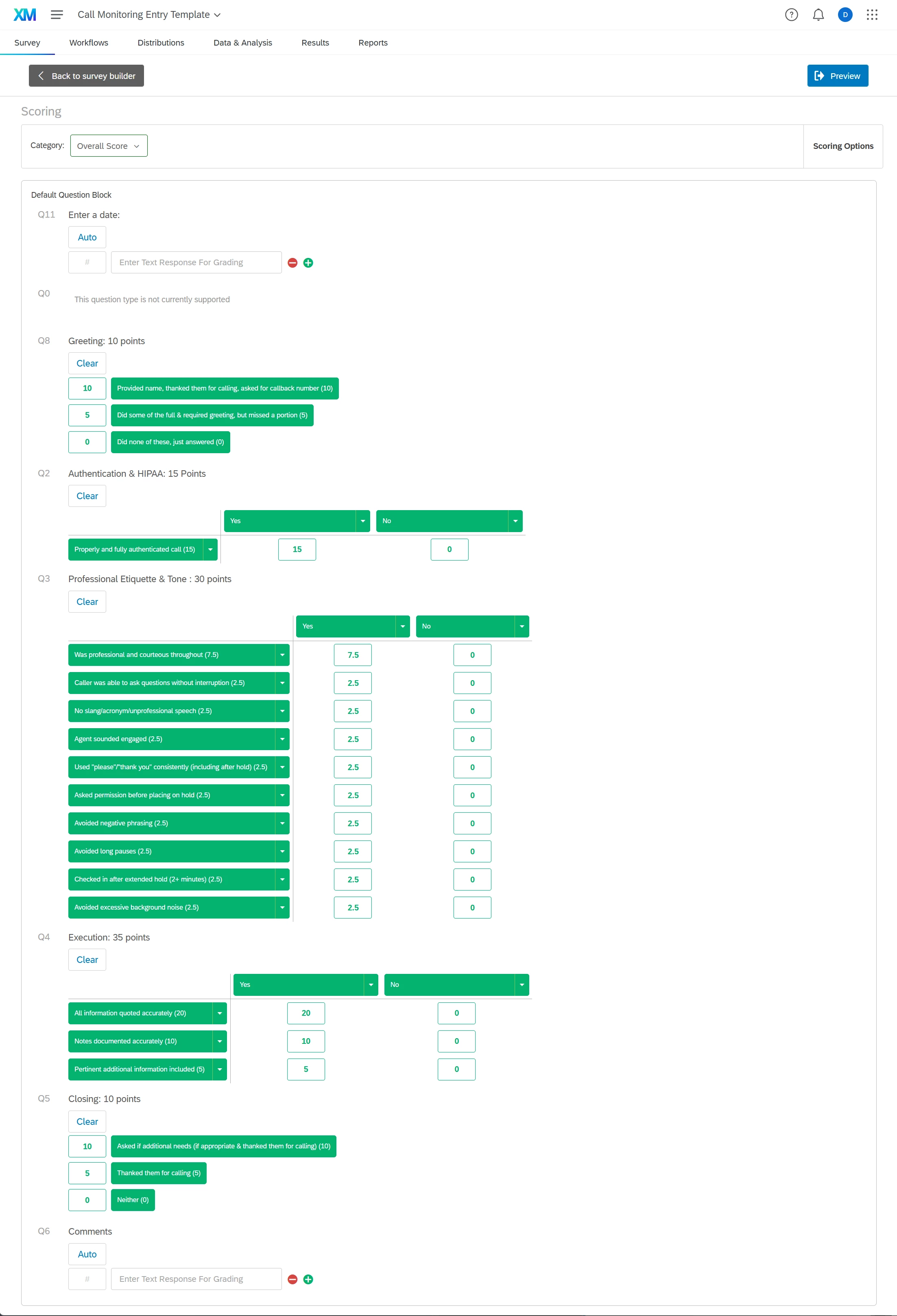
I’ve attached a “survey” we use to score call center interactions. We use the survey as a data entry and have a dashboard created to view and print results. This has streamlined our process greatly. We use dashboard roles to allow call center agents to view their own scores over time. 


We think this is a unique way to accomplish this. If you haven’t used scoring before, try it! Below is a screenshot of the scoring we’ve set up. 


lizb311
Level 4 ●●●●
Forum|alt.badge.img+20
  • Level 4 ●●●●
  • June 8, 2026

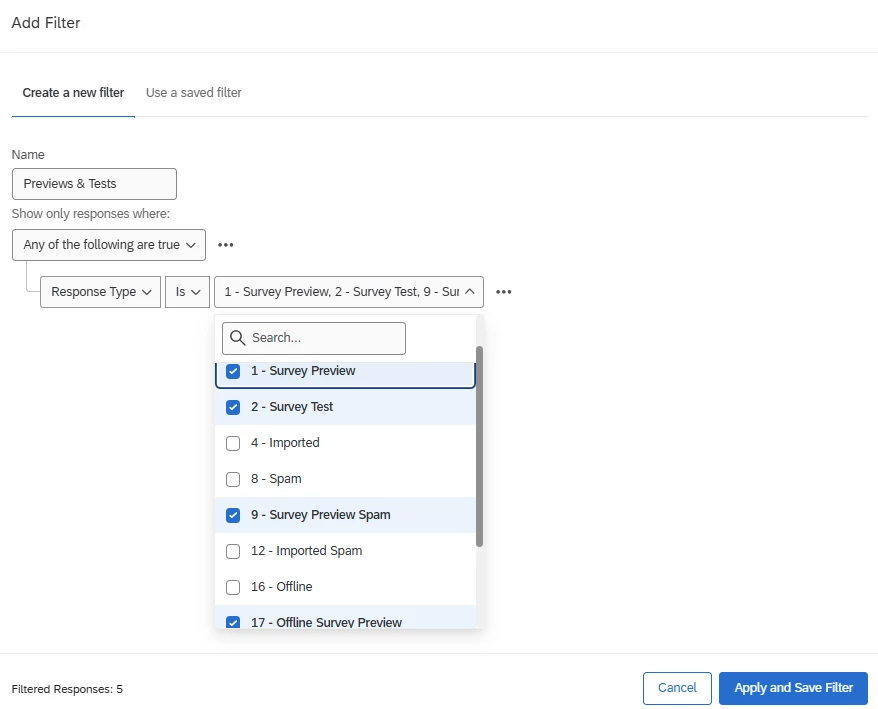
here’s an easy starter tip - a filter I save to all of my surveys to get check for (and get rid of) preview and test data. If you have a lot of stakeholders with access to your survey preview link, you never know when one of them will sneak an extra preview response into your dataset!

super simple: just create a filter for Response Type = Survey Preview, Survey Test, Survey Preview Spam, or Offline Survey Preview. 


lizb311
Level 4 ●●●●
Forum|alt.badge.img+20
  • Level 4 ●●●●
  • June 8, 2026

Sometimes we need to edit or delete a whole bunch of responses at once (for one reason or another). This trick does require a little extra knowledge of R and access to your Qualtrics API, but it’s pretty handy. 
Here’s an R Script that will edit the value of an embedded data variable for a batch of survey responses. A few notes: 

  • You will need to edit this script to add your own API and data center ID
  • You’ll add your survey ID and a list of the Response IDs you want to edit
  • The embedded data fields you edit in this script must already exist in your Survey Flow. If they don’t - go into your Survey Flow, add them, and publish the changes. Alternatively, edit the script so that it references fields that DO exist in your Survey Flow. 
    • In my example, I am editing two embedded data fields: `gc` (which I am editing so that everything will now take on a value of “3” and `Manual_QC` which I am editing so that everything will have a value of “QC.”) 
  • In my experience, this script will NOT overwrite changes if a variable has already been edited in the Data & Analysis tab

Here is the R script. Hope it helps someone.

## This script will update responses for a given survey in Qualtrics, using the Qualtrics API
## API: https://api.qualtrics.com/2ced5de7dc638-start-an-update-embedded-data-job
##
## This script cannot *create* embedded data fields. You must first create the field in either the Survey Flow or the "Data & Analysis" tab.
## If you have already edited the embedded data variable in the "Data & Analysis" tab, this script will NOT overwrite those changes.
##

install.packages(c("httr", "jsonlite"))
library(httr)
library(jsonlite)

## Replace this string with your API token. (Found in Account settings > Qualtrics IDs > API - Generate token)
api_token <- 'Xi0101010101'

## Replace this string with your survey id. (Found in Account settings > Qualtrics IDs > Surveys OR by looking at the end of the URL when you're in the Survey Builder or Data & Analysis tabs.)
survey_id <- 'SV_0101010101'

## Replace these response id's with the id's you want to update. You can copy/paste a list directly from Excel. Hard returns are fine; no need for commas.
data <- read.table(text='
R_010101010101010
R_010101010101010
R_010101010101010
R_010101010101010
')

## Reset the RecordedDate? TRUE or FALSE
## Defaults to TRUE if not specified. FALSE is preferred. If FALSE, will increment recorded date by 1 second. This is being deprecated.
resetRecordedDate_boolean <- FALSE


##
## BE CAREFUL WITH EDITS TO THIS SECTION. Edit desired embedded data field & value.
## You may need to update `iad` to your data center below. Check your Account Settings: https://www.qualtrics.com/support/integrations/api-integration/finding-qualtrics-ids/#LocatingtheDatacenterID
##

api_url <- paste('iad.qualtrics.com/API/v3/surveys/', survey_id, '/update-responses', sep = "") ## `iad` should be replaced with your data center.
colnames(data) <- 'responseId'

allResponses <- list()
for (row in 1:nrow(data)) {
embeddedData <- list(gc="3", ## Edit your desired embedded data field name & value here. The field "gc" needs to exist in your Survey Flow as an embedded data field already. This line will change the value of all ResponseIds that you put into this script to whatever value you set here.
Manual_QC = "QC" ## Another possible embedded data field name & value to edit
)
###
### DO NOT EDIT PAST HERE
###
response <- list(responseId=data[row, 1], resetRecordedDate=resetRecordedDate_boolean, embeddedData=embeddedData)
allResponses <- append(allResponses, list(response))
}

payload <- toJSON(list(updates=allResponses), auto_unbox = TRUE)

res <- POST(
url = api_url,
body = payload, #postData ?
add_headers(.headers = c(
'X-API-TOKEN'= api_token,
'Content-Type' = 'application/json'
))
)
print(content(res))


hokie404
Level 2 ●●
Forum|alt.badge.img+4
  • Level 2 ●●
  • June 8, 2026

Sometimes we need to edit or delete a whole bunch of responses at once (for one reason or another). This trick does require a little extra knowledge of R and access to your Qualtrics API, but it’s pretty handy. 
Here’s an R Script that will edit the value of an embedded data variable for a batch of survey responses. A few notes: 

  • You will need to edit this script to add your own API and data center ID
  • You’ll add your survey ID and a list of the Response IDs you want to edit
  • The embedded data fields you edit in this script must already exist in your Survey Flow. If they don’t - go into your Survey Flow, add them, and publish the changes. Alternatively, edit the script so that it references fields that DO exist in your Survey Flow. 
    • In my example, I am editing two embedded data fields: `gc` (which I am editing so that everything will now take on a value of “3” and `Manual_QC` which I am editing so that everything will have a value of “QC.”) 
  • In my experience, this script will NOT overwrite changes if a variable has already been edited in the Data & Analysis tab

Here is the R script. Hope it helps someone.

## This script will update responses for a given survey in Qualtrics, using the Qualtrics API
## API: https://api.qualtrics.com/2ced5de7dc638-start-an-update-embedded-data-job
##
## This script cannot *create* embedded data fields. You must first create the field in either the Survey Flow or the "Data & Analysis" tab.
## If you have already edited the embedded data variable in the "Data & Analysis" tab, this script will NOT overwrite those changes.
##

install.packages(c("httr", "jsonlite"))
library(httr)
library(jsonlite)

## Replace this string with your API token. (Found in Account settings > Qualtrics IDs > API - Generate token)
api_token <- 'Xi0101010101'

## Replace this string with your survey id. (Found in Account settings > Qualtrics IDs > Surveys OR by looking at the end of the URL when you're in the Survey Builder or Data & Analysis tabs.)
survey_id <- 'SV_0101010101'

## Replace these response id's with the id's you want to update. You can copy/paste a list directly from Excel. Hard returns are fine; no need for commas.
data <- read.table(text='
R_010101010101010
R_010101010101010
R_010101010101010
R_010101010101010
')

## Reset the RecordedDate? TRUE or FALSE
## Defaults to TRUE if not specified. FALSE is preferred. If FALSE, will increment recorded date by 1 second. This is being deprecated.
resetRecordedDate_boolean <- FALSE


##
## BE CAREFUL WITH EDITS TO THIS SECTION. Edit desired embedded data field & value.
## You may need to update `iad` to your data center below. Check your Account Settings: https://www.qualtrics.com/support/integrations/api-integration/finding-qualtrics-ids/#LocatingtheDatacenterID
##

api_url <- paste('iad.qualtrics.com/API/v3/surveys/', survey_id, '/update-responses', sep = "") ## `iad` should be replaced with your data center.
colnames(data) <- 'responseId'

allResponses <- list()
for (row in 1:nrow(data)) {
embeddedData <- list(gc="3", ## Edit your desired embedded data field name & value here. The field "gc" needs to exist in your Survey Flow as an embedded data field already. This line will change the value of all ResponseIds that you put into this script to whatever value you set here.
Manual_QC = "QC" ## Another possible embedded data field name & value to edit
)
###
### DO NOT EDIT PAST HERE
###
response <- list(responseId=data[row, 1], resetRecordedDate=resetRecordedDate_boolean, embeddedData=embeddedData)
allResponses <- append(allResponses, list(response))
}

payload <- toJSON(list(updates=allResponses), auto_unbox = TRUE)

res <- POST(
url = api_url,
body = payload, #postData ?
add_headers(.headers = c(
'X-API-TOKEN'= api_token,
'Content-Type' = 'application/json'
))
)
print(content(res))


This is AMAZING! I can’t tell you how many times I’ve scrubbed my data in Q and then needed my qualtrics data to have matching scrub flags so that any future exporting has clear indicators of which cases were dropped. Thank you so much!!