
Hello,
I carry out a study in which I present different sentences (one per page).
I would like to insert randomly words in those sentences.
Each participant sees the sentences in the same order. Only one word in each of the sentences have to be randomly presented.
For example :
-Hello [insert one of the 8 words] i like dogs.
-Hello [insert one of the 7 remaining words] i like birds.
-Hi [insert one of the 6 remaining words] i like cats.
etc.
I think I have to use Javascript and I don't know how to do it, but maybe there is a simpler solution.
Thank you for your help and have a nice day !

Solved
Randomly insert words into sentences
Best answer by SurajK
Hi b_stb ,
No worries, use the below code before all of the 8 questions where you want to insert the random name.
Create one Descriptive text question and add the below code in JS.
Qualtrics.SurveyEngine.addOnReady(function()
{
var names = ["Jennifer", "Jessica", "Amanda", "Ashley", "Sarah", "Stephanie", "Melissa", "Nicole"];
var copy = names.slice();
var cnt=1;
while( copy.length )
{
var name = copy.splice( Math.floor(Math.random()*copy.length), 1 );
console.log(name)
Qualtrics.SurveyEngine.addEmbeddedData("name"+cnt, name);
cnt+=1
}
jQuery('#Wrapper').css('visibility','hidden');
jQuery('#Wrapper').css('opacity','0');
jQuery('#NextButton').click();
});
And after this add the insertion in each sentence like,
My name is ${e://Field/name1} and i like apples.
My name is ${e://Field/name2} and i like orange.
My name is ${e://Field/name3} and i like mango.
etc...



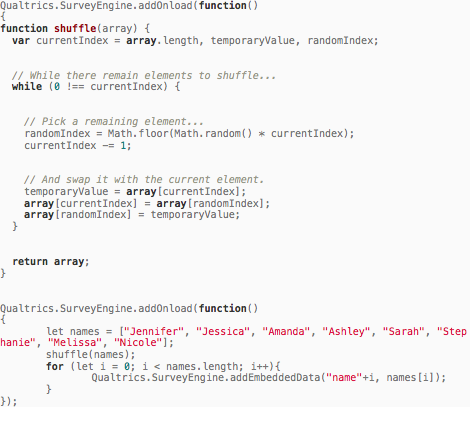 Maybe I pasted the wrong code? (I don't know anything about javascript coding).
Sign up
Already have an account? Login

Welcome! To join the Qualtrics Experience Community, log in with your existing Qualtrics credentials below.
Confirm your username, share a bit about yourself, Once your account has been approved by our admins then you're ready to explore and connect .
Free trial account? No problem. Log in with your trial credentials to join.
No free trial account? No problem! Register here
Already a member? Hi and welcome back! We're glad you're here 🙂
You will see the Qualtrics login page briefly before being taken to the Experience Community
Login with Qualtrics
Welcome! To join the Qualtrics Experience Community, log in with your existing Qualtrics credentials below.
Confirm your username, share a bit about yourself, Once your account has been approved by our admins then you're ready to explore and connect .
Free trial account? No problem. Log in with your trial credentials to join. No free trial account? No problem! Register here
Already a member? Hi and welcome back! We're glad you're here 🙂
You will see the Qualtrics login page briefly before being taken to the Experience Community
Login to the Community
Welcome! To join the Qualtrics Experience Community, log in with your existing Qualtrics credentials below.
Confirm your username, share a bit about yourself, Once your account has been approved by our admins then you're ready to explore and connect .
Free trial account? No problem. Log in with your trial credentials to join.
No free trial account? No problem! Register here
Already a member? Hi and welcome back! We're glad you're here 🙂
You will see the Qualtrics login page briefly before being taken to the Experience Community
Login with Qualtrics
Welcome! To join the Qualtrics Experience Community, log in with your existing Qualtrics credentials below.
Confirm your username, share a bit about yourself, Once your account has been approved by our admins then you're ready to explore and connect .
Free trial account? No problem. Log in with your trial credentials to join. No free trial account? No problem! Register here
Already a member? Hi and welcome back! We're glad you're here 🙂
You will see the Qualtrics login page briefly before being taken to the Experience Community
Enter your E-mail address. We'll send you an e-mail with instructions to reset your password.