

Hi,
Today I was trying to set up a survey where I would like for each of the values of a multiple value text set to be an option in a multiple choice question. So if the embedded data field has 'green, yellow, red' then I would love to be able to ask a participant what their favorite color is and give these three options. I was able to achieve it with Javascript, but I was wondering if there is an easier way. Teaching Javascript to my faculty just to achieve this will be an adventure.
Thank you!
PS, for anyone interested this is my code. I then create a multiple choice question where the values are the embedded data fields that result from this.
Qualtrics.SurveyEngine.addOnPageSubmit(function()
{
var str = "${e://Field/All%20colors}";
var res = str.split(", ");
for (let i = 0; i < str.length; i++) {
Qualtrics.SurveyEngine.setEmbeddedData("Color " +i, res[i]);
}
});

Multiple value text set embedded data field as multiple choice question


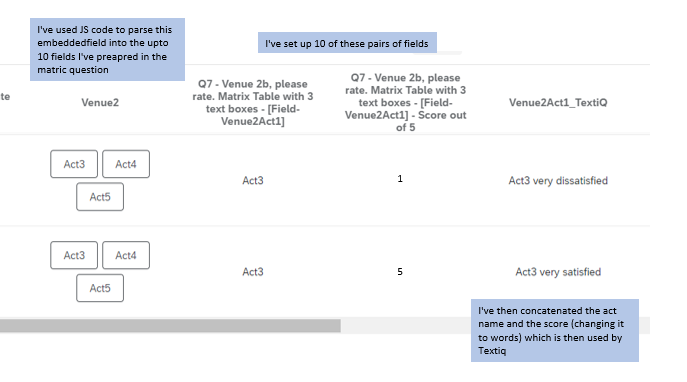 and this is the resulting textiQ once I've built the topic
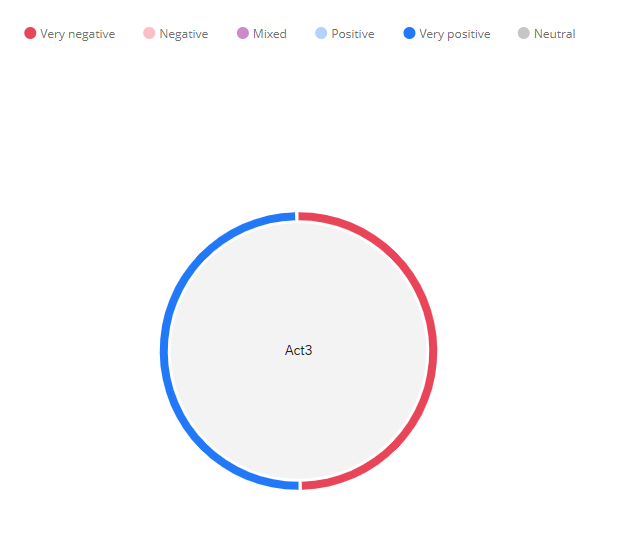 This is the bubble iq widget. This should work for the table iq widget but it's a bit temperamental and I often have to get Qualtrics Support to get it working again
 Sign up
Already have an account? Login

Welcome! To join the Qualtrics Experience Community, log in with your existing Qualtrics credentials below.
Confirm your username, share a bit about yourself, then you're ready to explore and connect .
Free trial account? No problem. Log in with your trial credentials to join.
No free trial account? No problem! Register here
Already a member? Hi and welcome back! We're glad you're here 🙂
You will see the Qualtrics login page briefly before being taken to the Experience Community.
Login with Qualtrics
Welcome! To join the Qualtrics Experience Community, log in with your existing Qualtrics credentials below.
Confirm your username, share a bit about yourself, then you're ready to explore and connect .
Free trial account? No problem. Log in with your trial credentials to join. No free trial account? No problem! Register here
Already a member? Hi and welcome back! We're glad you're here 🙂
You will see the Qualtrics login page briefly before being taken to the Experience Community.
Login to the Community
Welcome! To join the Qualtrics Experience Community, log in with your existing Qualtrics credentials below.
Confirm your username, share a bit about yourself, then you're ready to explore and connect .
Free trial account? No problem. Log in with your trial credentials to join.
No free trial account? No problem! Register here
Already a member? Hi and welcome back! We're glad you're here 🙂
You will see the Qualtrics login page briefly before being taken to the Experience Community.
Login with Qualtrics
Welcome! To join the Qualtrics Experience Community, log in with your existing Qualtrics credentials below.
Confirm your username, share a bit about yourself, then you're ready to explore and connect .
Free trial account? No problem. Log in with your trial credentials to join. No free trial account? No problem! Register here
Already a member? Hi and welcome back! We're glad you're here 🙂
You will see the Qualtrics login page briefly before being taken to the Experience Community.
Enter your E-mail address. We'll send you an e-mail with instructions to reset your password.