


Insert a button that gives a pop-up additional information window when clicked
Best answer by NiC






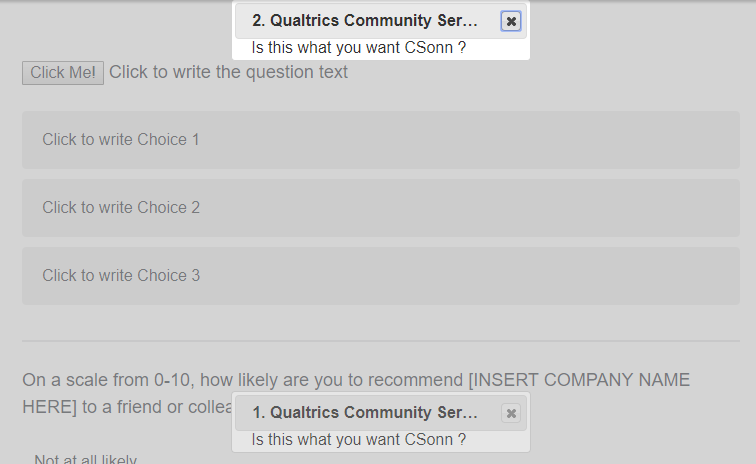 Note: If you want different button pops up different pop up then change the following lines of code
`<button id="btn1">Click Me1!</button><button id="btn2">Click Me2!</button>`
And
jQuery( "#btn1" ).click(function() {
jQuery("#dialog").dialog( "option", "modal", true );
jQuery("#dialog").dialog( "open" );
});
jQuery( "#btn2" ).click(function() {
jQuery("#dialog1").dialog( "option", "modal", true );
jQuery("#dialog1").dialog( "open" );
});
Note: If you want different button pops up different pop up then change the following lines of code
`<button id="btn1">Click Me1!</button><button id="btn2">Click Me2!</button>`
And
jQuery( "#btn1" ).click(function() {
jQuery("#dialog").dialog( "option", "modal", true );
jQuery("#dialog").dialog( "open" );
});
jQuery( "#btn2" ).click(function() {
jQuery("#dialog1").dialog( "option", "modal", true );
jQuery("#dialog1").dialog( "open" );
});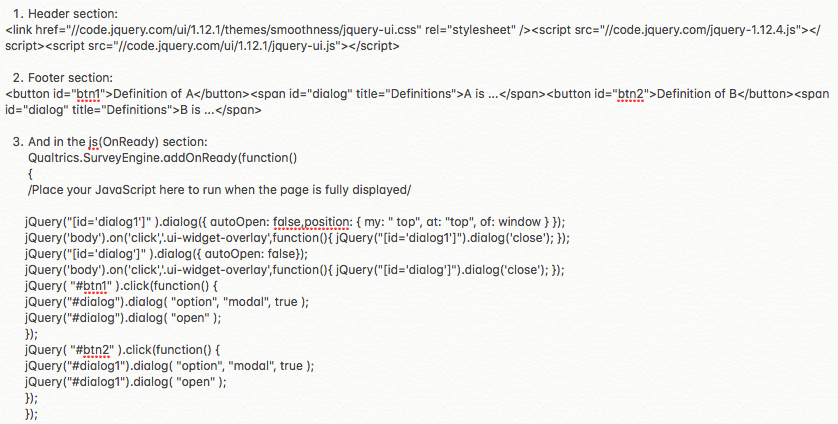
 I hope it is clear what I did. I basically repeated the code for both questions. Is this correct?


Sign up
Already have an account? Login

Welcome! To join the Qualtrics Experience Community, log in with your existing Qualtrics credentials below.
Confirm your username, share a bit about yourself, then you're ready to explore and connect .
Free trial account? No problem. Log in with your trial credentials to join.
No free trial account? No problem! Register here
Already a member? Hi and welcome back! We're glad you're here 🙂
You will see the Qualtrics login page briefly before being taken to the Experience Community.
Login with Qualtrics
Welcome! To join the Qualtrics Experience Community, log in with your existing Qualtrics credentials below.
Confirm your username, share a bit about yourself, then you're ready to explore and connect .
Free trial account? No problem. Log in with your trial credentials to join. No free trial account? No problem! Register here
Already a member? Hi and welcome back! We're glad you're here 🙂
You will see the Qualtrics login page briefly before being taken to the Experience Community.
Login to the Community
No account yet? Create an account
Welcome! To join the Qualtrics Experience Community, log in with your existing Qualtrics credentials below.
Confirm your username, share a bit about yourself, then you're ready to explore and connect .
Free trial account? No problem. Log in with your trial credentials to join.
No free trial account? No problem! Register here
Already a member? Hi and welcome back! We're glad you're here 🙂
You will see the Qualtrics login page briefly before being taken to the Experience Community.
Login with Qualtrics
Welcome! To join the Qualtrics Experience Community, log in with your existing Qualtrics credentials below.
Confirm your username, share a bit about yourself, then you're ready to explore and connect .
Free trial account? No problem. Log in with your trial credentials to join. No free trial account? No problem! Register here
Already a member? Hi and welcome back! We're glad you're here 🙂
You will see the Qualtrics login page briefly before being taken to the Experience Community.
Enter your E-mail address. We'll send you an e-mail with instructions to reset your password.