





Ask Your Research Anything: AI Search and Recommendations in Research Hub
One question. Every study you've ever run. Ask in plain language—get a synthesized answer, not a file hunt.
Two updates to Research Hub change how teams find and reuse what they already know. Now you can ask Research Hub a question the way you'd ask a colleague—and get an answer drawn from every study in your brand. When the answer isn't there yet, Research Hub tells you what to go research next.
If you've ever re-run a study only to find someone had already answered it, or spent a morning hunting for the one dashboard that answers a stakeholder's question, these are for you.
1. AI Search That Understands the Question
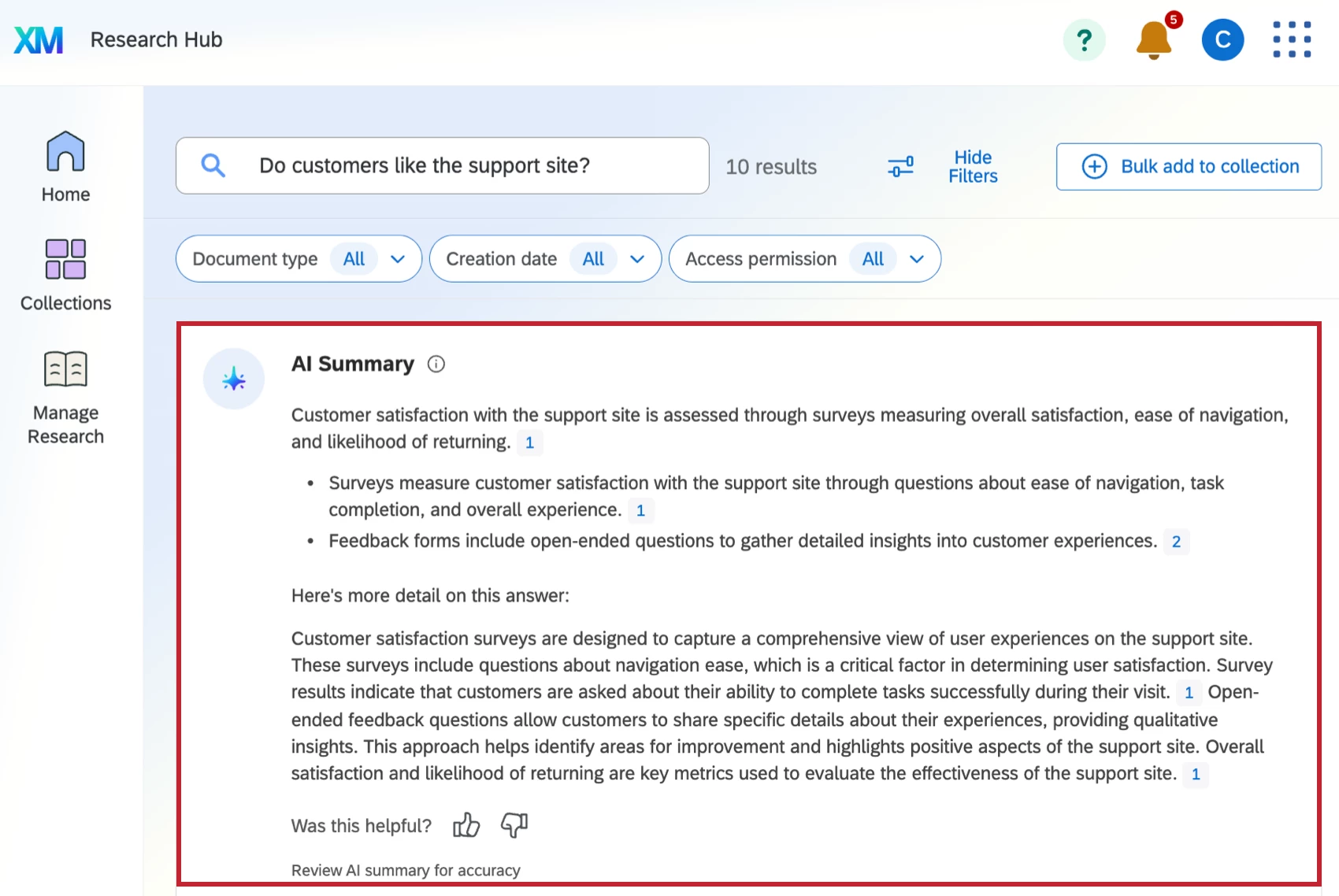
Research Hub search now reads across everything in your Qualtrics license—surveys, dashboards, videos, imported data projects, uploaded files, and Insights Explorer—and returns the most relevant results, not just keyword matches. Ask in real phrases ("What drives customer satisfaction with our shoes?") rather than keyword fragments, and search responds to the intent behind the question.
Two things make this more than a faster lookup:
An AI summary up top. Instead of opening result after result, you get a quick synthesized answer pulled from the resources in your Research Hub—so a question that used to mean an afternoon of clicking becomes a single read. Thumbs up or down tunes what you get next.
Relevancy you can interrogate. With AI search relevancy turned on, hover the info tooltip on any result to see exactly why it surfaced. No black box—just a plain-language reason the result earned its spot.
Filter by document type, creation date, or access permission, and narrow to documents you can actually open with a single click. Results sort by relevance, so the strongest answer rises to the top.
2. Research Recommendations When the Answer Isn't There Yet
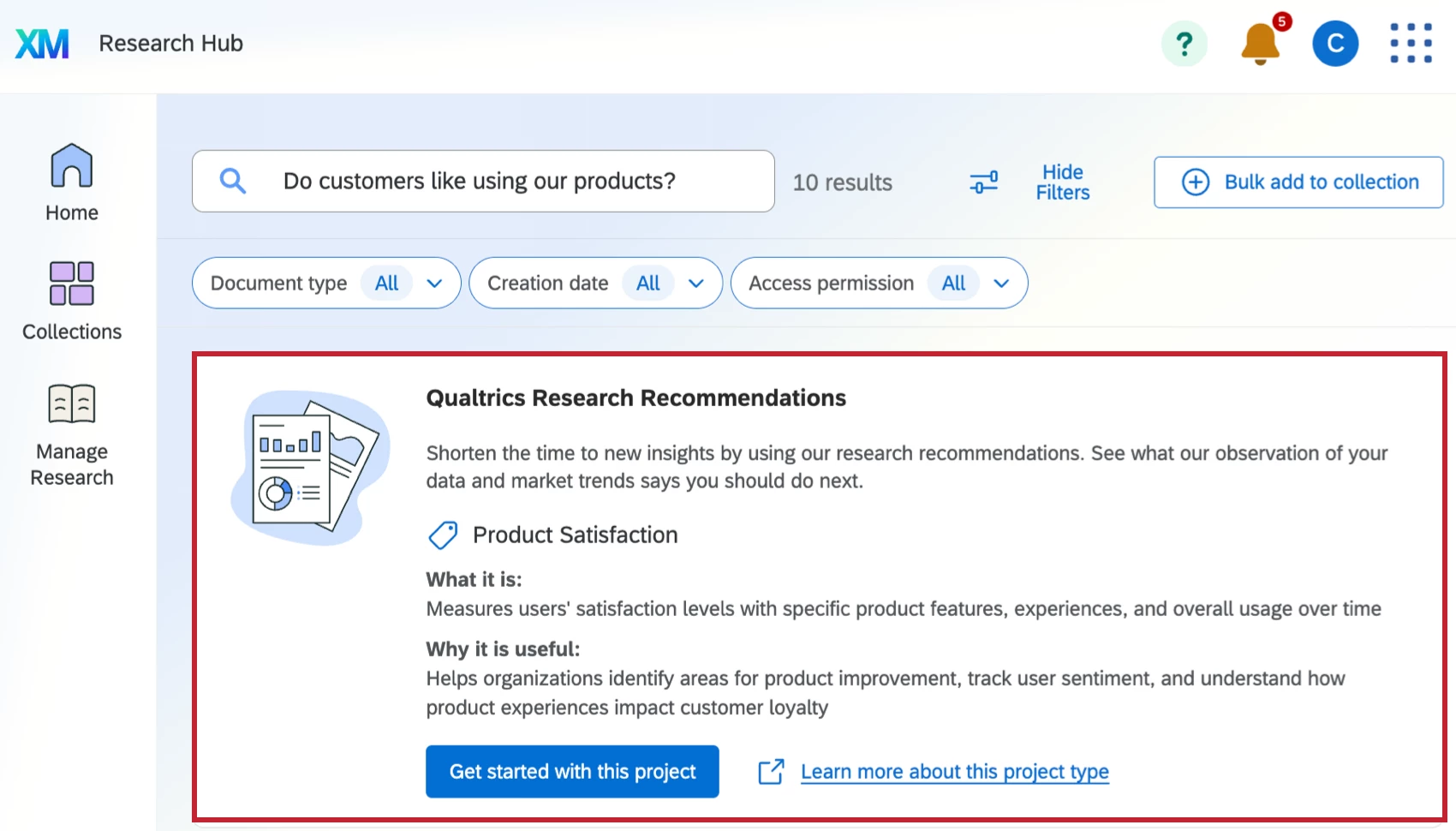
Sometimes the honest answer is "we haven't studied this." When your library doesn't hold enough insight for an AI summary, Research Hub doesn't dead-end you—it gives you Qualtrics Research Recommendations instead.
Recommendations suggest the primary research you could run to close the gap, guiding you toward a new project shaped by your data and current market trends. A search that comes up empty turns into a starting point for what to field next.
Where teams are using this today:
Onboarding new researchers — Let someone new ask the library what the org already knows, instead of waiting to absorb it by osmosis.
Killing duplicate studies — Check what exists before fielding. The fastest study is the one you don't have to re-run.
Fast stakeholder answers — "What do we know about X?" gets a synthesized response in minutes, not a research request in your queue.
Pre-study synthesis — Build on prior work before designing something new, so each study starts from the org's accumulated knowledge instead of a blank page.
The bigger unlock: when years of research—surveys, dashboards, videos, uploaded decks—live behind one question box, your back catalog stops being an archive and becomes something you can ask. Institutional knowledge that used to depend on who remembered what is available to anyone with a question.
Why This Matters
These two updates close two gaps in how research teams operate: a discovery gap (insight buried across formats, owners, and tools) and a direction gap (knowing what to study when the answer doesn't exist yet). AI Search makes the work you've already done findable and answerable. Recommendations point you at the work worth doing next. Together they turn a research library into a research system—one you query, not one you dig through.
A Note on Access
AI Search and Recommendations are available to customers on the new simplified pricing and packaging plans, and to customers who participated in the Preview Program for this feature. AI summaries and relevancy explanations also depend on AI permissions set by your admin. If you're unsure about your plan, your account team can confirm.
We'd Love Your Input
A few questions for this community:
- What questions do you most wish you could ask your research library directly?
- Which document types hold the most buried value for your team—videos, dashboards, uploaded reports, something else?
- When a search comes up short, what kind of recommendation would actually help you act on it?
Your feedback directly shapes what we build next.
Want to Learn More?
Reach out to your account team or explore the support documentation:
- Search in Research Hub
- Research Hub Overview
- Collections
- AI Administration (permissions for AI summaries and relevancy)
