




Advanced Transform task (Python script), passing a result to a pipe text for proceeding tasks | Experience Community
Skip to main content

Advanced Transform task (Python script), passing a result to a pipe text for proceeding tasks

  • March 16, 2026
  • 4 replies
  • 144 views

Forum|alt.badge.img+11

Hi All,


In the Advanced Transform task (where you can write a python script) to manipulate the data, I would like to know how, like the code task, you can return a value or string that is available to use in a later tasks.  All the help (and bots!) say it’s possible using something like


return { summary: summary_text }


but this needs to be wrapped in a function() I believe.


The other option is to use something like


#print(SUMMARY=summary_text)


This get’s to the log, which is a downloadable file but I’d like to pass this into the proceeding email task.  Every variants I’ve tried still won’t show it up in the piped text dropdown.


Is this possible?


Thanks


Rod Pestell

PS there is no ‘Advanced Transform Task’ tag so had to select ‘Task’!
4 replies

Forum|alt.badge.img+11
  • Author
  • Level 4 ●●●●
  • March 16, 2026

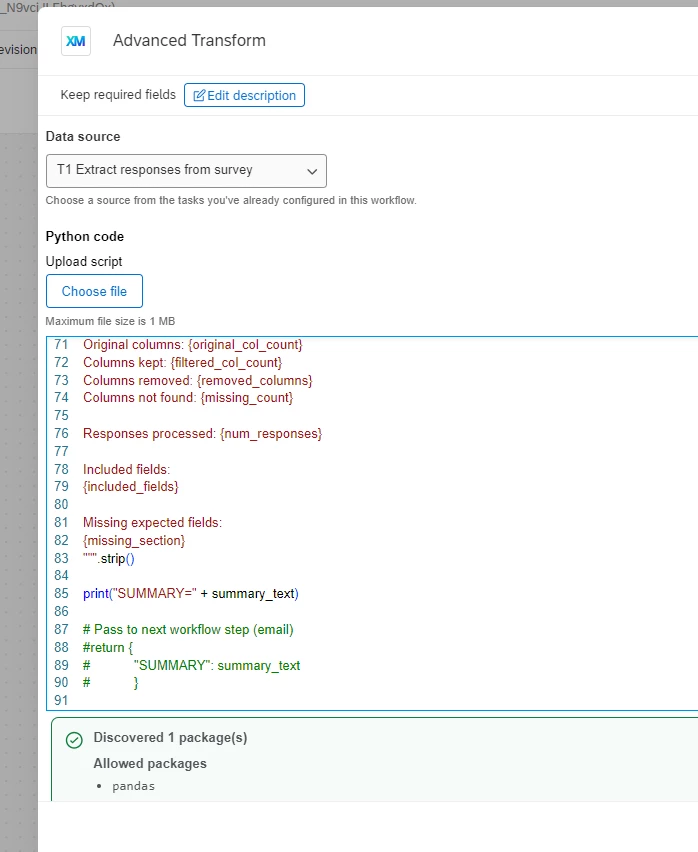
Update - Perhaps not everyone can see this task as it was a preview last year so incase not here is a screen shot of what it looks like


 you can see that I have tried print(“SUMMARY=” + summary_text) and also return but in this context it causes the script to fail as return needs to be put inside a function but there is no documentation that I can find on this to know how to pass this to a piped text for proceeding tasks.


I have also cc’d in the preview contact on this but am hoping a reply from anyone else who has perhaps had a play with this task.


Thanks


Rod Pestell


Forum|alt.badge.img+11
  • Author
  • Level 4 ●●●●
  • April 9, 2026

Hi All,


Just wondering if anyone has had any ideas on this and how to resolve?


Thanks


Rod Pestell


Forum|alt.badge.img+1
  • September 14, 2026

Hi ​@Rod_Pestell not sure if you already found a solution. If not, Advance Transform can generate a file that you could use for data importation within Qualtrics. If you are planning to use the output data, simply for piping, the Advance Transform might be “over-qualified” and instead use a simple Code Task.


Forum|alt.badge.img+11
  • Author
  • Level 4 ●●●●
  • September 14, 2026

Hi ​@KenI


Thanks for the reply.  I’ve not found a solution to this yet.  I’m using Advanced Transform to manipulate a file and wanted to create a log to check it was working ok.  So I am already in effect generating a file but then also wanted to generate a second file - a log file as it were.  But this is the problem as it seems you can only create one file… unless they’ve made a change since April??


Thanks.

