Hello, how can I apply alternating gray and white to the baseline, mid-year and year-end columns? I found a lot of questions for matrix, but not much for a basic table created using rich content editor.
Thank you!
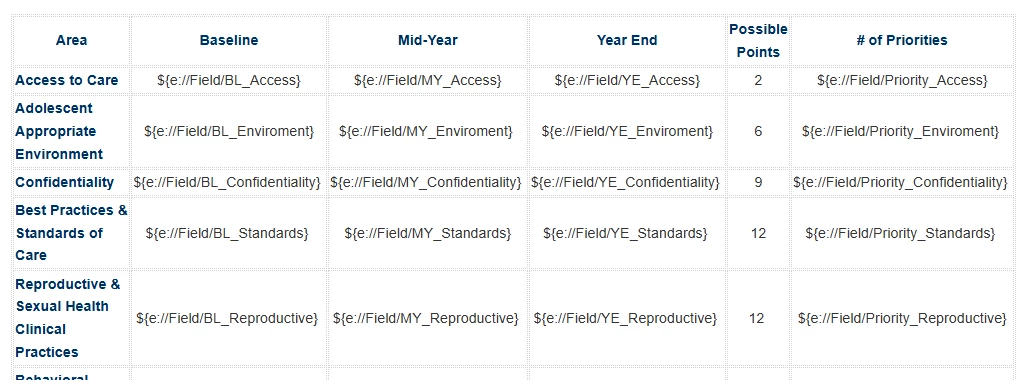

Hello, how can I apply alternating gray and white to the baseline, mid-year and year-end columns? I found a lot of questions for matrix, but not much for a basic table created using rich content editor.
Thank you!
Best answer by nikamshubham73
Hi
Inside the Rich Content Editor, you will see a Source option. When you click on it, the HTML code of your table will be displayed. You need to declare a class and apply it to the table, and then define the styling within that class so you can highlight the column headers.
<style>
/* Create a class".table-style" that will help you find the Rows and Columns in Table */
.table-style {
Add all the properties you want for the table
}
/* Grey background for specific column headers, if you want to highlight for whole column, replace th with td */
.table-style th:nth-child(2),
.table-style th:nth-child(3),
.table-style th:nth-child(4) {
background-color: #808080;
}
</style>
/* Make sure you declare the class and add your table Structure */
<table class="table-style">
<tr>
Your Table in HTML
</tr>
</table>
.table-style applies styling to the entire table element that has the class table-style.
.table-style th applies styling specifically to the header cells (th) within the table that has the class table-style.
.table-style td applies styling to the data cells (td) inside the table that has the class table-style.
Already have an account? Login

Welcome! To join the Qualtrics Experience Community, log in with your existing Qualtrics credentials below.
Confirm your username, share a bit about yourself, then you're ready to explore and connect .
Free trial account? No problem. Log in with your trial credentials to join. No free trial account? No problem! Register here
Already a member? Hi and welcome back! We're glad you're here 🙂
You will see the Qualtrics login page briefly before being taken to the Experience Community.
No account yet? Create an account
Welcome! To join the Qualtrics Experience Community, log in with your existing Qualtrics credentials below.
Confirm your username, share a bit about yourself, then you're ready to explore and connect .
Free trial account? No problem. Log in with your trial credentials to join. No free trial account? No problem! Register here
Already a member? Hi and welcome back! We're glad you're here 🙂
You will see the Qualtrics login page briefly before being taken to the Experience Community.
Enter your E-mail address. We'll send you an e-mail with instructions to reset your password.