

Hi all,
In one of your forums I found a perfect solution to insert a calendar question with EU date format (DD-MM-YYYY) instead of pre-set American (MM-DD-YYYY).
Solution imported into my test survey (from Tom_1842 → Calendar with date in DD/MM/YYYY format — Qualtrics Community):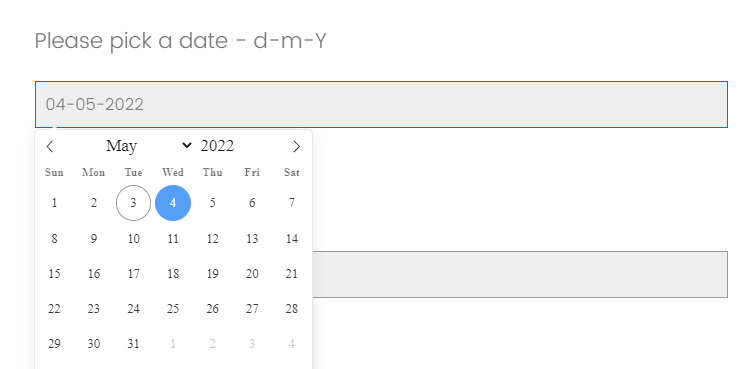 --> In JavaScript editor: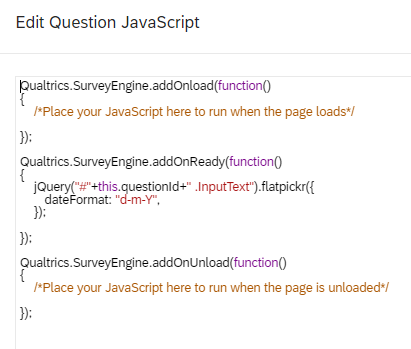
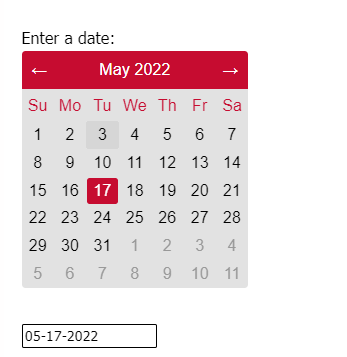
But when I copy-paste the same code to my other survey, I get a single line (no pop-up calendar):
Do you know where the problem could be?
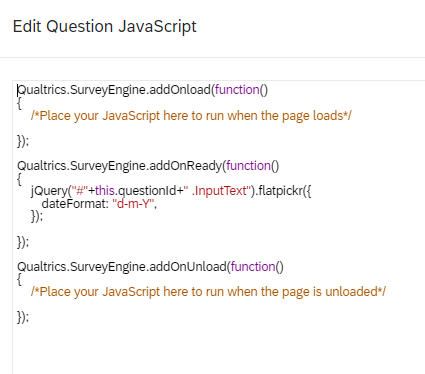
Code is the same and works for other, I just don't know where the problem is (maybe new survey's design settings, or something?).
thank you in advance!
Dovile

Solved
Calendar - code works on one survey, but not the other one. What is the issue?
 +3
+3Best answer by Dovi
I found a solution!
Paste this link into the Look & feel →General→Header:
 -->
--> 
Sign up
Already have an account? Login

Welcome! To join the Qualtrics Experience Community, log in with your existing Qualtrics credentials below.
Confirm your username, share a bit about yourself, then you're ready to explore and connect .
Free trial account? No problem. Log in with your trial credentials to join.
No free trial account? No problem! Register here
Already a member? Hi and welcome back! We're glad you're here 🙂
You will see the Qualtrics login page briefly before being taken to the Experience Community.
Login with Qualtrics
Welcome! To join the Qualtrics Experience Community, log in with your existing Qualtrics credentials below.
Confirm your username, share a bit about yourself, then you're ready to explore and connect .
Free trial account? No problem. Log in with your trial credentials to join. No free trial account? No problem! Register here
Already a member? Hi and welcome back! We're glad you're here 🙂
You will see the Qualtrics login page briefly before being taken to the Experience Community.
Login to the Community
Welcome! To join the Qualtrics Experience Community, log in with your existing Qualtrics credentials below.
Confirm your username, share a bit about yourself, then you're ready to explore and connect .
Free trial account? No problem. Log in with your trial credentials to join.
No free trial account? No problem! Register here
Already a member? Hi and welcome back! We're glad you're here 🙂
You will see the Qualtrics login page briefly before being taken to the Experience Community.
Login with Qualtrics
Welcome! To join the Qualtrics Experience Community, log in with your existing Qualtrics credentials below.
Confirm your username, share a bit about yourself, then you're ready to explore and connect .
Free trial account? No problem. Log in with your trial credentials to join. No free trial account? No problem! Register here
Already a member? Hi and welcome back! We're glad you're here 🙂
You will see the Qualtrics login page briefly before being taken to the Experience Community.
Enter your E-mail address. We'll send you an e-mail with instructions to reset your password.