


Hi. I am designing a psychology experiment using Guilford's alternative uses task.
I am going to have the participants write multiple uses in a text entry box and separate the answers with a comma. Then, I can count the number of commas to refer how many uses were created, and display the score on a separate page, caculated based on the sum of number of commas from 3 text entry boxes. The scoring system gives 10 points per each uses created.
Here's what I did so far:
I've set embedded data for each text entry box as answer1, answer2, answer3.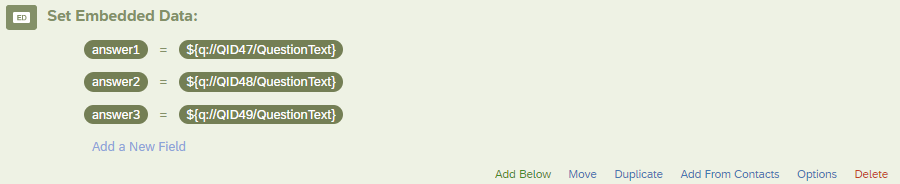 Then, on a separate page, I put html tag:
Your total score: 0
and javascript:
Qualtrics.SurveyEngine.addOnReady(function()
{
//For every new embedded value, add a line below here, and add the new value in the array
var answer1 = "${e://Field/answer1}";
var answer2 = "${e://Field/answer2}";
var answer3 = "${e://Field/answer3}";
let allAnswers = [answer1, answer2, answer3];
//General logic, no need to be touched
var countOfAnswers = 0;
for (let singleAnswer of allAnswers) {
if(singleAnswer !== "") {
var count = (singleAnswer.match(/,/g) || []).length;
countOfAnswers += count+1;
}
}
//Logic to display value in the input field, and block the field so that user cannot interact with it
var display = $('#scoreDisplay');
display.text((countOfAnswers + 1) * 10);
});
However, this doesn't seem to work, as the number in the HTML span tag wouldn't change.
How do I fix this? Please help.

Counting the number of answers in multiple text entry boxes and displaying the calculated score
Best answer by TomG
Try changing:
var display = $('#scoreDisplay');
to:
var display = jQuery('#scoreDisplay');



Sign up
Already have an account? Login

Welcome! To join the Qualtrics Experience Community, log in with your existing Qualtrics credentials below.
Confirm your username, share a bit about yourself, then you're ready to explore and connect .
Free trial account? No problem. Log in with your trial credentials to join.
No free trial account? No problem! Register here
Already a member? Hi and welcome back! We're glad you're here 🙂
You will see the Qualtrics login page briefly before being taken to the Experience Community.
Login with Qualtrics
Welcome! To join the Qualtrics Experience Community, log in with your existing Qualtrics credentials below.
Confirm your username, share a bit about yourself, then you're ready to explore and connect .
Free trial account? No problem. Log in with your trial credentials to join. No free trial account? No problem! Register here
Already a member? Hi and welcome back! We're glad you're here 🙂
You will see the Qualtrics login page briefly before being taken to the Experience Community.
Login to the Community
Welcome! To join the Qualtrics Experience Community, log in with your existing Qualtrics credentials below.
Confirm your username, share a bit about yourself, then you're ready to explore and connect .
Free trial account? No problem. Log in with your trial credentials to join.
No free trial account? No problem! Register here
Already a member? Hi and welcome back! We're glad you're here 🙂
You will see the Qualtrics login page briefly before being taken to the Experience Community.
Login with Qualtrics
Welcome! To join the Qualtrics Experience Community, log in with your existing Qualtrics credentials below.
Confirm your username, share a bit about yourself, then you're ready to explore and connect .
Free trial account? No problem. Log in with your trial credentials to join. No free trial account? No problem! Register here
Already a member? Hi and welcome back! We're glad you're here 🙂
You will see the Qualtrics login page briefly before being taken to the Experience Community.
Enter your E-mail address. We'll send you an e-mail with instructions to reset your password.