

Dear All,
With reference to the picture below, I would like to hide column #2 when the survey enters into the page, and to reveal column#2 when choices in column #1 are selected (either YES&YES or NO&NO).
Initially, I tried to apply the display logic on the question for column 2. It did hide the column, but did not reveal it when the conditions are met. After some readings, it seems that display logic does not work well with SBS question. Hence, I have attempted to add JS into this question.  Logic: hide column#2, get the recode value of choices in column#1, check condition, reveal column#2 if conditions are met.
I do not have any prior JS knowledge, but have tried to piece together solutions offered in this forum. Below is my current JS code. 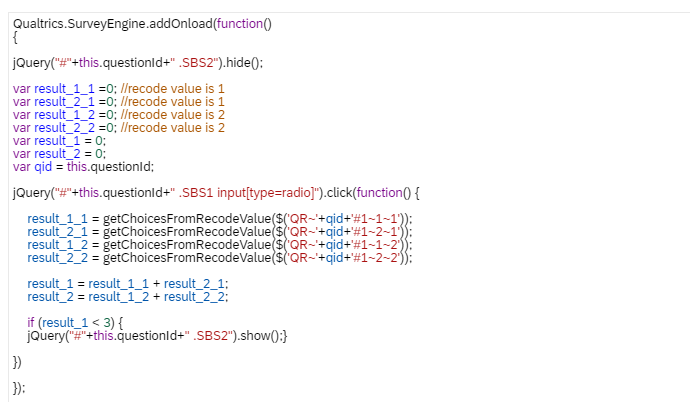 Appreciate if someone could help please. Thank you.

Hiding column#2 in a side-by-side Question, and revealing it upon selection of choices in column#1
Best answer by ahmedA
Okay. Yes that's an issue. Sorry didn't notice that I was hiding SBS2. Just delete the else block:
else { // Hide SBS2 otherwise
quest.questionContainer.querySelectorAll(".SBS2").forEach((item) => item.hide());
}
And it should work fine.



Sign up
Already have an account? Login

Welcome! To join the Qualtrics Experience Community, log in with your existing Qualtrics credentials below.
Confirm your username, share a bit about yourself, then you're ready to explore and connect .
Free trial account? No problem. Log in with your trial credentials to join.
No free trial account? No problem! Register here
Already a member? Hi and welcome back! We're glad you're here 🙂
You will see the Qualtrics login page briefly before being taken to the Experience Community.
Login with Qualtrics
Welcome! To join the Qualtrics Experience Community, log in with your existing Qualtrics credentials below.
Confirm your username, share a bit about yourself, then you're ready to explore and connect .
Free trial account? No problem. Log in with your trial credentials to join. No free trial account? No problem! Register here
Already a member? Hi and welcome back! We're glad you're here 🙂
You will see the Qualtrics login page briefly before being taken to the Experience Community.
Login to the Community
Welcome! To join the Qualtrics Experience Community, log in with your existing Qualtrics credentials below.
Confirm your username, share a bit about yourself, then you're ready to explore and connect .
Free trial account? No problem. Log in with your trial credentials to join.
No free trial account? No problem! Register here
Already a member? Hi and welcome back! We're glad you're here 🙂
You will see the Qualtrics login page briefly before being taken to the Experience Community.
Login with Qualtrics
Welcome! To join the Qualtrics Experience Community, log in with your existing Qualtrics credentials below.
Confirm your username, share a bit about yourself, then you're ready to explore and connect .
Free trial account? No problem. Log in with your trial credentials to join. No free trial account? No problem! Register here
Already a member? Hi and welcome back! We're glad you're here 🙂
You will see the Qualtrics login page briefly before being taken to the Experience Community.
Enter your E-mail address. We'll send you an e-mail with instructions to reset your password.