



Qualtrics support says we can change via custom code the response buttons themselves in terms of size and look, but didn’t provide a specific solution.
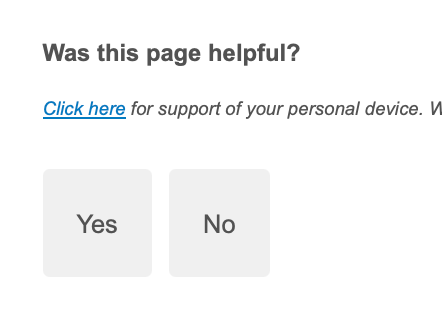
Does anyone know how I can change the size of these grey boxes containing Yes and No choices?

Qualtrics support says we can change via custom code the response buttons themselves in terms of size and look, but didn’t provide a specific solution.
Does anyone know how I can change the size of these grey boxes containing Yes and No choices?
Already have an account? Login

Welcome! To join the Qualtrics Experience Community, log in with your existing Qualtrics credentials below.
Confirm your username, share a bit about yourself, then you're ready to explore and connect .
Free trial account? No problem. Log in with your trial credentials to join. No free trial account? No problem! Register here
Already a member? Hi and welcome back! We're glad you're here 🙂
You will see the Qualtrics login page briefly before being taken to the Experience Community.
Enter your E-mail address. We'll send you an e-mail with instructions to reset your password.