


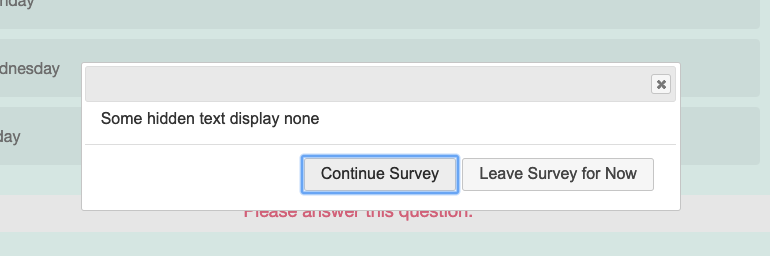
 The issue is that when you hit "save & continue," while the dialog box does show up, the fact that the background is kind of reloading with all the stuff/warnings to remind you there are required questions you haven't answered yet, prevents the close button from working. I don't mean the X on the top right, but an actual close button ("Continue Survey) after your message.
```
jQuery('input[id=NextButton]').click(function(event){
console.log('next btn clicked');
var mytext = jQuery('#myText').val();
jQuery('<div id="confirm-dialog">'+mytext+'</div>').appendTo('body');
jQuery("#confirm-dialog").dialog({
width: 600,
modal: true,
close: function(event, ui) {
jQuery("#confirm-dialog").remove();
},
buttons: {
"Continue Survey": function(event, ui) {
jQuery('.ui-dialog').dialog('close');
},
"Leave Survey for Now": function(event, ui) {
window.location.href='url here';
}
}
});
jQuery('#confirm-dialog').dialog('open');
});
```
I tried event.preventDefault; and event.stopPropagation, but they didn't work. I tried event.stopImmediatePropagation which worked but then also stopped the user from being able to actually go to the next page.
I'd rather have people be able to click on the Continue Survey option rather than the X, since I have the other button.
Any ideas? The X button works, as does the "Leave Survey for Now."
Thank you!
The issue is that when you hit "save & continue," while the dialog box does show up, the fact that the background is kind of reloading with all the stuff/warnings to remind you there are required questions you haven't answered yet, prevents the close button from working. I don't mean the X on the top right, but an actual close button ("Continue Survey) after your message.
```
jQuery('input[id=NextButton]').click(function(event){
console.log('next btn clicked');
var mytext = jQuery('#myText').val();
jQuery('<div id="confirm-dialog">'+mytext+'</div>').appendTo('body');
jQuery("#confirm-dialog").dialog({
width: 600,
modal: true,
close: function(event, ui) {
jQuery("#confirm-dialog").remove();
},
buttons: {
"Continue Survey": function(event, ui) {
jQuery('.ui-dialog').dialog('close');
},
"Leave Survey for Now": function(event, ui) {
window.location.href='url here';
}
}
});
jQuery('#confirm-dialog').dialog('open');
});
```
I tried event.preventDefault; and event.stopPropagation, but they didn't work. I tried event.stopImmediatePropagation which worked but then also stopped the user from being able to actually go to the next page.
I'd rather have people be able to click on the Continue Survey option rather than the X, since I have the other button.
Any ideas? The X button works, as does the "Leave Survey for Now."
Thank you!
Solved
How to get the jQuery dialog close button to actually close?
Hello,
I have a jQuery dialog box that pops up when the user hits my next button. I renamed "next" to "save & continue" and wanted to give users extra reassurance that their answers are being recorded and also give them an option to leave the survey (it's tldr; as to why so I won't get into that here).
!
The issue is that when you hit "save & continue," while the dialog box does show up, the fact that the background is kind of reloading with all the stuff/warnings to remind you there are required questions you haven't answered yet, prevents the close button from working. I don't mean the X on the top right, but an actual close button ("Continue Survey) after your message.
```
jQuery('input[id=NextButton]').click(function(event){
console.log('next btn clicked');
var mytext = jQuery('#myText').val();
jQuery('<div id="confirm-dialog">'+mytext+'</div>').appendTo('body');
jQuery("#confirm-dialog").dialog({
width: 600,
modal: true,
close: function(event, ui) {
jQuery("#confirm-dialog").remove();
},
buttons: {
"Continue Survey": function(event, ui) {
jQuery('.ui-dialog').dialog('close');
},
"Leave Survey for Now": function(event, ui) {
window.location.href='url here';
}
}
});
jQuery('#confirm-dialog').dialog('open');
});
```
I tried event.preventDefault; and event.stopPropagation, but they didn't work. I tried event.stopImmediatePropagation which worked but then also stopped the user from being able to actually go to the next page.
I'd rather have people be able to click on the Continue Survey option rather than the X, since I have the other button.
Any ideas? The X button works, as does the "Leave Survey for Now."
Thank you!
The issue is that when you hit "save & continue," while the dialog box does show up, the fact that the background is kind of reloading with all the stuff/warnings to remind you there are required questions you haven't answered yet, prevents the close button from working. I don't mean the X on the top right, but an actual close button ("Continue Survey) after your message.
```
jQuery('input[id=NextButton]').click(function(event){
console.log('next btn clicked');
var mytext = jQuery('#myText').val();
jQuery('<div id="confirm-dialog">'+mytext+'</div>').appendTo('body');
jQuery("#confirm-dialog").dialog({
width: 600,
modal: true,
close: function(event, ui) {
jQuery("#confirm-dialog").remove();
},
buttons: {
"Continue Survey": function(event, ui) {
jQuery('.ui-dialog').dialog('close');
},
"Leave Survey for Now": function(event, ui) {
window.location.href='url here';
}
}
});
jQuery('#confirm-dialog').dialog('open');
});
```
I tried event.preventDefault; and event.stopPropagation, but they didn't work. I tried event.stopImmediatePropagation which worked but then also stopped the user from being able to actually go to the next page.
I'd rather have people be able to click on the Continue Survey option rather than the X, since I have the other button.
Any ideas? The X button works, as does the "Leave Survey for Now."
Thank you!Best answer by TomG
Right, your replacement button can't have the id NextButton. When I do this I give it the id checkButton. The biggest issue is that Qualtrics styles the NextButton using the id, so you'll have to style your checkButton to match the NextButton.
The clickNextButton function is attached to question objects (this.clickNextButton() ). So, if your 'this' context changes it won't work. You can save 'this' to a variable (e.g. qobj) then use qobj.clickNextButton(). Alternatively, you can do it directly with jQuery("#NextButton").click().



Sign up
Already have an account? Login

Welcome! To join the Qualtrics Experience Community, log in with your existing Qualtrics credentials below.
Confirm your username, share a bit about yourself, then you're ready to explore and connect .
Free trial account? No problem. Log in with your trial credentials to join.
No free trial account? No problem! Register here
Already a member? Hi and welcome back! We're glad you're here 🙂
You will see the Qualtrics login page briefly before being taken to the Experience Community.
Login with Qualtrics
Welcome! To join the Qualtrics Experience Community, log in with your existing Qualtrics credentials below.
Confirm your username, share a bit about yourself, then you're ready to explore and connect .
Free trial account? No problem. Log in with your trial credentials to join. No free trial account? No problem! Register here
Already a member? Hi and welcome back! We're glad you're here 🙂
You will see the Qualtrics login page briefly before being taken to the Experience Community.
Login to the Community
No account yet? Create an account
Welcome! To join the Qualtrics Experience Community, log in with your existing Qualtrics credentials below.
Confirm your username, share a bit about yourself, then you're ready to explore and connect .
Free trial account? No problem. Log in with your trial credentials to join.
No free trial account? No problem! Register here
Already a member? Hi and welcome back! We're glad you're here 🙂
You will see the Qualtrics login page briefly before being taken to the Experience Community.
Login with Qualtrics
Welcome! To join the Qualtrics Experience Community, log in with your existing Qualtrics credentials below.
Confirm your username, share a bit about yourself, then you're ready to explore and connect .
Free trial account? No problem. Log in with your trial credentials to join. No free trial account? No problem! Register here
Already a member? Hi and welcome back! We're glad you're here 🙂
You will see the Qualtrics login page briefly before being taken to the Experience Community.
Enter your E-mail address. We'll send you an e-mail with instructions to reset your password.