Modify Qualtrics Slider | Experience Community
Skip to main content
Question

Modify Qualtrics Slider

  • June 26, 2026
  • 1 reply
  • 0 views

Forum|alt.badge.img

Hi! 


This is the current CSS code I have: 


.question .required-marker { display:none; }

.slider-min, .slider-max {

    display: none;

}


.slider .question-content {

    display: flex;

    flex-direction: column;

}


.slider .slider-labels {

    order: 2;

    padding-inline-end: 0;

}


.slider .slider-statement {

    order: 1;

}


This how my slide look like:
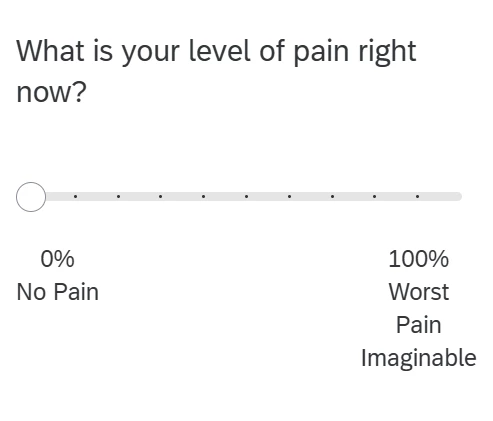
 

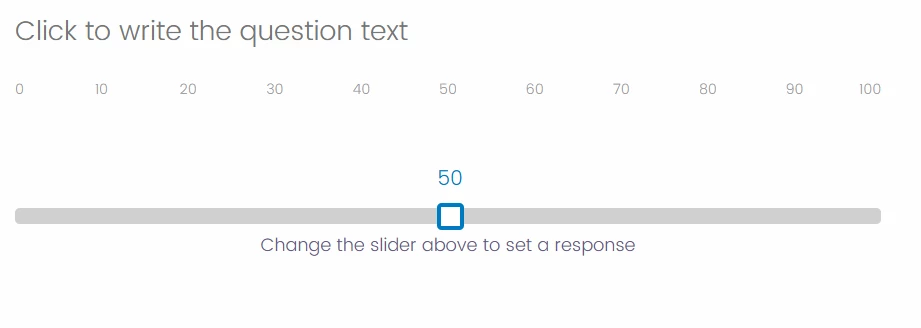
I would like to: 1) Add this text above or below the slider “Change the slider above to set a response” and 2) have the slider at circle in the middle, so it is easier for the participant to move.

Like this:



1 reply

nikamshubham73
Level 2 ●●
Forum|alt.badge.img+4

Hi ​@yvaguila,

You can copy paste the below code in you JS snippet of the Slider Question and it should work for you.

Qualtrics.SurveyEngine.addOnload(function() {
/* 1. SET SLIDER TO 50 */
var qid = this.questionId;
var currentValue = jQuery("#" + qid + " .ResultsInput").val();

// Only set to 50 if the question hasn't been answered yet
if(currentValue == "") {
this.setChoiceValue(1, 50);
}

/* 2. INJECT CSS */
if (!document.getElementById('custom-slider-shape-css')) {
var css = `
/* Shape the Slider Track (the bar) */
.Skin .horizontalbar .Slider .track {
border-radius: 4px !important;
height: 14px !important;
}

/* Shape the Slider Handle (the draggable box) */
.Skin .horizontalbar .Slider .handle {
border-radius: 4px !important;
width: 24px !important;
height: 24px !important;
margin-top: -5px !important;
top: 0px !important;
box-shadow: none !important;
}

/* Force the Tooltip (the 50 box) to be visible immediately */
.Skin .horizontalbar .Slider .sliderToolTip {
display: block !important;
opacity: 1 !important;
visibility: visible !important;
}
`;

var style = document.createElement('style');
style.id = 'custom-slider-shape-css';
style.type = 'text/css';
style.innerHTML = css;
document.head.appendChild(style);
}
});

Qualtrics.SurveyEngine.addOnReady(function() {
/* 3. ADD INSTRUCTION TEXT UNDER THE SLIDER */
var qid = this.questionId;

// Target the BarOuter class
var targetContainer = jQuery("#" + qid + " .BarOuter");

// Check if we already added it (prevents duplicates if the page resizes/reloads)
if (targetContainer.find('.slider-helper-text').length === 0) {

// The text and styling to inject
var textToInject = '<div class="slider-helper-text" style="text-align: center; color: #665885; margin-top: 15px; font-size: 16px;">Change the slider above to set a response</div>';

// Append the text block inside the BarOuter container
targetContainer.append(textToInject);
}
});

Qualtrics.SurveyEngine.addOnUnload(function() {
/* Place your JavaScript here to run when the page is unloaded */
});