

Hello Qualtrics team!
We’re working in the layout of a ‘Multiple choice’ question and we want to be sure it’s correctly displayed.
It consists on a 'aidedBrandAwareness' question and The works similarly to the industry standard for this 'aided Awareness' KPI: we prompt the respondent with our brand alongside the rest of the competitors (name and logo) so they can select those they recognise. For instance:
Based on the survey design, only four brands (3 in the mobile phone layout) are clearly visible but users must scroll down to see the rest.
Although the list of competitors is randomised, reducing the scroll-down would minimise the risk of survey items being forgotten (which could impact our KPI measurement) due to the survey's layout. We're talking about 11 different brands (=options) in countries with the fewest options, up to 15 in the country with the most.
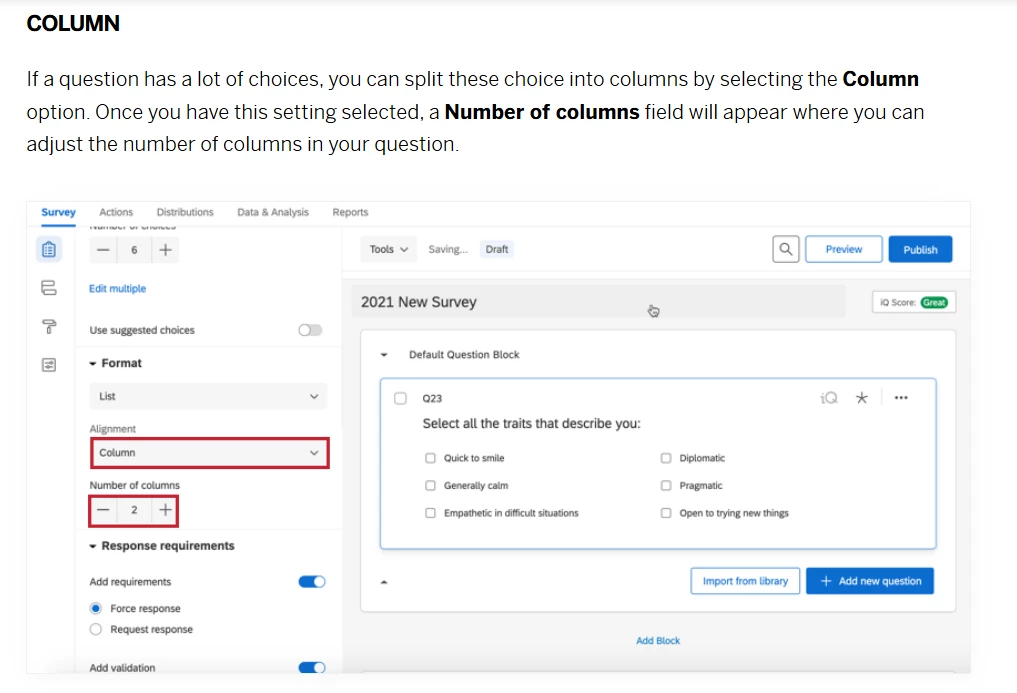
Could we configure the question to minimise scrolling down for this type of question? I assume that it could be impossible to completely eliminate, but at least reducing as much as possible. For instance, configuring the list to appear in 2 columns, reducing the size of the rows, etc.
Your assistance could be very useful.
Thanks!