
Read only in constant sum grid with default choices | Experience Community
Skip to main content
Solved

Read only in constant sum grid with default choices

  • Jun 12, 2023 6:59 PM UTC
  • 15 replies
  • 236 views

Forum|alt.badge.img+2

Hello!


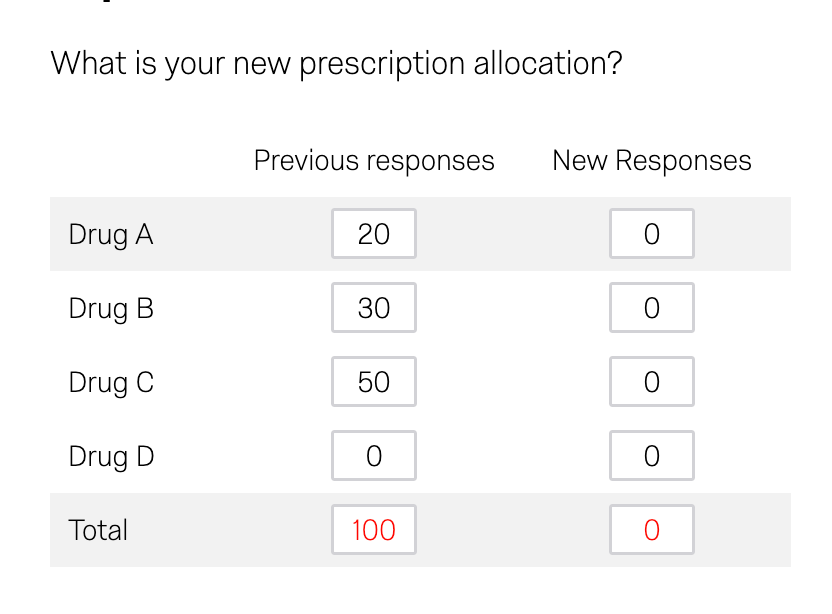
I’m trying to create a constant sum grid question where previous choices are shown in the first column and would not be editable.  I’m using default choices to display the previous responses.  None of the the other similar community posts have helped.  My variables are named:


QR~QID4~1~1

QR~QID4~2~1

QR~QID4~3~1

QR~QID4~4~1


Thanks!

Best answer by Deepak

@zacks

On this question you can add a javascript to disable the input boxes on load as mentioned below.

var n=     jQuery("#"+this.questionId+" .c4 input").length; for (let i=0;i<n;i++){jQuery("#"+this.questionId+" .c4 input").eq(i).prop('disabled',true);}

Hope it helps!

View original

15 replies

Deepak
QPN Level 8 ●●●●●●●●
Forum|alt.badge.img+48
  • Jun 12, 2023 7:55 PM UTC

@zacks Can you elaborate this use case?


Forum|alt.badge.img+2
  • Author
  • Qualtrics Employee
  • Jun 12, 2023 8:12 PM UTC

At @Deepak on one screen you’d ask their allocation of drug prescriptions using a constant sum.  You would then introduce them to a new durg and ask for their new allocation.  I’d want to show their previous allocation as a reference, but it shouldn’t be editable.


Deepak
QPN Level 8 ●●●●●●●●
Forum|alt.badge.img+48
  • Answer
  • Jun 12, 2023 8:20 PM UTC

@zacks

On this question you can add a javascript to disable the input boxes on load as mentioned below.

var n=     jQuery("#"+this.questionId+" .c4 input").length; for (let i=0;i<n;i++){jQuery("#"+this.questionId+" .c4 input").eq(i).prop('disabled',true);}

Hope it helps!


Forum|alt.badge.img+2
  • Author
  • Qualtrics Employee
  • Jun 12, 2023 8:26 PM UTC

That worked, thank you @Deepak!


Forum|alt.badge.img+2
  • Level 2 ●●
  • Nov 13, 2023 4:43 PM UTC

hi @Deepak  i have similar issue and i tried the code you sent but it did not work. 

Am i supposed to edit anything to fit my survey or this is just a custom code? 

Please help me out


Deepak
QPN Level 8 ●●●●●●●●
Forum|alt.badge.img+48
  • Nov 14, 2023 5:51 PM UTC

@Bee 

Can you share how have you included it?


Forum|alt.badge.img+2
  • Level 2 ●●
  • Nov 16, 2023 3:52 PM UTC

Hi, so i have no knowledge and experience with java script. so this is what i did; 

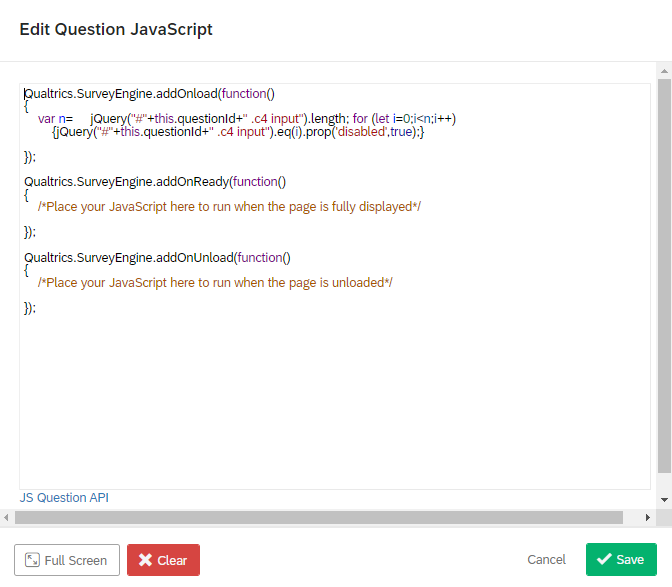
on the constant sum question grid (in the survey), I went to JavaScript and pasted the codes there. Below is an screenshot. I would appreciate it if you are very thorough with your explanation/response, i have no prior knowledge in JavaScript. Thank You.


Deepak
QPN Level 8 ●●●●●●●●
Forum|alt.badge.img+48
  • Nov 16, 2023 4:04 PM UTC

@Bee 

Are you sure you’re using same matrix- constant sum question?


Forum|alt.badge.img+2
  • Level 2 ●●
  • Nov 16, 2023 4:07 PM UTC

question type: Constant sum

answer type: choices


I dont know if that is what you are asking but i hope it answered your question. Please help me out


Deepak
QPN Level 8 ●●●●●●●●
Forum|alt.badge.img+48
  • Nov 16, 2023 4:08 PM UTC

Yes, that’s the error the original question asked is about matrix type question.


Forum|alt.badge.img+2
  • Level 2 ●●
  • Nov 16, 2023 4:10 PM UTC

Sorry about that, i didn’t realize it. So how do i solve my issue in that format please?


Deepak
QPN Level 8 ●●●●●●●●
Forum|alt.badge.img+48
  • Nov 16, 2023 4:11 PM UTC

The original question disables the entire column what are you looking for here can you describe?


Forum|alt.badge.img+2
  • Level 2 ●●
  • Nov 16, 2023 4:20 PM UTC

So to explain. My form is a survey here respondents will enter scores in text entry box. At the end of the questions, they will see a summary of the scores they entered in the constant sum display. So i created the constant sum question and inserted the score entries from the text boxes using default choices. 

Now i want to disable the text boxes in the constant sum such that if they want to make changes to their scores they will have to go back to the text entry where they entered the score instead of editing the score in the constant sum box. 


I hope this clarifies things


Deepak
QPN Level 8 ●●●●●●●●
Forum|alt.badge.img+48
  • Nov 16, 2023 4:24 PM UTC

kindly create a new post for this


Forum|alt.badge.img+2
  • Level 2 ●●
  • Nov 16, 2023 4:25 PM UTC

ok