


Hi everyone,
I want to reduce the size of the answer boxes of every question, these for instance are too big (heigh) for my purposes: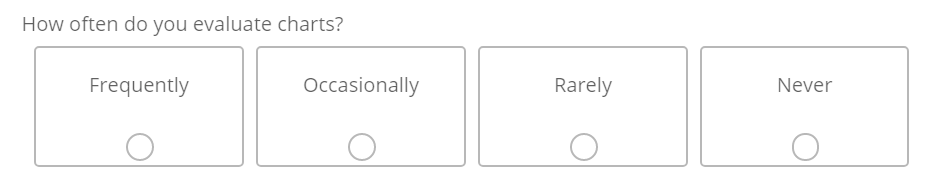 I found several solution proposals on this forum, none of them are working, including the one below. The size of the boxes doesn't change when I enter this code into "Custom CSS" in the "Look and Feel" view.
.Skin label.MultipleAnswer, .Skin label.SingleAnswer { padding:5px; }
Something does seems to happen, as can be seen when I inspect the "Frequently" Box.
Inspected without the above CSS code included: Inspected with the above CSS code included:
But I am new to CSS, so I don't know what to try next. Help would be much appreciated!
p.s. I also tried
.Skin label.MultipleAnswer, .Skin label.SingleAnswer { padding:5px!important; }

Reducing Size of Multiple Choice Answer boxes: existing solutions not working
Best answer by CodeCollective
I think there were two small mistakes in your code, your second row reads "label.SingleAnswerAnswer", one "Answer" too much, and there was a comma before the first "{"
It seems to be working with this code now:
.Skin label.MultipleAnswer.LabelPositionBELOW>span,
.Skin label.SingleAnswer.LabelPositionBELOW>span {
padding-bottom:5px;
}
Thank you for your help!



Sign up
Already have an account? Login

Welcome! To join the Qualtrics Experience Community, log in with your existing Qualtrics credentials below.
Confirm your username, share a bit about yourself, then you're ready to explore and connect .
Free trial account? No problem. Log in with your trial credentials to join.
No free trial account? No problem! Register here
Already a member? Hi and welcome back! We're glad you're here 🙂
You will see the Qualtrics login page briefly before being taken to the Experience Community.
Login with Qualtrics
Welcome! To join the Qualtrics Experience Community, log in with your existing Qualtrics credentials below.
Confirm your username, share a bit about yourself, then you're ready to explore and connect .
Free trial account? No problem. Log in with your trial credentials to join. No free trial account? No problem! Register here
Already a member? Hi and welcome back! We're glad you're here 🙂
You will see the Qualtrics login page briefly before being taken to the Experience Community.
Login to the Community
No account yet? Create an account
Welcome! To join the Qualtrics Experience Community, log in with your existing Qualtrics credentials below.
Confirm your username, share a bit about yourself, then you're ready to explore and connect .
Free trial account? No problem. Log in with your trial credentials to join.
No free trial account? No problem! Register here
Already a member? Hi and welcome back! We're glad you're here 🙂
You will see the Qualtrics login page briefly before being taken to the Experience Community.
Login with Qualtrics
Welcome! To join the Qualtrics Experience Community, log in with your existing Qualtrics credentials below.
Confirm your username, share a bit about yourself, then you're ready to explore and connect .
Free trial account? No problem. Log in with your trial credentials to join. No free trial account? No problem! Register here
Already a member? Hi and welcome back! We're glad you're here 🙂
You will see the Qualtrics login page briefly before being taken to the Experience Community.
Enter your E-mail address. We'll send you an e-mail with instructions to reset your password.