

How can I include a "see more" button in my question, where the respondent can click on the button and display more details about the question?

Solved
"See more" button
 +1
Best answer by Nam Nguyen
<style type="text/css">#hidden-paragraph {
            display: none;
        }
</style>
<p>The short part of the question <span id="hidden-paragraph">The hidden part that will be revealed when you click see more button....................ble bla bla</span></p>
<button id="see-more-button">See more...</button>
Add this to Javascript to activate the button
Qualtrics.SurveyEngine.addOnReady(function() {
document.getElementById("see-more-button").addEventListener("click", function() {
            var hiddenParagraph = document.getElementById("hidden-paragraph");
            if (hiddenParagraph.style.display === "none") {
                hiddenParagraph.style.display = "inline";
                this.textContent = "See less...";
            } else {
                hiddenParagraph.style.display = "none";
                this.textContent = "See more...";
            }
        });
});
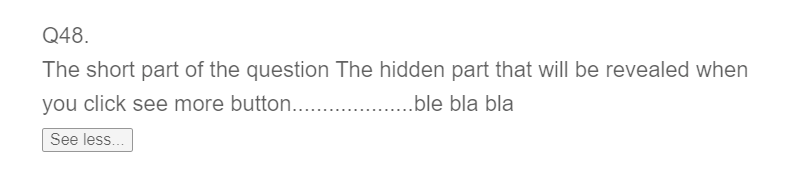
Hope this helps





Sign up
Already have an account? Login
Welcome! To join the Qualtrics Experience Community, log in with your existing Qualtrics credentials below.
Confirm your username, share a bit about yourself, then you're ready to explore and connect .
Free trial account? No problem. Log in with your trial credentials to join.
No free trial account? No problem! Register here
Already a member? Hi and welcome back! We're glad you're here 🙂
You will see the Qualtrics login page briefly before being taken to the Experience Community.
Login with Qualtrics
Welcome! To join the Qualtrics Experience Community, log in with your existing Qualtrics credentials below.
Confirm your username, share a bit about yourself, then you're ready to explore and connect .
Free trial account? No problem. Log in with your trial credentials to join. No free trial account? No problem! Register here
Already a member? Hi and welcome back! We're glad you're here 🙂
You will see the Qualtrics login page briefly before being taken to the Experience Community.
Login to the Community
Welcome! To join the Qualtrics Experience Community, log in with your existing Qualtrics credentials below.
Confirm your username, share a bit about yourself, then you're ready to explore and connect .
Free trial account? No problem. Log in with your trial credentials to join.
No free trial account? No problem! Register here
Already a member? Hi and welcome back! We're glad you're here 🙂
You will see the Qualtrics login page briefly before being taken to the Experience Community.
Login with Qualtrics
Welcome! To join the Qualtrics Experience Community, log in with your existing Qualtrics credentials below.
Confirm your username, share a bit about yourself, then you're ready to explore and connect .
Free trial account? No problem. Log in with your trial credentials to join. No free trial account? No problem! Register here
Already a member? Hi and welcome back! We're glad you're here 🙂
You will see the Qualtrics login page briefly before being taken to the Experience Community.
Enter your E-mail address. We'll send you an e-mail with instructions to reset your password.