


Side by Side Question | Experience Community
Skip to main content

Side by Side Question

  • August 13, 2026
  • 1 reply
  • 24 views

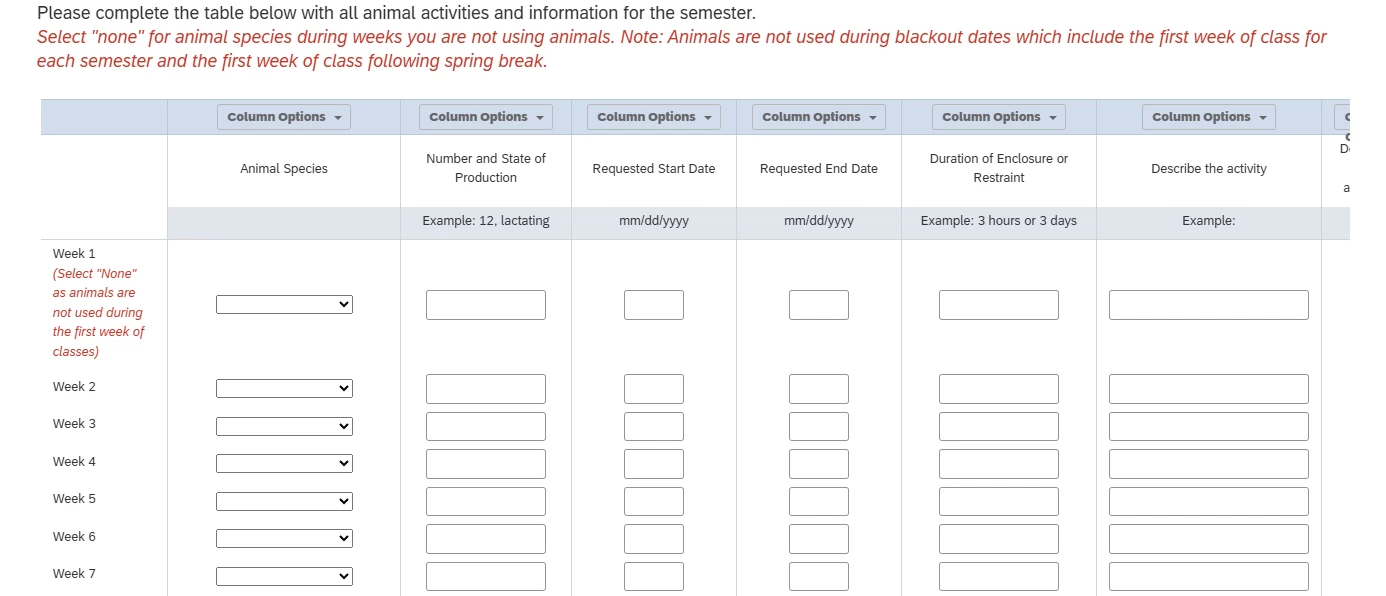
I created a forced response side by side question with 14 statements and 8 columns for instructors using animals in their courses to complete. I want to be able to show only column 1 when the question loads then if they select an answer other than “none” columns 2-8 will show. Also, I want the tab order to go across horizontally not vertically when someone is completing the question. I do not have any experience with javascript. Any help is greatly appreciated. Thank you!



1 reply

Forum|alt.badge.img+21
  • QPN Level 5 ●●●●●
  • August 14, 2026

hey ​@KKOhioState you can use the below code in your SBS question. there are few modifications that you will need to perform- 

  • Replace QIDXX with the QID of your question.
    • Example: If your question is QID27, replace every QIDXX with QID27.
  • Replace the answer value 2 with the answer (“None”) that should trigger the columns to appear.
    • Currently, 2 means Answer 2 i.e., None” .
    • If the required answer has value 3, change it to 3.
Qualtrics.SurveyEngine.addOnload(function() {

var $q = jQuery('#QIDXX');
var $table = $q.find('table');

function hideColumns() {

// Hide columns 2 to 8
$q.find(
'th.SBS2, th.SBS3, th.SBS4, th.SBS5, ' +
'th.SBS6, th.SBS7, th.SBS8'
).hide();

// Hide radio button cells
$q.find('input[type="radio"]').each(function() {
jQuery(this).closest('td').hide();
});

// Hide separator cells
$q.find('td.Separator1, td.Separator2').hide();

// Shrink table
$table.css({
'width': 'auto',
'table-layout': 'auto'
});
}

function showColumns() {

// Show columns 2 to 8
$q.find(
'th.SBS2, th.SBS3, th.SBS4, th.SBS5, ' +
'th.SBS6, th.SBS7, th.SBS8'
).show();

// Show radio button cells
$q.find('input[type="radio"]').each(function() {
jQuery(this).closest('td').show();
});

// Show separator cells
$q.find('td.Separator1, td.Separator2').show();

// Restore table layout
$table.css({
'width': '',
'table-layout': ''
});
}

// Initially hide columns
hideColumns();

// Find the first dropdown
var answer2 = document.getElementById('QR~QIDXX#1~1~2');

if (answer2) {

var select = answer2.parentElement;

jQuery(select).on('change', function() {

if (this.value === '2') {
showColumns();
} else {
hideColumns();
}

});
}

});

