

Hi All,
I was wondering if there is a way to temporarily store a question response so that it can be accessed in later survey pages. But such that the response isn’t actually recorded in the data. Something similar to a local variable in other coding environments.
The specifics: We are designing a survey where we are asking students to provide characteristics about their best friends. To aid them with the task, we want to pipe in their friends’ names throughout the survey after they list them on an earlier page. However, due to agreements with our research partner, we can never actually store the names that they provide. They are completely fine with us using the names as an aid as long as they aren’t actually saved.
Any suggestions would be greatly appreciated!

“Temporary” Variables in Qualtrics Survey



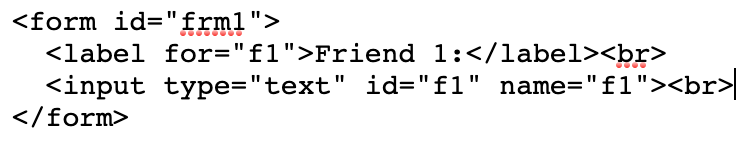 JavaScript (put in addOnReady):
var input = document.getElementById("f1");
input.addEventListener("change", function() {
inputValue = document.getElementById("f1").value;
Qualtrics.SurveyEngine.setEmbeddedData( 'test1', inputValue) ;
});
JavaScript (put in addOnReady):
var input = document.getElementById("f1");
input.addEventListener("change", function() {
inputValue = document.getElementById("f1").value;
Qualtrics.SurveyEngine.setEmbeddedData( 'test1', inputValue) ;
});Sign up
Already have an account? Login

Welcome! To join the Qualtrics Experience Community, log in with your existing Qualtrics credentials below.
Confirm your username, share a bit about yourself, then you're ready to explore and connect .
Free trial account? No problem. Log in with your trial credentials to join.
No free trial account? No problem! Register here
Already a member? Hi and welcome back! We're glad you're here 🙂
You will see the Qualtrics login page briefly before being taken to the Experience Community.
Login with Qualtrics
Welcome! To join the Qualtrics Experience Community, log in with your existing Qualtrics credentials below.
Confirm your username, share a bit about yourself, then you're ready to explore and connect .
Free trial account? No problem. Log in with your trial credentials to join. No free trial account? No problem! Register here
Already a member? Hi and welcome back! We're glad you're here 🙂
You will see the Qualtrics login page briefly before being taken to the Experience Community.
Login to the Community
No account yet? Create an account
Welcome! To join the Qualtrics Experience Community, log in with your existing Qualtrics credentials below.
Confirm your username, share a bit about yourself, then you're ready to explore and connect .
Free trial account? No problem. Log in with your trial credentials to join.
No free trial account? No problem! Register here
Already a member? Hi and welcome back! We're glad you're here 🙂
You will see the Qualtrics login page briefly before being taken to the Experience Community.
Login with Qualtrics
Welcome! To join the Qualtrics Experience Community, log in with your existing Qualtrics credentials below.
Confirm your username, share a bit about yourself, then you're ready to explore and connect .
Free trial account? No problem. Log in with your trial credentials to join. No free trial account? No problem! Register here
Already a member? Hi and welcome back! We're glad you're here 🙂
You will see the Qualtrics login page briefly before being taken to the Experience Community.
Enter your E-mail address. We'll send you an e-mail with instructions to reset your password.