Difference (Not sum) in a CX Table Widget | Experience Community
Skip to main content
Solved

Difference (Not sum) in a CX Table Widget

  • March 12, 2026
  • 3 replies
  • 13 views

jmborzick
QPN Level 5 ●●●●●
Forum|alt.badge.img+41

How can I calculate the difference between two columns in a CX Table widget? 


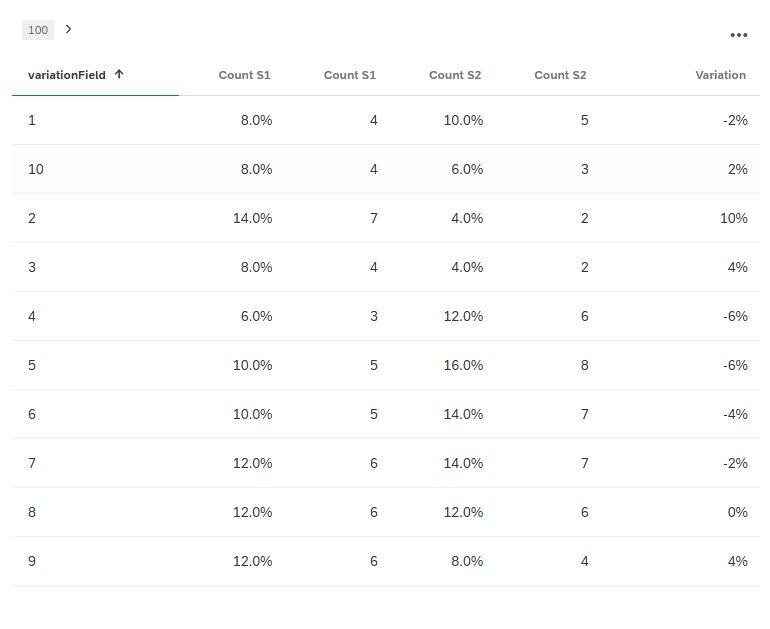
I have two columns of data each formatted like the screenshot below. One column pulls from one data source the other column from a second data source. The rows of the table are a common  field between both sources that disaggregates the percentage by site. 


I want to add a third column that displays the difference between the percentages. The “Calculations” allow for  “Sum” but not difference. I tried building a custom metric, but that didn’t get me very far. 


Suggestions ?
 

Best answer by vgayraud

Hi,

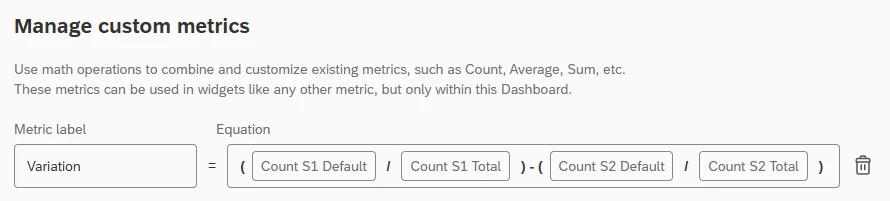
I’d use a custom metric, similar to this:


3 replies

  • Level 4 ●●●●
  • March 12, 2026

Custom metrics should work to what you are trying, not sure why its not working for you. 

If you can give me details on how you are using custom metric, I help you to fix that.


vgayraud
QPN Level 7 ●●●●●●●
Forum|alt.badge.img+62
  • QPN Level 7 ●●●●●●●
  • Answer
  • March 12, 2026

Hi,

I’d use a custom metric, similar to this:


jmborzick
QPN Level 5 ●●●●●
Forum|alt.badge.img+41
  • Author
  • QPN Level 5 ●●●●●
  • March 12, 2026

@vgayraud  Yep….I forgot to check the “Total” box in my denominators, and it kept throwing off my numbers. Thank you for your help-the screenshot was perfect.