



 Hello XM Community,
I wasn't able to find a topic on this already so apologise if I have missed it in my search. I am relatively new to the Qualtrics space so still learning the ropes.
One of our surveys uses responses imported using an automation via a CSV file. In these responses, one of the questions is multi-select (external, non Qualtrics survey) and so we have a column that contains potentially multiple options of course separated by comma.
However, on the dashboarding side this is quite difficult to display accurately as each possible combination of results appears as a unique entry - and doesn't count each time an option on the multi-select is chosen as one towards the total. An example would be:
If customer A chose options "1,2,5" and customer B chose options "3, 5" we would want to show that option '5' was chosen twice. I have also included a screenshot for a bit of visual reference.
I hope that makes sense and please let me know if I need to provide any further information - thanks in advance for any assistance 😀.

Displaying comma-separated variables as individual counts






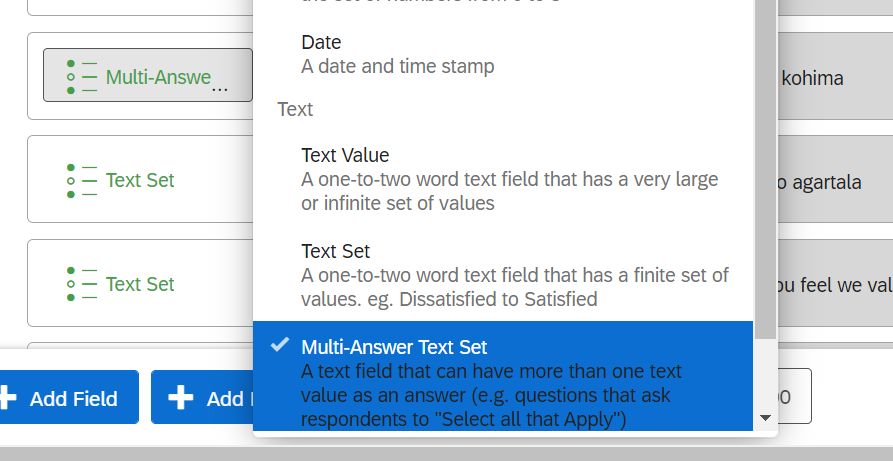 Click on Blue Gear icon and scroll to the bottom More Options and edit delimiter to comma
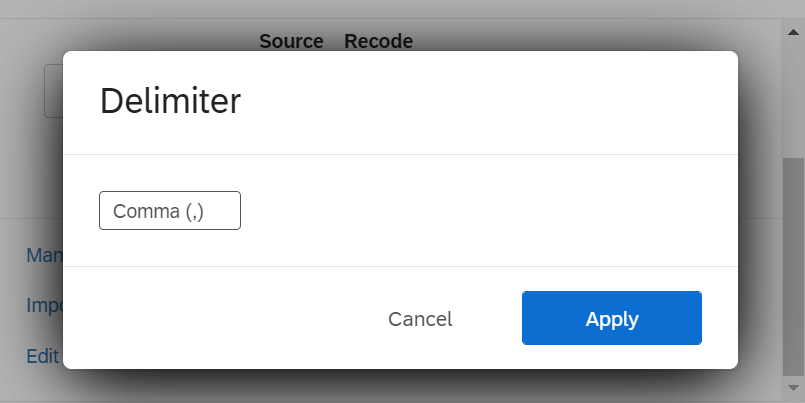 Hope it helps!
Sign up
Already have an account? Login

Welcome! To join the Qualtrics Experience Community, log in with your existing Qualtrics credentials below.
Confirm your username, share a bit about yourself, then you're ready to explore and connect .
Free trial account? No problem. Log in with your trial credentials to join.
No free trial account? No problem! Register here
Already a member? Hi and welcome back! We're glad you're here 🙂
You will see the Qualtrics login page briefly before being taken to the Experience Community.
Login with Qualtrics
Welcome! To join the Qualtrics Experience Community, log in with your existing Qualtrics credentials below.
Confirm your username, share a bit about yourself, then you're ready to explore and connect .
Free trial account? No problem. Log in with your trial credentials to join. No free trial account? No problem! Register here
Already a member? Hi and welcome back! We're glad you're here 🙂
You will see the Qualtrics login page briefly before being taken to the Experience Community.
Login to the Community
No account yet? Create an account
Welcome! To join the Qualtrics Experience Community, log in with your existing Qualtrics credentials below.
Confirm your username, share a bit about yourself, then you're ready to explore and connect .
Free trial account? No problem. Log in with your trial credentials to join.
No free trial account? No problem! Register here
Already a member? Hi and welcome back! We're glad you're here 🙂
You will see the Qualtrics login page briefly before being taken to the Experience Community.
Login with Qualtrics
Welcome! To join the Qualtrics Experience Community, log in with your existing Qualtrics credentials below.
Confirm your username, share a bit about yourself, then you're ready to explore and connect .
Free trial account? No problem. Log in with your trial credentials to join. No free trial account? No problem! Register here
Already a member? Hi and welcome back! We're glad you're here 🙂
You will see the Qualtrics login page briefly before being taken to the Experience Community.
Enter your E-mail address. We'll send you an e-mail with instructions to reset your password.