

Hello! I am working with a client who is building a lifecycle survey. The client has provided me an employee file containing your standard metadata, but Age and Tenure are provided as specific dates. The dashboard filters will be much easier to navigate if these two fields are presented as buckets (i.e. Tenure Band of <1, 1-2, 3-5, etc.).
Normally I would request that the client change these to buckets in the employee file and then resend the file, but the client is unable to make this change quickly due to their large size.
Is there a way I can use the "Set Embedded Data" blocks in the survey flow to create Age and Tenure Bands (buckets) for use in the dashboard? I have seen similar questions that utilize some JS, which I am more than comfortable diving into, but not comfortable enough to tackle on my own.
Any help would be much appreciated! I will check in often to answer any clarifying questions.
Thank you in advance!

Creating Custom Metadata Field Post-Survey



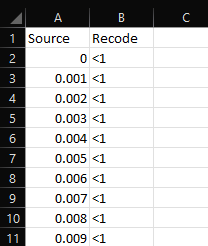 If this is the case, the participant import file needs to have a new column added that covers the "Tenure Bands" and "Age Bands".
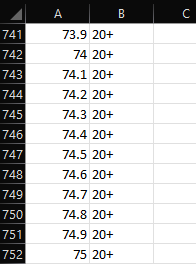 However, Recode Values do not work with the Response Rates widget, so if the client wants either Tenure or Age to be used there, the participant file should include the buckets as new metadata columns as mentioned above.
Sign up
Already have an account? Login

Welcome! To join the Qualtrics Experience Community, log in with your existing Qualtrics credentials below.
Confirm your username, share a bit about yourself, then you're ready to explore and connect .
Free trial account? No problem. Log in with your trial credentials to join.
No free trial account? No problem! Register here
Already a member? Hi and welcome back! We're glad you're here 🙂
You will see the Qualtrics login page briefly before being taken to the Experience Community.
Login with Qualtrics
Welcome! To join the Qualtrics Experience Community, log in with your existing Qualtrics credentials below.
Confirm your username, share a bit about yourself, then you're ready to explore and connect .
Free trial account? No problem. Log in with your trial credentials to join. No free trial account? No problem! Register here
Already a member? Hi and welcome back! We're glad you're here 🙂
You will see the Qualtrics login page briefly before being taken to the Experience Community.
Login to the Community
Welcome! To join the Qualtrics Experience Community, log in with your existing Qualtrics credentials below.
Confirm your username, share a bit about yourself, then you're ready to explore and connect .
Free trial account? No problem. Log in with your trial credentials to join.
No free trial account? No problem! Register here
Already a member? Hi and welcome back! We're glad you're here 🙂
You will see the Qualtrics login page briefly before being taken to the Experience Community.
Login with Qualtrics
Welcome! To join the Qualtrics Experience Community, log in with your existing Qualtrics credentials below.
Confirm your username, share a bit about yourself, then you're ready to explore and connect .
Free trial account? No problem. Log in with your trial credentials to join. No free trial account? No problem! Register here
Already a member? Hi and welcome back! We're glad you're here 🙂
You will see the Qualtrics login page briefly before being taken to the Experience Community.
Enter your E-mail address. We'll send you an e-mail with instructions to reset your password.