



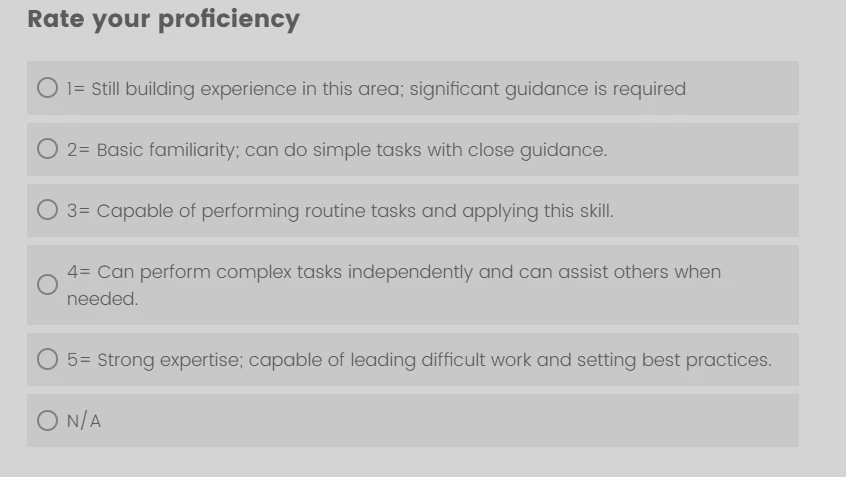
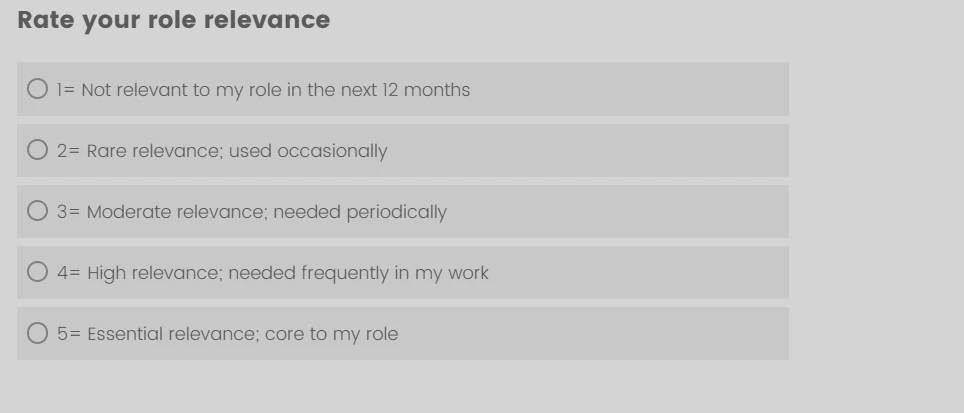
Hello, I have a multiple question but it has 2 parts, if the employee selects “N/A” is there a way to just grey out the 2nd part? I don’t wan’t to remove or proceed to next question, just want part 2 to be greyed out if N/A is chosen. Thanks

Solved
Grey out selection
Best answer by vgayraud
Hi,
Test this out.
// PLACE THIS SCRIPT ON Q1 (the driver question). Legacy/Classic layout.
// Q2 (the other MC question on the same page) is greyed out and made
// non-interactable when ones of the NA choices is selected in Q1
// and its answer is cleared.
// QIDs are resolved dynamically.

Qualtrics.SurveyEngine.addOnReady(function () {
  // CONFIG
  var NA_RECODE_VALUES = ['3']; // recode value(s) of the NA option(s) in Q1
  var DISABLED_OPACITY = '0.4';

  var self = this;
  var qid1 = this.questionId;

  // RESOLVE Q2 — the other question on the page
  var qid2 = null;
  var allInfo = Qualtrics.SurveyEngine.QuestionInfo || {};
  var ids = Object.keys(allInfo);
  for (var i = 0; i < ids.length; i++) {
    if (ids[i] !== qid1) { qid2 = ids[i]; break; }
  }
  if (!qid2) { return; }

  var q1Container = this.getQuestionContainer();
  if (!q1Container) { return; }

  // RESOLVE NA CHOICE IDS FROM RECODE VALUES
  var naIds = [];
  for (var j = 0; j < NA_RECODE_VALUES.length; j++) {
    var matches = this.getChoicesFromRecodeValue(NA_RECODE_VALUES[j]) || [];
    for (var r = 0; r < matches.length; r++) { naIds.push(String(matches[r])); }
  }
  if (naIds.length === 0) { return; }
  console.log('[naDisable] qid1=', qid1, 'qid2=', qid2, 'naIds=', naIds);

  var naActive = false;

  // LIVE Q2 CONTAINER
  function getQ2Container() {
    return document.getElementById('question-' + qid2) || document.getElementById(qid2);
  }

  // APPLY DISABLED STATE TO Q2
  function applyState(container, disabled) {
    if (!container) { return; }
    container.style.opacity = disabled ? DISABLED_OPACITY : '';
    container.style.pointerEvents = disabled ? 'none' : '';
    if ('inert' in container) { container.inert = disabled; }
    var fields = container.querySelectorAll('input, textarea, select, button');
    for (var k = 0; k < fields.length; k++) { fields[k].disabled = disabled; }
  }

  // EVALUATE Q1 AND SET Q2
  function updateState() {
    var selected = self.getSelectedChoices() || [];
    var isNA = false;
    for (var n = 0; n < selected.length; n++) {
      if (naIds.indexOf(String(selected[n])) !== -1) { isNA = true; break; }
    }
    naActive = isNA;
    console.log('[naDisable] updateState Q1 selected:', selected, 'isNA=', isNA);

    var container = getQ2Container();
    applyState(container, isNA);

    if (isNA) {
      var q2 = Qualtrics.SurveyEngine.QuestionData.getInstance(qid2);
      if (q2) {
        var sel = q2.getSelectedChoices() || [];
        console.log('[naDisable] Q2 selected before clear:', sel);
        for (var c = 0; c < sel.length; c++) { q2.setChoiceValue(sel[c], false); }
        console.log('[naDisable] Q2 selected after clear:', q2.getSelectedChoices());
      }
    }
  }

  // BIND Q1 CHANGES
  var q1Inputs = q1Container.querySelectorAll('input');
  for (var m = 0; m < q1Inputs.length; m++) {
    q1Inputs[m].addEventListener('change', updateState);
  }

  // RE-APPLY ON Q2 RE-RENDER
  var scope = document.getElementById('survey-canvas') || document.body;
  var obs = new MutationObserver(function () {
    if (!naActive) { return; }
    applyState(getQ2Container(), true);
  });
  obs.observe(scope, { childList: true, subtree: true });
  window['__naObs_' + qid1] = obs;

  updateState();
});

Qualtrics.SurveyEngine.addOnPageSubmit(function () {
  var obs = window['__naObs_' + this.questionId];
  if (obs) { obs.disconnect(); window['__naObs_' + this.questionId] = null; }
});






Sign up
Already have an account? Login

Welcome! To join the Qualtrics Experience Community, log in with your existing Qualtrics credentials below.
Confirm your username, share a bit about yourself, then you're ready to explore and connect .
Free trial account? No problem. Log in with your trial credentials to join.
No free trial account? No problem! Register here
Already a member? Hi and welcome back! We're glad you're here 🙂
You will see the Qualtrics login page briefly before being taken to the Experience Community.
Login with Qualtrics
Welcome! To join the Qualtrics Experience Community, log in with your existing Qualtrics credentials below.
Confirm your username, share a bit about yourself, then you're ready to explore and connect .
Free trial account? No problem. Log in with your trial credentials to join. No free trial account? No problem! Register here
Already a member? Hi and welcome back! We're glad you're here 🙂
You will see the Qualtrics login page briefly before being taken to the Experience Community.
Login to the Community
Welcome! To join the Qualtrics Experience Community, log in with your existing Qualtrics credentials below.
Confirm your username, share a bit about yourself, then you're ready to explore and connect .
Free trial account? No problem. Log in with your trial credentials to join.
No free trial account? No problem! Register here
Already a member? Hi and welcome back! We're glad you're here 🙂
You will see the Qualtrics login page briefly before being taken to the Experience Community.
Login with Qualtrics
Welcome! To join the Qualtrics Experience Community, log in with your existing Qualtrics credentials below.
Confirm your username, share a bit about yourself, then you're ready to explore and connect .
Free trial account? No problem. Log in with your trial credentials to join. No free trial account? No problem! Register here
Already a member? Hi and welcome back! We're glad you're here 🙂
You will see the Qualtrics login page briefly before being taken to the Experience Community.
Enter your E-mail address. We'll send you an e-mail with instructions to reset your password.