Share Preview | Experience Community
Skip to main content
Question

Share Preview

  • July 24, 2026
  • 2 replies
  • 14 views

Forum|alt.badge.img+2

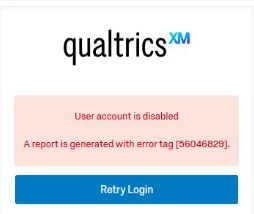
Hi all! I have 2 surveys still in draft and was attempting to test with coworkers. However, coworkers are having issues accessing the “preview” that I am attempting to share. Below is the error response once they try to login. I am not an admin but I created both surveys.

 

2 replies

gPandey_715
Level 4 ●●●●
Forum|alt.badge.img+10
  • Level 4 ●●●●
  • July 24, 2026

Hi ​@jduncan ,

It seems the user account has been disabled for some reason. Please ask your Brand Administrator to enable the account by navigating to Admin → Users, locating the affected user, and changing the Account Status to Enabled. For more information, please refer to the following support article:

https://www.qualtrics.com/support/survey-platform/sp-administration/managing-users/creating-and-managing-users/


Forum|alt.badge.img+28

Alternatively, you can go to preview and change the visibility to public before sharing the preview link to your coworkers so that they can preview the survey without logging in.