

Retake link Lifecycle project | Experience Community
Skip to main content
Question

Retake link Lifecycle project

  • February 18, 2026
  • 5 replies
  • 12 views

PeeyushBansal
Level 7 ●●●●●●●
Forum|alt.badge.img+47

I have a EX lifecycle exit survey. Employee will fill survey after that I am triggering the retake link to HR to review answer and show one question to provide answer to this HR question. When HR take the retake survey employee answers are getting disappeared, what should I do to avoid this so I have single entry where i can see both HR and employee answer.


Retake link for this survey looks ike


https://asml.eu.qualtrics.com/jfe/form/SV_7kjdsnsJKVQ3k?Q_TS_ID=test2kds&Q_TS_RS=Self&Q_TS_PID=${e://Field/Q_TS_PID}&Q_TS_RE_PID=${e://Field/Q_TS_PID}&Q_R_DEL=1&Role=HRBP

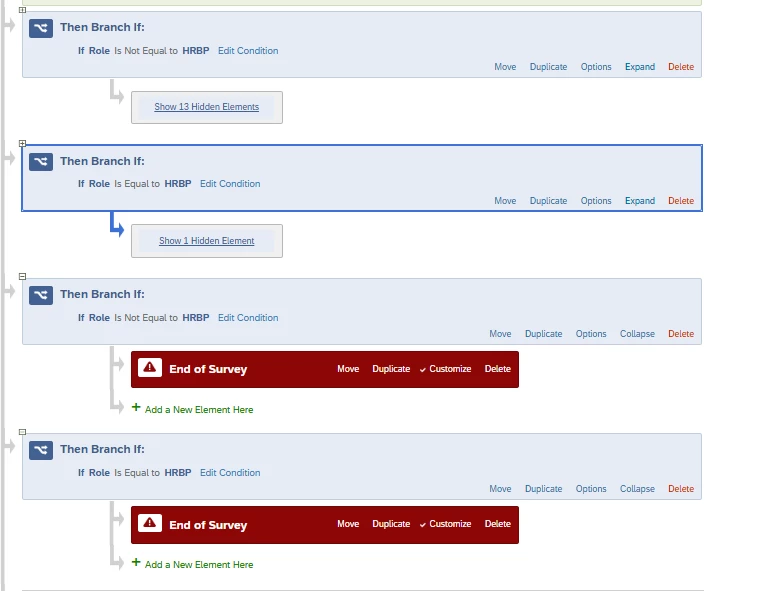
This is how my flow looks like first section for Employee also have end of survey in elements …
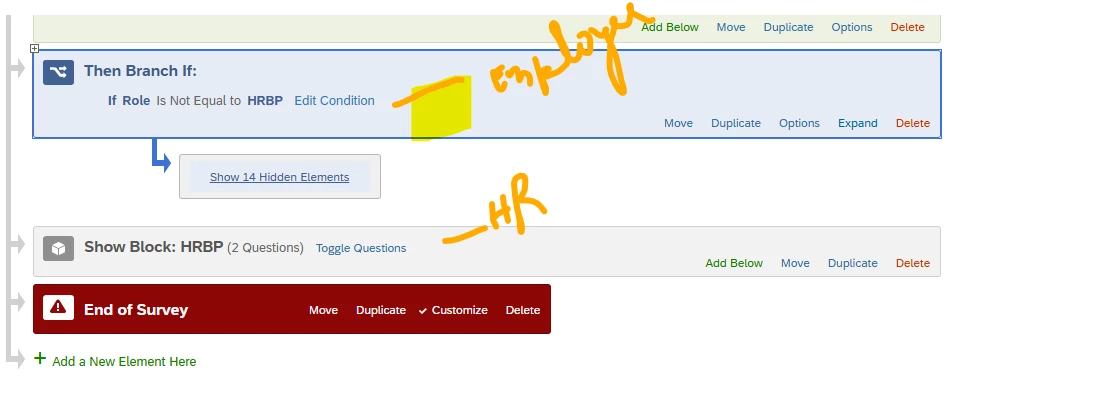
 

@Tom_1842 , I think you answered in past but can not find post.


5 replies

Tom_1842
Level 8 ●●●●●●●●
Forum|alt.badge.img+28
  • Level 8 ●●●●●●●●
  • February 18, 2026

Hi Peeyush, hmm I do not have EX so I am not completely sure, but looking at the support page for the EX Retake link, maybe you have a pseudonymization policy enabled?:

“Qtip: If the pseudonymization policy is enabled, participants will not be able to see their previous answers while taking a retake link.”


PeeyushBansal
Level 7 ●●●●●●●
Forum|alt.badge.img+47
  • Author
  • Level 7 ●●●●●●●
  • February 19, 2026

@Tom_1842  thanks for the update, we dont have pseudonymization. Is it possible to make one survey block non editable if role is HRBP. So HR can see answers but can not edit but can only provide answer to HR specific block.


Tom_1842
Level 8 ●●●●●●●●
Forum|alt.badge.img+28
  • Level 8 ●●●●●●●●
  • February 19, 2026

When using the Retake link, the questions must be displayed to the retaker for the answers to be saved with the response (See the Auto-Advance Timing Questions of the ‘Hiding Certain Content During Retakes’ section of the Retake Link support page). Based on your Survey Flow branch, it looks like HRBP are not seeing any of the original survey answers so I think that is why those answers are not being saved when the HRBP completes the Retake link. 

It is possible to make a question non-editable during the Retake link, in this case only when "HRBP" exists in the embedded data field "Role" . I would recommend changing your Survey Flow so that HRBP sees all questions, and then try adding the below JS to any question that should be non-editable for them.

var Role = "${e://Field/Role}";

if (Role === "HRBP") {
var q = jQuery(this.getQuestionContainer());

// Disable question inputs
q.find('input, select, textarea, button').prop('disabled', true);

// dim and block interactions
q.css({ opacity: 0.6, pointerEvents: 'none' });
}


PeeyushBansal
Level 7 ●●●●●●●
Forum|alt.badge.img+47
  • Author
  • Level 7 ●●●●●●●
  • February 20, 2026

Ahh ok thanks, is there any other easy solution. As I have around 50 question in employee section. And only 1 question for HRBP


PeeyushBansal
Level 7 ●●●●●●●
Forum|alt.badge.img+47
  • Author
  • Level 7 ●●●●●●●
  • February 20, 2026

This is how my current flow looks like